CORRECTION/CORRECTION/
CORRECCIONE
DHA-S690 68-12118Z84-A (Y)
The
Owner's
Manual
has
errors
as
shown
here./le
mode
d'emploi
contient
les
erreurs
indiquees
icLJEI
manual
de
operacion
contiene
los
errores
mostrados
aquL
English
• Add the following sentence to the Note of "Setting the Connected Head
Unit" on page 21.
• Depending on the connected head unit, even when DVD video, DVD audio, DVD-
VR,
DivX or
MC
is played back, MP3 media may still be displayed.
• Head units sold after January 2008 will adopt the following model names.
"CD
CHG"
compatible head units: CDA-9884, CDA-9886, iDA-X300, iDA-X200
and
iDA-XlOO
"DVD CHG" compatible head units: IVA-DJ06 and IVA-W505
In
the case
of
any
of
the above models, make this setting. Otherwise, refer to the Owner's Manual
of
the head units to be connected.
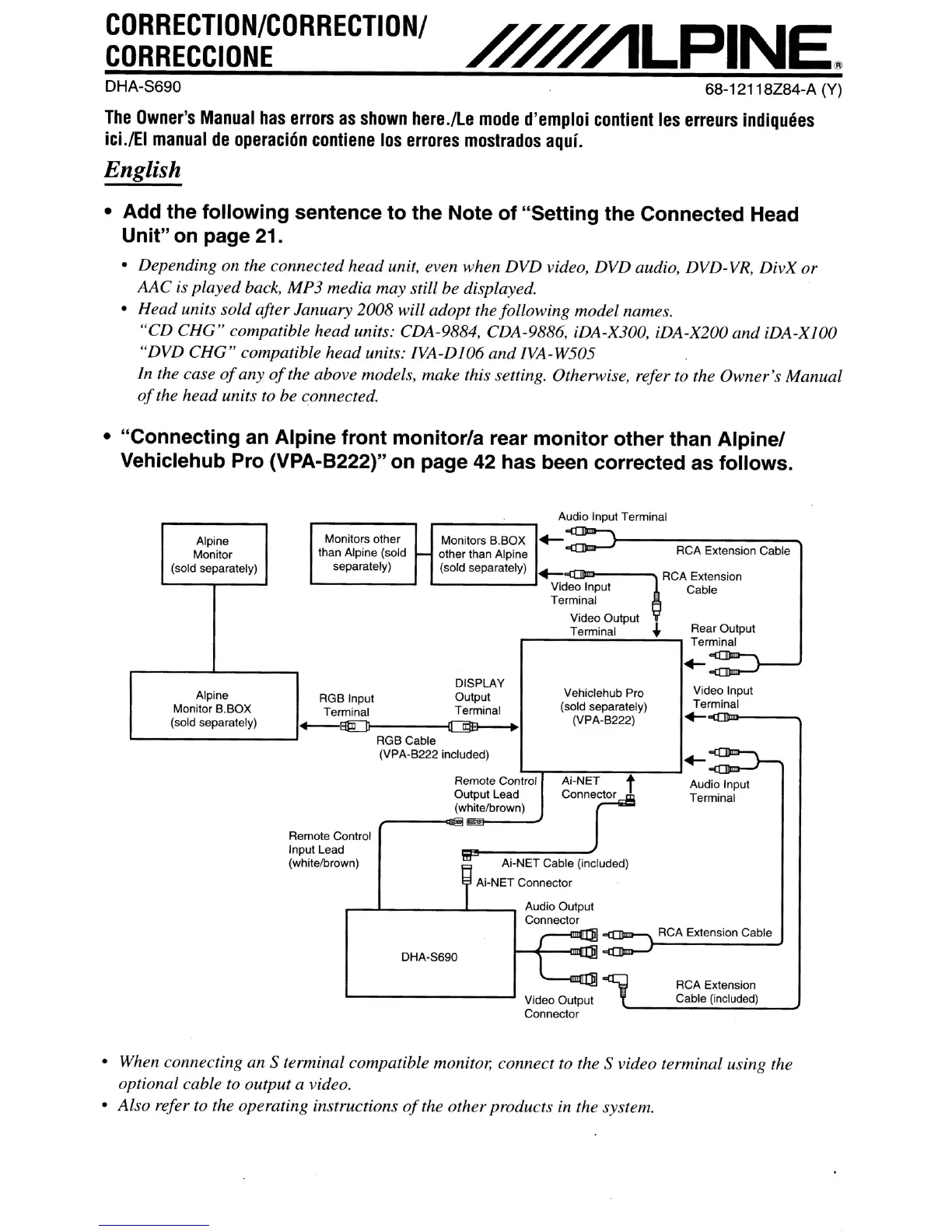
• "Connecting an Alpine front monitor/a rear monitor other than Alpinel
Vehiclehub Pro (VPA-B222)" on page 42 has been corrected as follows.
Audio Input Terminal
Rear Output
Terminal
Audio Input
Terminal
Extension
Cable
CA Extension Cable
Video Input
Terminal
+-~----.,
RCA Extension
Cable (included)
RCA Extension Cable
~T"
uded)
Vdeo
Output
Connector
Output Lead
J
(whitelbrown)
antral
:
wn)
f'i
Ai-NET Cable (incl
Ai-NET Connector
Audio Output
Connector
-
J
~
DHA-S690
1
.......,
~
~
i
RemoteC
Input Lead
(whitelbro
Alpine
Monitors
other
Monitors B.BOX
.-
Monitor
than Alpine (sold
,...
other than Alpine
R
(sold separately)
separately)
(sold separately)
.-
RCA
Video Input
Terminal
~
Video Output
~
Terminal
DISPLAY
Alpine
RGB Input
Output
Vehiclehub Pro
Monitor B.BOX
Terminal
Terminal
(sold separately)
(sold separately)
(VPA·B222)
~
RGBCable
~
(VPA·B222 included)
Remote ContraIl
Ai-NET
t
• When connecting an S terminal compatible monitor, connect to the S video terminal using the
optional cable
to output a video.
• Also refer to the operating instructions
of
the other products in the system.



 To Next Page