6
EnglishEnglish/Français/Español
Operation
Power ON/OFF
The unit is turned OFF/ON from the head
unit's Power switch.
Operating procedures for use
with non-Ai-NET Head Units
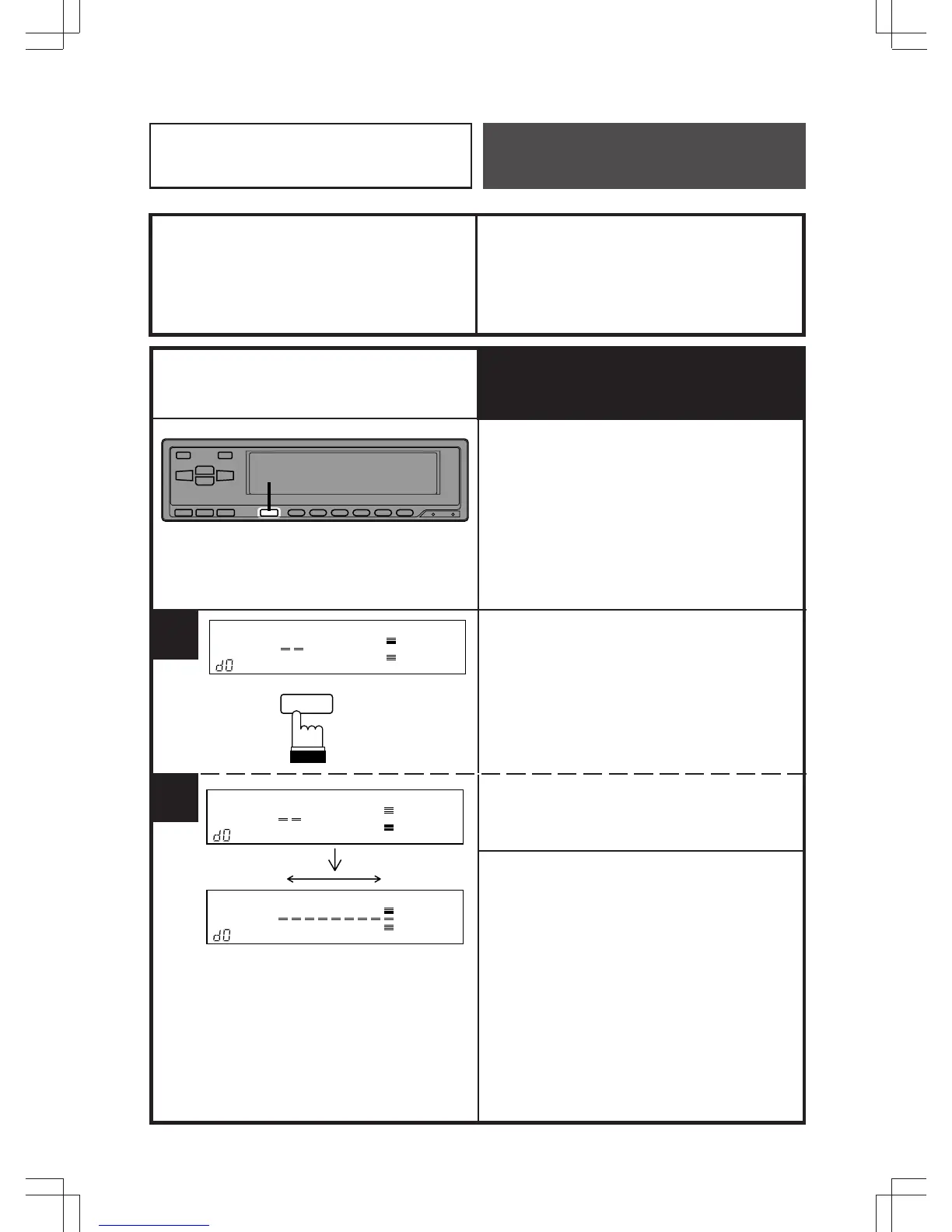
Setting Input Level
Before operating the equalizer, the input level
from the head unit needs to be properly
adjusted. Following the procedures below will
ensure that optimum sound quality will be
achieved.
• If the setting is not made, sound with
higher S/N ratio may not be obtained.
Press the DISP button until "d0" appears in
the lower left corner of the display. The
indicator will show the input from the head
unit. Use a dynamic music source to make
the level adjustment.
Use the volume control of the head unit to set
the optimum input level based on the reading
in the display.
Notes:
• After setting the input level, use the ERA-
G320 to make any volume adjustments.
Whenever the input level becomes
excessive, the "OVER" (overrange)
indicator will flash in the display. To
minimize distortion and for the best
possible sound, adjust the input level so
the "OVER" indicator no longer flashes.
• If the "OVER" indicator comes on when
using a different source, repeat the above
procedure for the new source.
1
1
DISP
Low/Bas/Bajo
High/Haut/Alto
2



 To Next Page