7.2 Hotbed leveling test:
Hotbed leveling test: Please make calibration to level the hotbed according to the video(SD-Card:\Installation
Instruction\Video\Hot Bed Leveling.mp4)After assembling, you need to level the bed when firstly print
7.2.1 Rough Debugging to level hotbed
7.2.1.1 Adjust the screws at the 4 angle of the hotbed to make the screws 4mm out of the nut (Picture 7.1);
7.2.1.2 Move the nozzle as near as possible to the hotbed, and pull the extruder with hand to the upper
everywhere of hotbed to check if the distance between the nozzle and 4 angle of hotbed is
accordant(Picture7.2);
7.2.1.3 Hold the T coupling at left& right bottom of Z axis with hand and rotate it to make the nozzle to 4mm
above the hotbed (Picture7. 3, 7.4)
7.2.1.4 Move the Z axis limit switch to the proper position, to make that the Z axis stop once the bottom of left
Z axis nut support meet the sphere of limit switch (Picture 7.5)
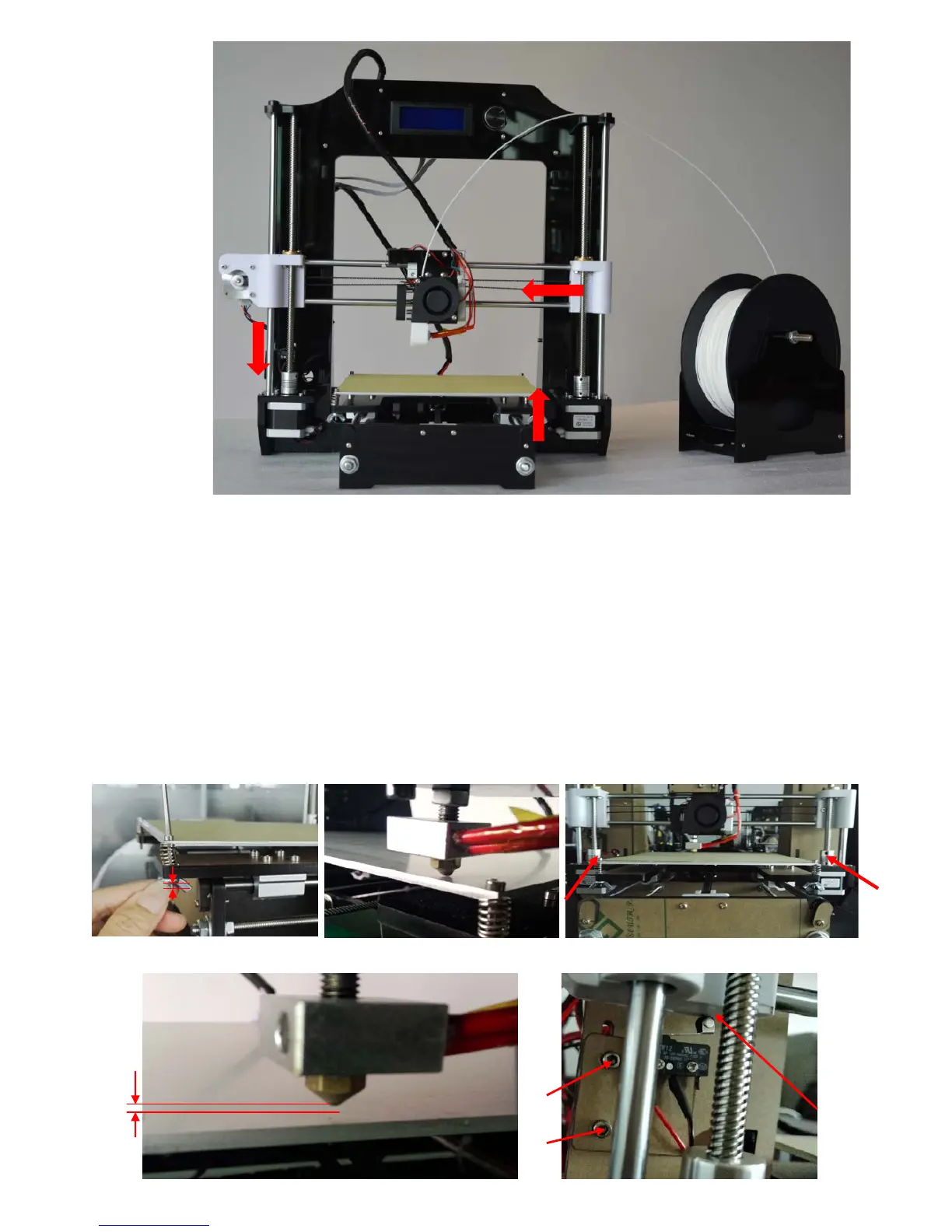
X axis move
Z axis move
Y axis move
Picture 7.1
Picture 7.3
Picture 7.2


 To Next Page