7.4.3.2 The 2
nd
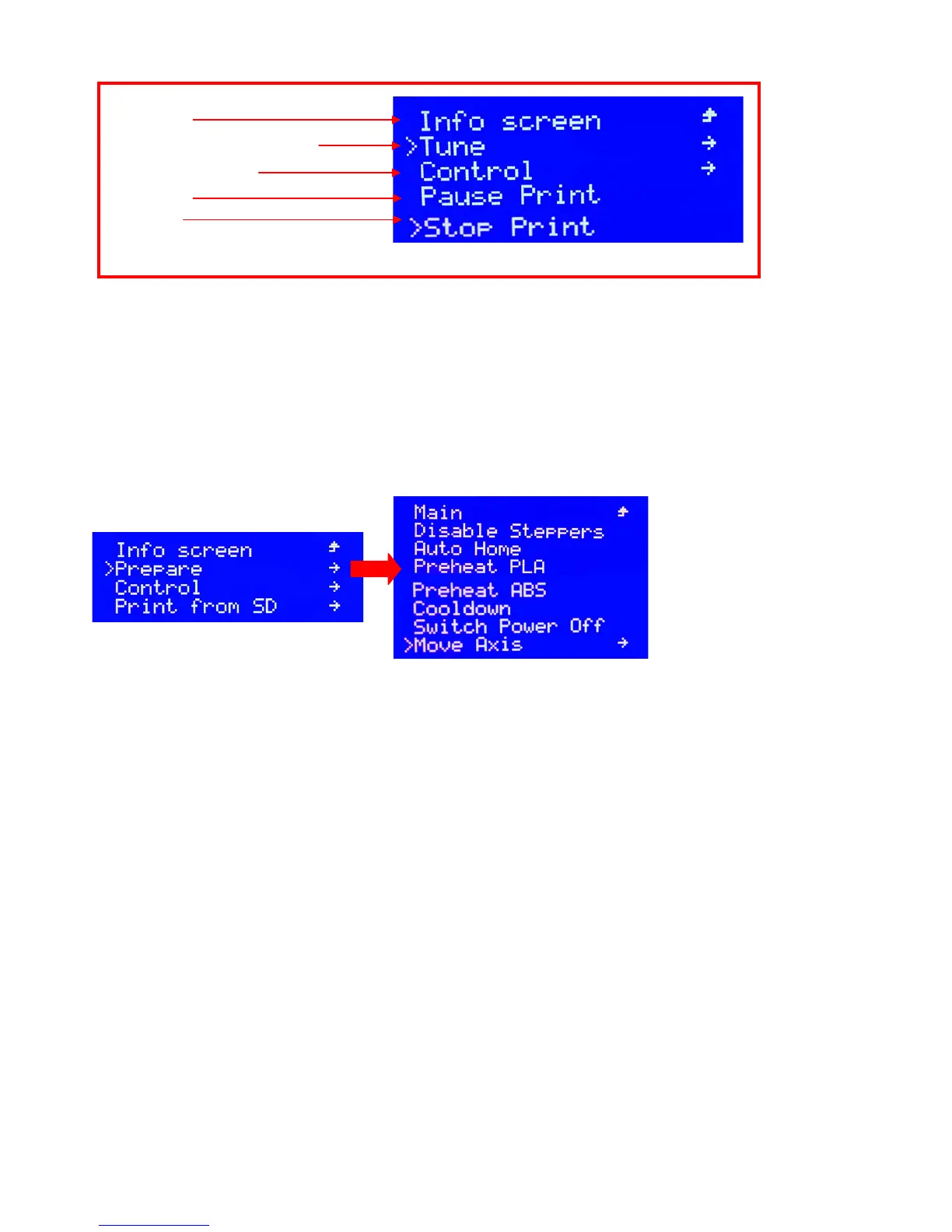
memo interface when printing (as shown on picture 7.19)
Click the (Info screen) and back the 1
st
page of memo interface
Click the (Tune) and adjust the temperature of nozzle& hotbed, speed of fan when printing
Click the (Control) and set up for the temperature of nozzle& hotbed, parameter of stepper motor, restoring the
fail-safe, and storage memory etc.
Click the (Pause Print) and pause the printing
Rotate down the knob and click the (Stop Print) to stop printing
7.4.4 Prepare for printing (prepare)
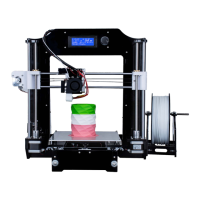
7.4.4.1 When 3D printer not printing, rotate the knob and click “prepare” in the secondary memo interface
(Picture 7.20) and then access to the 3
rd
memo interface (Picture 7.21)
(1) Unlock the disable stepper motor: click the (Disable Steppers) and then you can manual move the XYZ axis
smoothly
(2) Click the (Auto Home) and the XYZ axis will move back to the origin
(3) Click the (Preheat PLA) and then the nozzle would be heating up to the same as the setting temperature for
PLA, meanwhile, the LCD will also go back to the first memo interface.
(4) Click the (Preheat ABS) and then the nozzle would be heating up to the same as the setting temperature for
ABS, meanwhile, the LCD will also go back to the first memo interface
(5) Click the (Cool down), the temperature for nozzle and hotbed would be cool down to 0°automatically.
(6) Click the (switch power off) to turn off the power (it is not put into use at present)
(7) Click the (Move Axis) to control the move of XYZ, input & output the filament. Please don’t take the 10mm as
unit for Z axis movement and input& output the filament (extruder).
7.4.5 Move the axis and input& output the filament (Move Axis)
Click the “Move Axis” and do as the guide to all parts, then you will access to the 4
th
(Picture 7.23),
5
th
(Picture 7.24), and 6
th
(Picture 7.25) memo interface step by step. And then you could only take the 1mm &
0.1mm as unit for the Z axis movement and input & output filament (extruder).
Picture 7.19
Information


 To Next Page