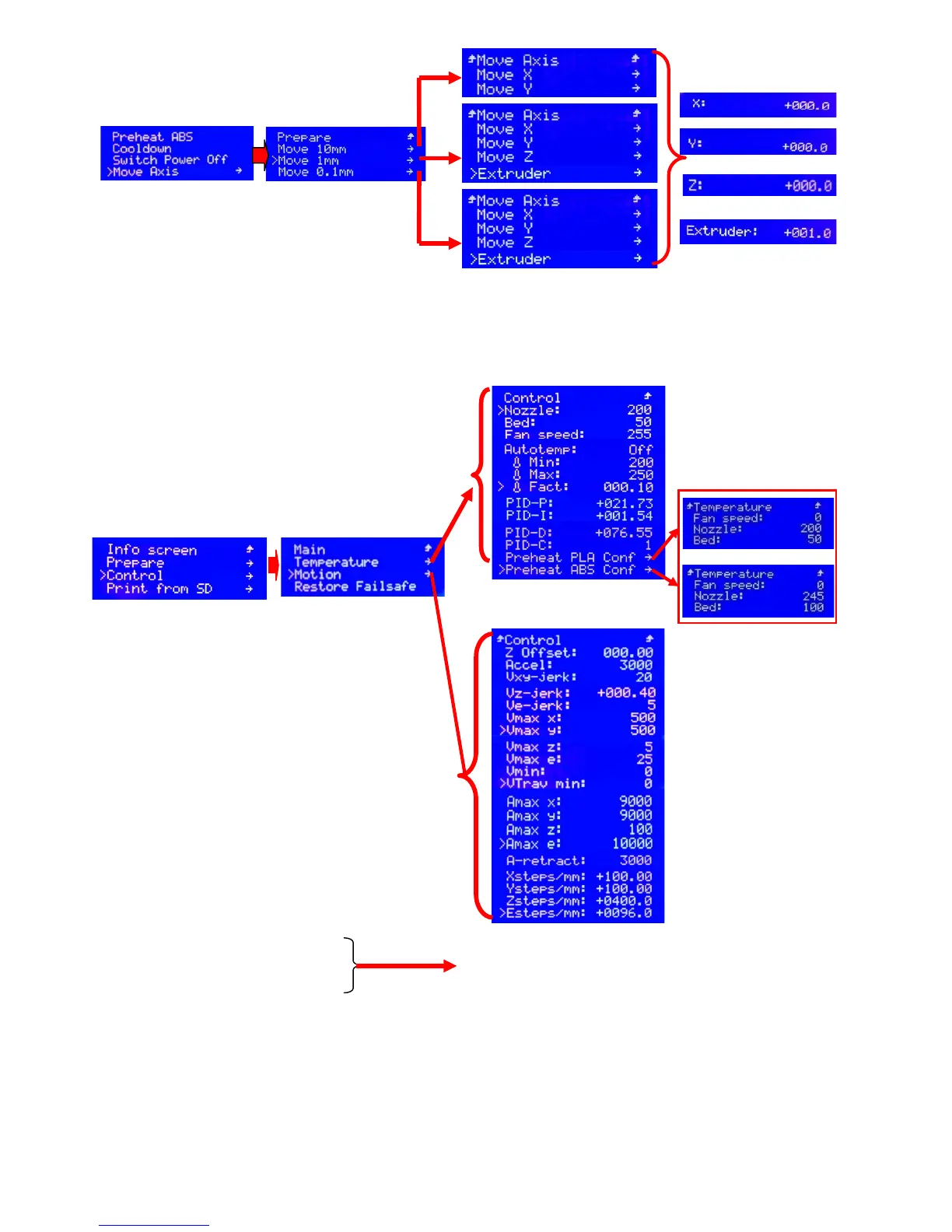
PS: The axis movement is based on current coordinate and it can only move to the positive direction.
The extruder could move to the positive& negative direction to input& output the filament.
7.4.6 The Parameter Adjustment when not printing (Control)
Picture 7.29
Z offset: Z axis offset
Accel: accel
Vxy-jerk: The speed variation of XY axis with no need acceleration
Vz-jerk: The speed variation of Z axis with no need acceleration
Ve-jerk: The speed variation of Extruder with no need acceleration
Vmax X: The maximal speed of X axis
Picture 7.24
Picture 7.22
Picture 7.23
Picture 7.26
Picture 7.28
Picture 7.29
Picture 7.30
Picture 7.27:
Temperature (Temperature control)
Motion (control for stepper motor)
Restore Failsafe (restore failsafe)
When not printing, you can rotate the knob
and click the “Control” at the secondary memo
interface (Picture 7.26), then you will access to the
3
rd
(Picture 7.27), 4th (Picture 7.28) and 5
th
memo
interface and make setting accordingly
Picture 7.28:
Nozzle: Temperature of nozzle
Bed: Temperature of hotbed
Fan speed: Adjust the speed of fan
Auto temp: automatic temperature
Min: The minimum temperature of nozzle
Max: The maximal temperature of nozzle
Fact: current temperature of nozzle
PID-P: The kp value of PID
PID-I: The ki value of PID
PID-D: The kd value of PID
PID-C: The ration of PID
Preheat PLA Conf(setting for preheat PLA)
Preheat ABS Conf(setting for preheat ABS)
The PID defines the temperature adjustment.
As usual, you needn't to manual adjust these
three variables since there are instructions of
automatic optimizing for PID.


 To Next Page