Structure and function
AMALOG BAH0017.1 11.08
15
4.3 Work display
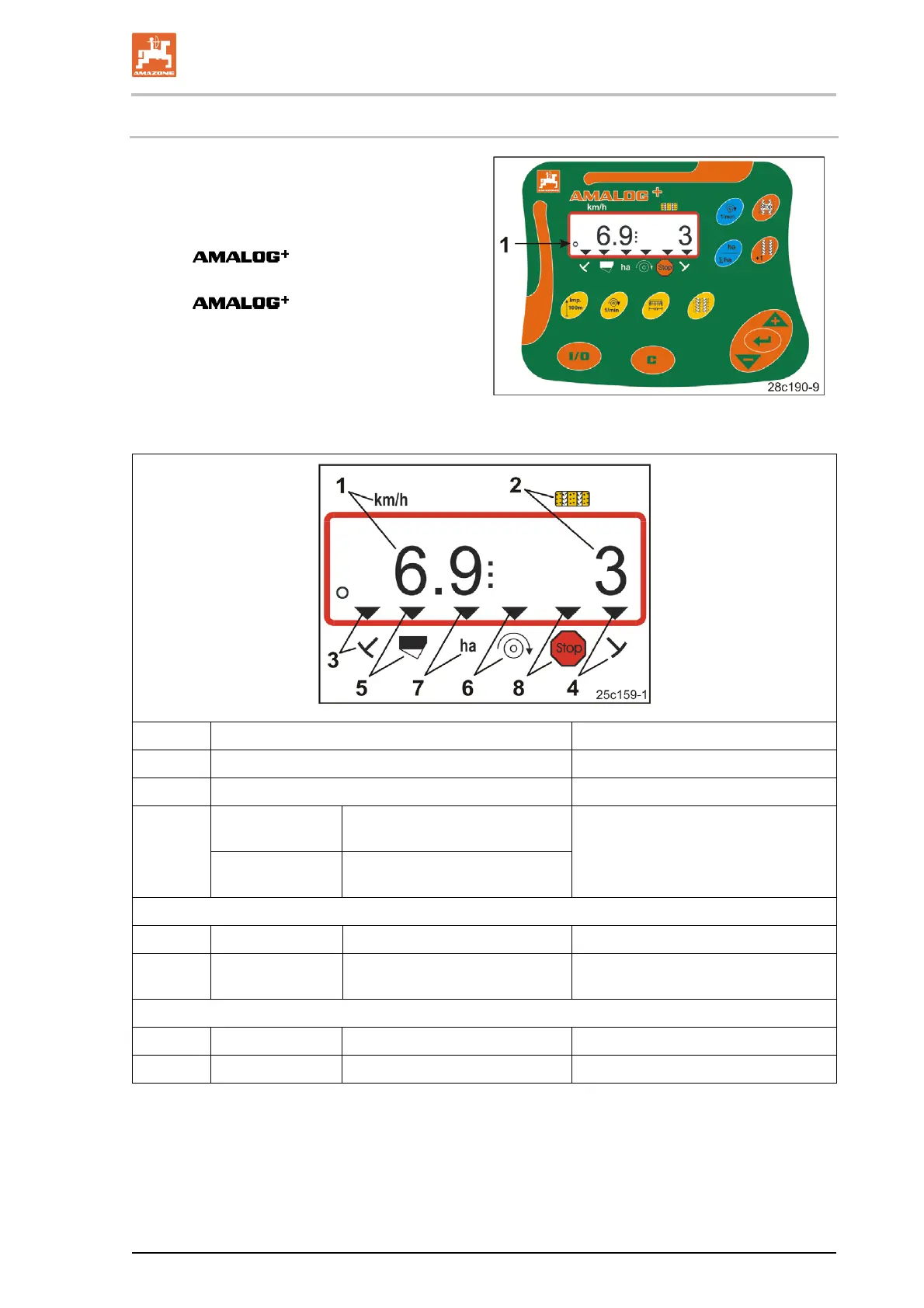
The work display (Fig. 5) appears with the first
gearbox sensor impulse.
The flashing circle symbol (Fig. 5/1) during work
indicates
• the
is receiving impulses
from the gearbox sensor
• the
is working correctly.
The work display depends on the work situation
[see table (Fig. 6)].
Fig. 5
Fig. 6/… Display and/or control symbol Sensor
1 Travel speed [km/h] Impulses from gearbox sensor
2 Position of tramline counter Computer data
Control symbol
Left track marker
in operational position
3
or
4
Control symbol
Right track marker
in operational position
Impulse,
e.g. from track marker sensor
Display appearing automatically in event of system errors:
5 Control symbol Refill hopper Impulses from level sensor
6 Control symbol
Blower fan speed deviation
above 10%
Impulses from fan sensor
(pneumatic seed drills)
Displays called up via function keys:
7 Control symbol Cultivated area [ha] Impulses from gearbox sensor
8 Control symbol Blocking the tramline counter Manual input
Fig. 6


 To Next Page