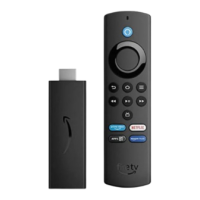
Can't Pair the Fire TV Remote App
If you can't pair your Fire TV Remote App, or if the app stops working, check your Wi-Fi network
connection.
Check this first:
Make sure the device with the Fire TV Remote App is connected to the same Wi-Fi network as your
Amazon Fire TV device.
Make sure another device isn't currently display mirroring to your Amazon Fire TV device, as this will
prevent the Fire TV Remote App from pairing.
If you have advanced settings set up on your Wireless router, make sure Multicast support is enabled.
If you used advanced settings on your Wireless router to manually assign a static IP address to your
Amazon Fire TV device, set the IP address to automatic.
You can have up to seven Bluetooth accessories and Amazon remotes actively connected to your
Amazon Fire TV at any time. Disconnect unused devices.
Still having trouble?
On the device with the app, clear the application data for the Fire TV Remote app. On Android devices,
go to Settings > Apps > Fire TV > Clear data. For Fire phone, go to Basic Troubleshooting for Fire
Phone for instructions on clearing application data.
Reboot the mobile device and then open the app again.


 To Next Page