- 22 -
C141501700.fm
User's manual
GB
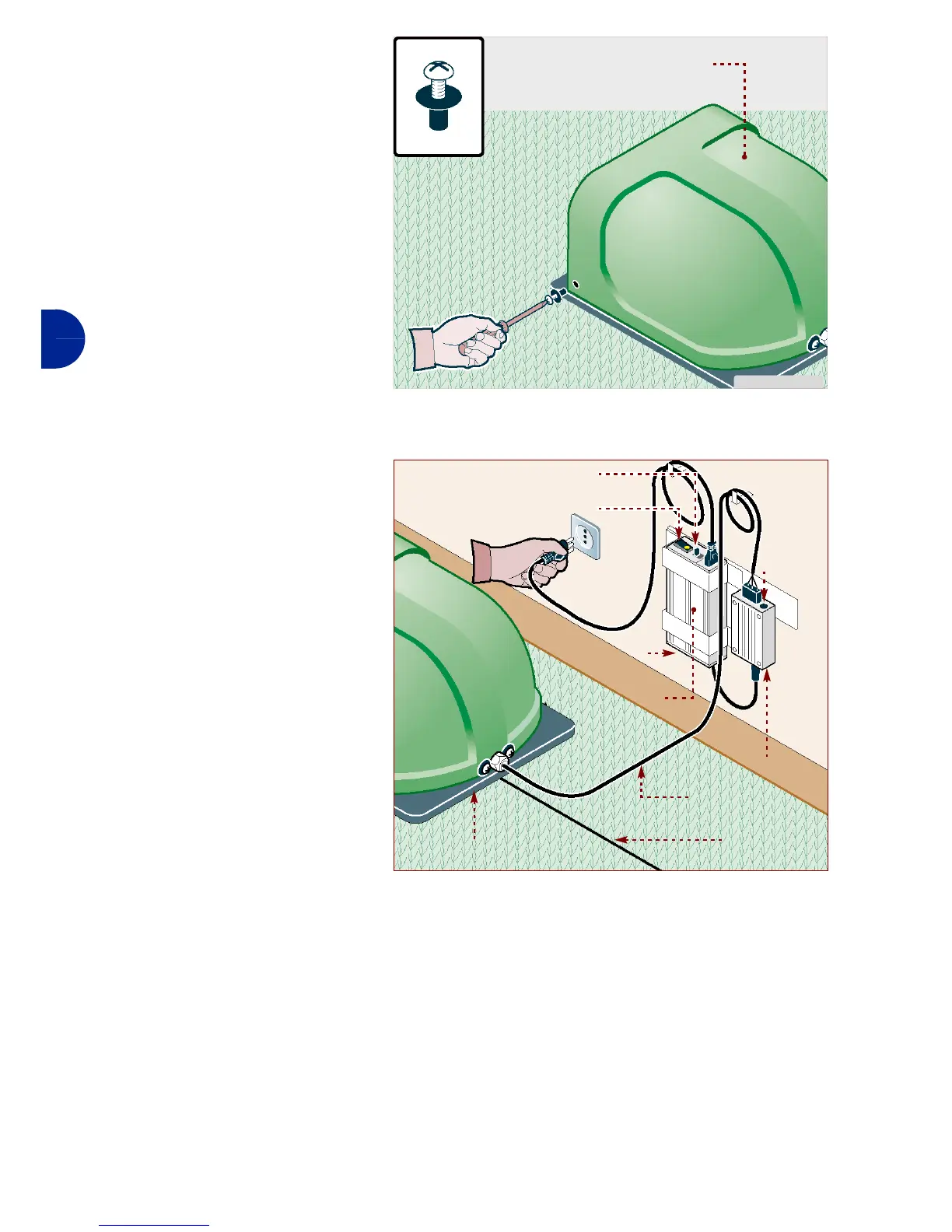
8-Reposition the shield (L).
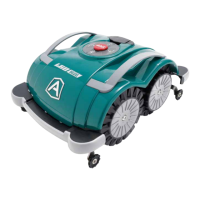
9-Connect the power supply ca-
ble (E) of the recharging sta-
tion (F) to the transmitter (B).
10-Operate on the cursor (C) to
select the power supply volt-
age (110 V or 220 V).
11-Press the button (D) of the
power supply unit on OFF.
12-Connect the plug of the power
supply unit (A) to the power
socket.
13-Restart the main electric sup-
ply.
14-Press the button (D) of the
power supply unit on ON.
15-If the led (G) turns on and the
led (H) flashes alternately
green and orange, the connec-
tion is correct. Otherwise, it is neces-
sary to find the defect (see
"Troubleshooting").
IDM - 41501701500.tif
guard (L)
IDM - 41501701700.tif
Reload station
perimeter
wire
cursor (C)
transmitter (B)
power supply
unit (A)
led (G)
power cable (E)
led (H)
pushbutton (D)


 To Next Page