– 15 –
ARMING PERIMETER ONLY
(With Entry Delay ON)
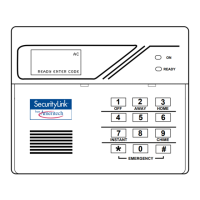
Using the 3 Key
HOME
Use this key when you are staying home, but might expect someone to use the
entrance door later.
When armed in HOME mode, the system will sound an alarm if a protected door
or window is opened, but you may otherwise move freely throughout the premises.
Late arrivals can enter through the entrance door without causing an alarm, but
they must disarm the system within the entry delay period or an alarm will occur.
Close all protected perimeter windows and doors before arming (see
CHECKING FOR OPEN ZONES section). The green READY indicator (if present)
on the keypad should be lit if the system is ready to be armed.
1. + 3 ENTER SECURITY CODE THEN PRESS HOME
(Security Code)
HOME if using the AM6128 keypad
or for quick arming PRESS THE “B” KEY (ON HOME) for 2 seconds if
using the AM6139 keypad.
Example: 7
2 9 6 then press the HOME key.
2.
A RM ED
* H OM E*
LISTEN FOR 3 BEEPS
The keypad will beep three times and will display
the armed HOME message. The red ARMED
indicator also lights.
You can restart the exit delay at any time after arming in HOME mode by
pressing the ✴
key. This is useful if you wish to open the entry/exit door to let
someone in after arming the system and avoids having to disarm the system and
then re-arm it again.


 To Next Page