– 23 –
PANIC KEYS
(FOR MANUALLY ACTIVATING SILENT AND/OR AUDIBLE ALARMS)
Using Panic
Keys
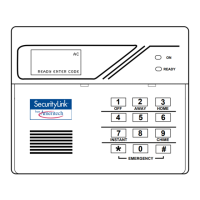
Your system may have been programmed to use special keys to manually activate panic
functions. The functions that might be programmed are listed below. See your installer for
the function(s) that may have been programmed for your system.
Your installer
should note the
functions that are
active in your
system.
Active Panic Functions
Keys Zone
Function
1 and ✱ 95
3 and # 96
✱ and # 99
To use a paired key panic function, simply press both keys of the assigned pair at the same time.
Types of Panic
Alarms
*If your system is
connected to an
alarm monitoring
company.
A silent emergency sends an
alarm signal to the alarm
monitoring company,* but there will
be no audible alarms or visual
displays.
An audible emergency sends an
emergency message to the alarm
monitoring company* and sounds a
loud, steady alarm at your keypad
and at any external sounders that
may be connected (ALARM plus a
zone number is also displayed).
A personal emergency alarm sends
an emergency message to the alarm
monitoring company* and sounds at
keypads, but not at external sounders.
(ALARM plus a zone number is also
displayed)
A fire alarm sends a fire alarm
message to the alarm monitoring
company* and uniquely activates
keypad and any external sounders
(FIRE plus a zone number is also
displayed).


 To Next Page
