EasyManua.ls Logo

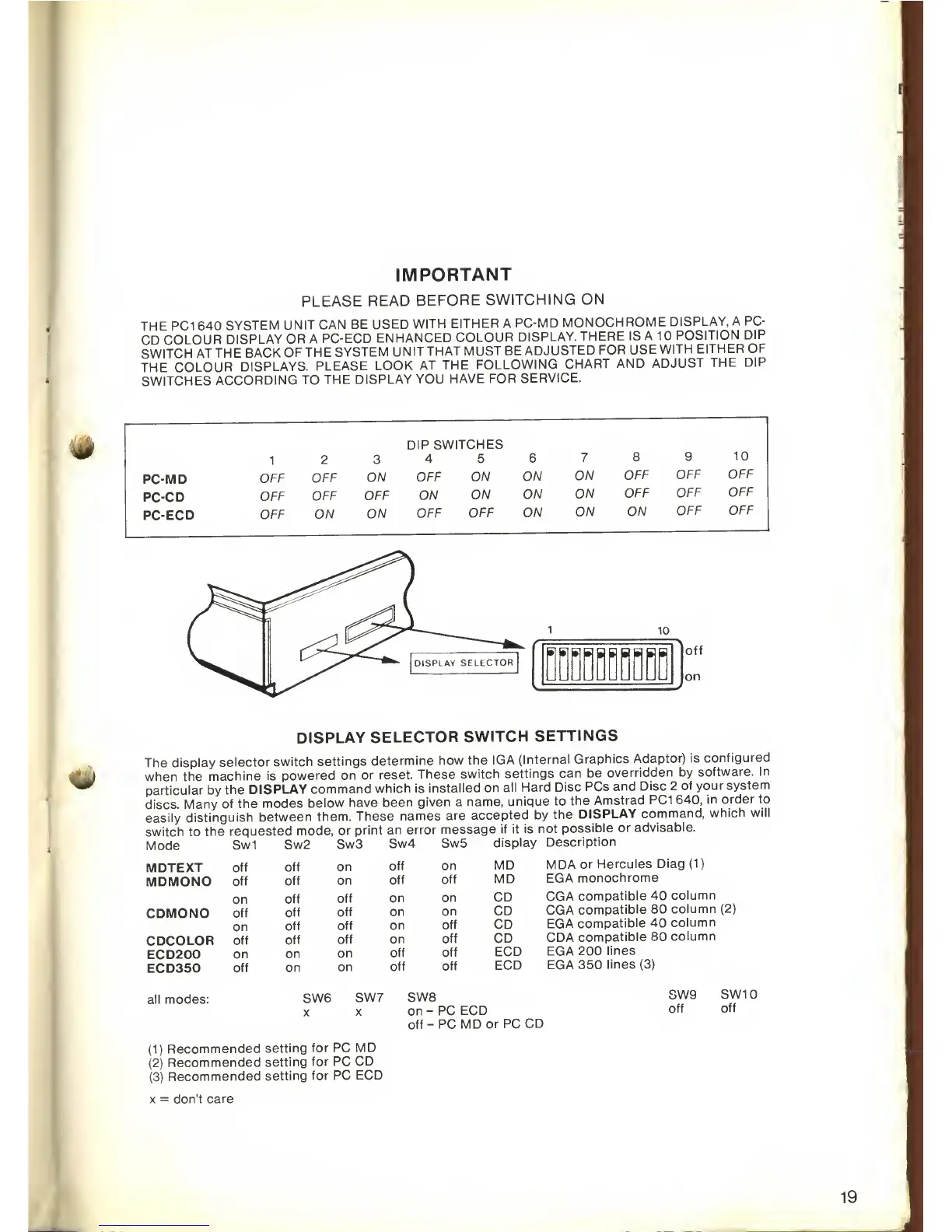
AMSTRAD PC1640 - Display Selector Switch Settings; Before Switching on

AMSTRAD PC1640
76 pages
Print Icon
To Next Page IconTo Next Page
To Previous Page IconTo Previous Page
Loading...
IMPORTANT
PLEASE
READ
BEFORE
SWITCHING
ON
THE PC1
640
SYSTEM
UNIT CAN
BE
USED
WITH
EITHER A
PC-MD
MONOCHROME
DISPLAY,
A PC-
CD
COLOUR
DISPLAY
OR
A PC-ECD
ENHANCED
COLOUR
DISPLAY.
THERE IS
A
1
POSITION
DIP
SWITCH
ATTHE
BACK
OF
THE
SYSTEM
UNITTHAT
MUST BE
ADJUSTED
FOR
USE
WITH
EITHER
OF
THE
COLOUR
DISPLAYS.
PLEASE
LOOK
AT THE
FOLLOWING
CHART
AND
ADJUST
THE
DIP
SWITCHES
ACCORDING
TO
THE
DISPLAY
YOU
HAVE
FOR
SERVICE.
1
2
3
DIP
SWITCHES
4 5
6
7
8
9
10
PC-MD
OFF
OFF
ON
OFF
ON
ON
ON
OFF
OFF
OFF
PC-CD
OFF
OFF
OFF
ON
ON
ON
ON
OFF
OFF
OFF
PC-ECD
OFF
ON
ON
OFF
OFF
ON
ON
ON
OFF
OFF
DISPLAY
SELECTOR
SWITCH
SETTINGS
The display
selector
switch
settings
determine
how the
IGA
(Internal
Graphics
Adaptor)
is
configured
J
when
the
machine
is
powered
on or
reset.
These
switch
settings
can be
overridden by
software.
In
^*
particular by
the
DISPLAY
command
which is
installed on
all
Hard Disc
PCs
and
Disc
2
of your
system
discs.
Many of
the modes
below
have been
given
a
name,
unique to
the
Amstrad PC1
640,
in
order to
easily
distinguish
between
them.
These
names
are
accepted by
the
DISPLAY
command,
which
will
switch to
the
requested
mode,
or
print
an error
message
if it is
not
possible
or
advisable.
Mode
Sw1
Sw2
Sw3
Sw4
Sw5
display
Description
MDA
or
Hercules
Diag
(1)
EGA
monochrome
CGA
compatible
40
column
CGA
compatible
80
column
(2)
EGA
compatible
40
column
CDA
compatible
80
column
EGA 200
lines
EGA
350
lines
(3)
MDTEXT
off
off
on
off
on MD
MDMONO
off
off
on
off
off
MD
on
off
off
on
on
CD
CDMONO
off
off
off
on
on
CD
on
off
off
on
off
CD
CDCOLOR
off
off
off
on
off
CD
ECD200
on
on
on
off off
ECD
ECD350
off
on
on
off
off
ECD
all modes:
SW6
SW7
SW£
X
X
on
-
off-
PC ECD
PC MD
or PC
CD
SW9
off
SW10
off
(1)
Recommended
setting
for PC
MD
(2)
Recommended
setting
for PC
CD
(3)
Recommended
setting
for
PC ECD
x
=
don't
care
19

Related product manuals