EasyManua.ls Logo

AMSTRAD PC1640 - Alignment Instructions PC-CD

AMSTRAD PC1640
76 pages
Print Icon
To Next Page IconTo Next Page
To Previous Page IconTo Previous Page
Loading...
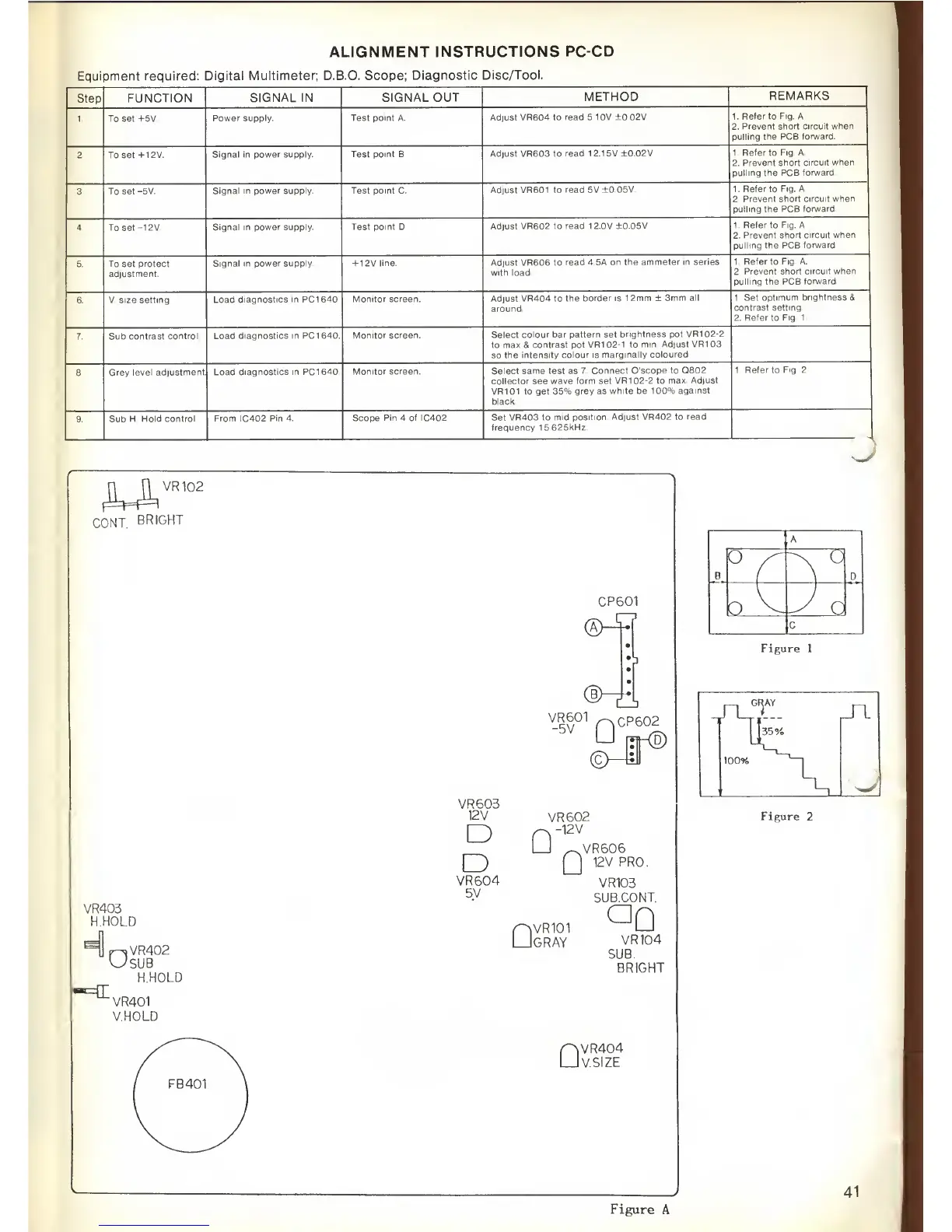
ALIGNMENT
INSTRUCTIONS
PC-CD
Equipment required:
Digital
Multimeter; D.B.O.
Scope;
Diagnostic Disc/Tool.
Step
FUNCTION
SIGNAL IN
SIGNAL OUT
METHOD
REMARKS
1.
To
set
+5V.
Power supply.
Test point
A.
Adjust VR604 to
read 5.1 OV
±0.02V.
1. Refer to
Fig. A.
2. Prevent
short circuit when
pulling the PCB
forward.
2. To set +12V.
Signal in power
supply. Test point B.
Adjust VR603 to read
12.15V ±0.02V.
1.
Refer
to
Fig. A.
2.
Prevent short
circuit when
pulling
the
PCB
forward.
3.
To
set
-5V.
Signal in power
supply. Test point
C
Adjust VR601
to read 5V
±0.05V
1.
Refer
to
Fig. A.
2.
Prevent short circuit
when
pulling the PCB
forward.
4. To set -12V.
Signal in
power supply. Test point D.
Adjust VR602 to
read 12.0V ±0.05V.
1. Refer to
Fig. A.
2.
Prevent short circuit
when
pulling
the PCB forward.
5. To set protect
adjustment.
Signal in power
supply. + 12V line.
Adjust VR606
to read
4.5A on the ammeter
in series
with load.
1.
Refer
to
Fig. A.
2.
Prevent short circuit when
pulling the PCB forward.
6. V. size setting. Load
diagnostics in PC1640. Monitor
screen.
Adjust VR404 to
the border is 1
2mm
±
3mm
all
around.
1. Set optimum
brightness
&
contrast
setting.
2.
Refer
to
Fig. 1.
7. Sub
contrast control. Load
diagnostics
in
PC1640.
Monitor screen.
Select
colour bar
pattern
set
brightness pot
VR1
02-2
to max S
contrast pot VR102-1
to
min. Adjust VR1 03
so
the
intensity colour is
marginally coloured.
8. Grey
level adjustment Load
diagnostics
in PC1640. Monitor screen.
Select same test as 7.
Connect Oscope to
Q802
collector
see
wave
form set VR1
02-2
to
max. Adjust
VR1
01
to
get 35% grey as
white be
1
00%
against
black.
1.
Refer
to
Fig. 2
9
Sub H.
Hold control. From IC402
Pin 4. Scope
Pin 4 of IC402.
Set VR403 to
mid
position. Adjust VR402 to
read
frequency
15.625kHz.
CONT.
BRIGHT
VR102
VR403
H.HOLD
p~*VR402
U>SUB
-=£
H.HOLD
VR401
V.HOLD
CP601
<5>
<Hi
VR601
r>GP602
"Si*
VR603
12V
D
D
VR602
-12V
U
_VR606
_J
12V PRO.
R6LV
I
VR103
bV
SUB.CONT.
P>VR101
LJgray
^0
VR104
SUB.
BRIGHT
P|VR404
LJvsize
Figure
A
A
O
•"
a
B D
o
V
y
o
c
Figure 1
GRAY
n
l
35
°
/°
100%
|
1
^
Figure
2
41

Related product manuals