EN 74 2017/06 Rev. 2.0
OptiBean (XL) Touch
2.5.4 Switching times
/i
2.5.5 Recipe counters
/i
2.5.6 Quick recipe
1
/i
2.5.7 Software / Hardware
/i
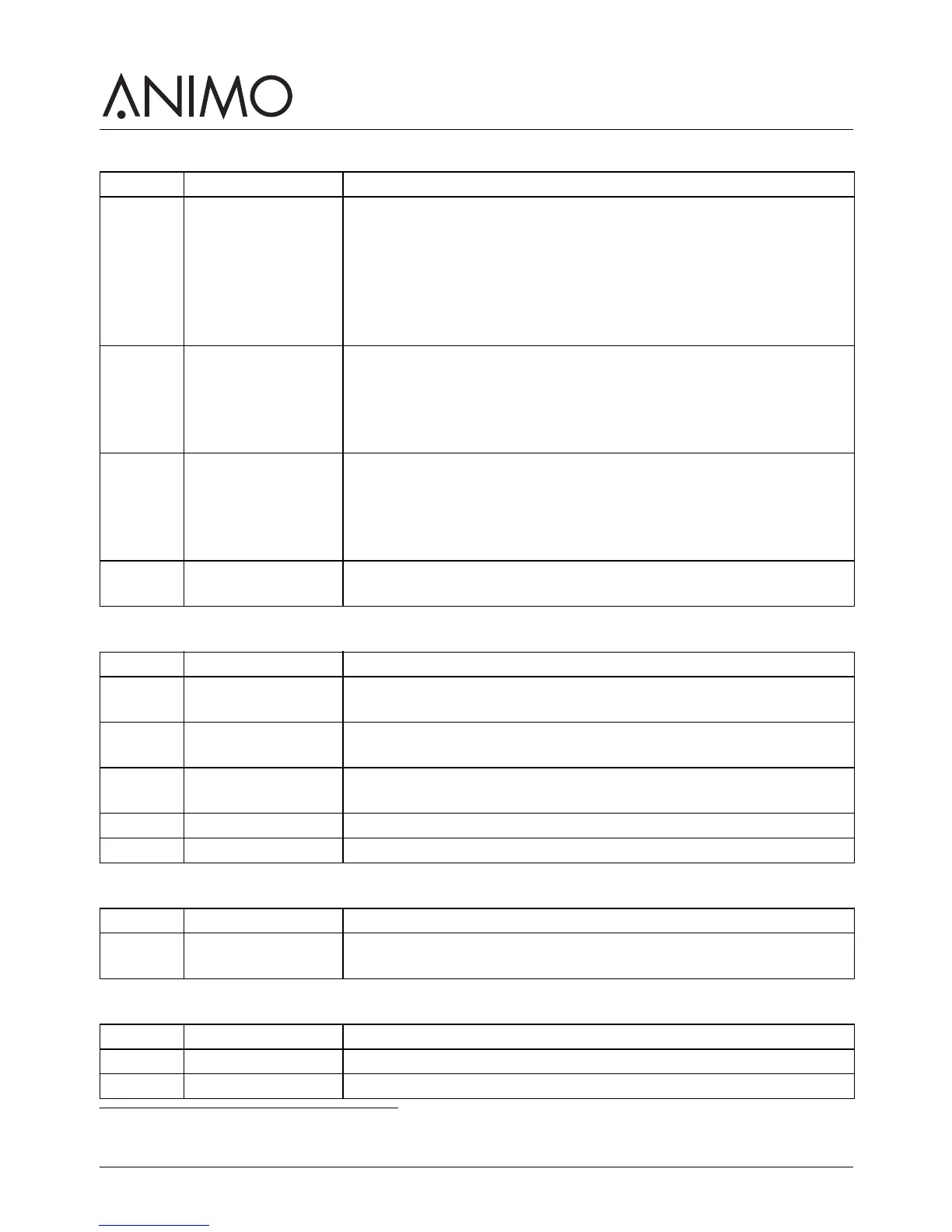
Screen Item Description
1.02.00 Monday - Friday To set the on and off time from Mondays until Fridays [hour:min]
00:00 = not active.
To set the pricing time from Mondays until Fridays [hour:min]. 00:00 =
not active.
To set the price choice from Mondays until Fridays [price low/free].
Available if pricing time is active.
There are 3 switching times available.
1.02.01 Saturday To set the on and off time on Saturdays [hour:min] 00:00 = not active.
To set the pricing time on Saturdays [hour:min]. 00:00 = not active.
To set the price choice on Saturdays [price low/free]. Available if
pricing time is active.
There are 3 switching times available.
1.02.02 Sunday To set the on and off time on Sundays [hour:min] 00:00 = not active.
To set the pricing time on Sundays [hour:min]. 00:00 = not active.
To set the price choice on Sundays [price low/free]. Available if
pricing time is active.
There are 3 switching times available.
1.2.3 Energy safe mode To activate and set the energy safe mode: active / not active, LCD,
OptiLight, and boiler temperature in energy safe mode. See 2.6.
Screen Item Description
1.03.00 Recipe 1-xx To show the amount of free, paid-low rate, paid-high rate, test
recipes, tokens, jug and total cups [0-99999 cups].
1.03.01 Recipe total To show the total amount of free, paid-low rate, paid-high rate, test
recipes, tokens, jug and total cups [0-99999 cups].
1.03.02 Service counters To show the amount of rinsing and cleaning of the system [0-99999]
and the most recent day when the rinsing or cleaning was done.
1.03.03 Reset counters If available, to reset all counters.
1.03.04 Save counters To save counters.
1. The quick recipe menu is only available if it has been activated by the service engineer.
Screen Item Description
1.04.00-
xx
Recipe: <recipe
name>
To set the volume, strength of coffee, cocoa, topping and sugar per
recipe.
Screen Item Description
1.06.00 Software To show the software version.
1.06.01 Hardware To show the hardware version [main print/interface print].



 To Next Page