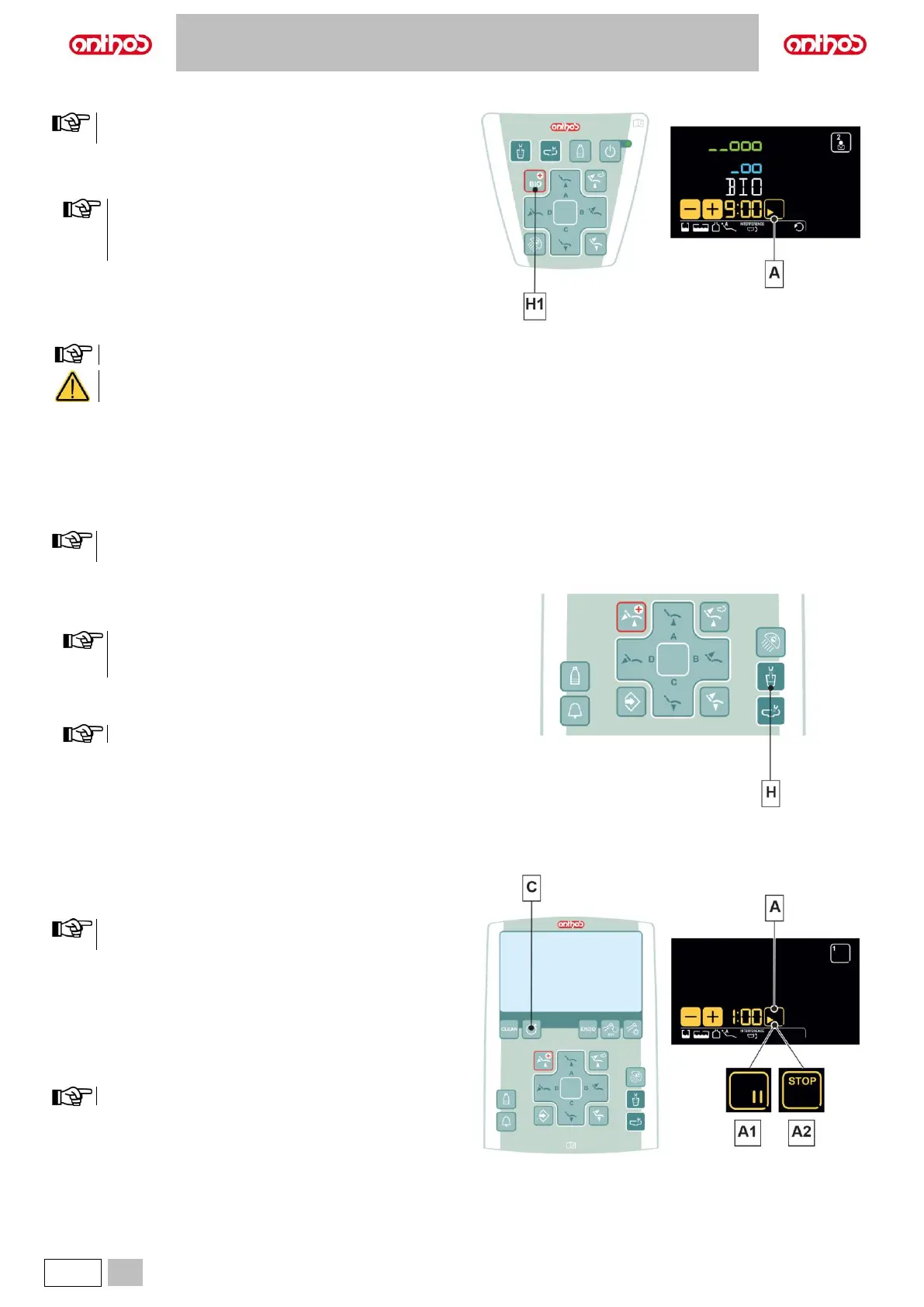
5.1.1.1.3. BIOSTER DISINFECTION CYCLE SETTING
We recommend carrying out this operation at the end of each
working day.
Performing the cycle.
• Press and hold the button (H1) on the assistant's board to select the
BIOSTER S cycle.
Cycle will not start if:
- disinfectant tank is in reserve (see paragraph 7.4.);
- an instrument is extracted;
- there is an error in the W.H.E. system
• Set cycle time by using buttons “+” or “-“.
Time setting ranges from a min. of 5 minutes to a max. of 10 minutes.
Disinfection according to the manufacturer's specifications is guaranteed by the 10-minute cycle, a shorter time may not guarantee
the same levels of disinfection.
• Extract the hoses to be treated (the selected hoses will be highlighted on the DISPLAY).
• Press the “PLAY” touch button (A) to start the BIOSTER S cycle (see paragraph 7.4.).
5.1.1.1.4. W.H.E. SYSTEM TANK EMPTYING
This function allows emptying the W.H.E. system water circuit (see
paragraph 7.3.).
This operation is recommended if the dental unit has been
switched off for more than 7 days.
Performing the emptying.
• Insert the special supplied cup under the spout.
• Press and hold button (H) for at least 5 seconds to start the emptying
cycle, the DISPLAY will show the system’s code illuminated.
Cycle will not start if:
- S.H.S. system is active;
- there is an error in the W.H.E. system.
The cycle end is signalled by a sound (3 BEEPS).
Now the dental unit is in lockout mode and it can be turned off.
At restart, the W.H.E. system will be automatically restored.
• Press button (C) to access the STOPWATCH function:
Stopwatch setting
The countdown can be set from a minimum of 10 seconds to a
maximum of 9 minutes and 59 seconds.
• Set the time using the touch buttons "+" and "-".
• Press the "PLAY" button (A) to start the countdown.
• Press the "PAUSE" button (A1) to stop the countdown.
Once the set time has elapsed, the dental unit emits an intermittent sound.
• Press the "STOP" button (A2) to stop the sound and select the last time
value set in the timer.
• Press and hold the "PAUSE" touch button (A1) to stop the countdown
and go back to the time setting step.
The last set time is stored.



 To Next Page