5.1.1. MAIN SETTINGS
5.1.1.1. HYGIENE CYCLE SETTING
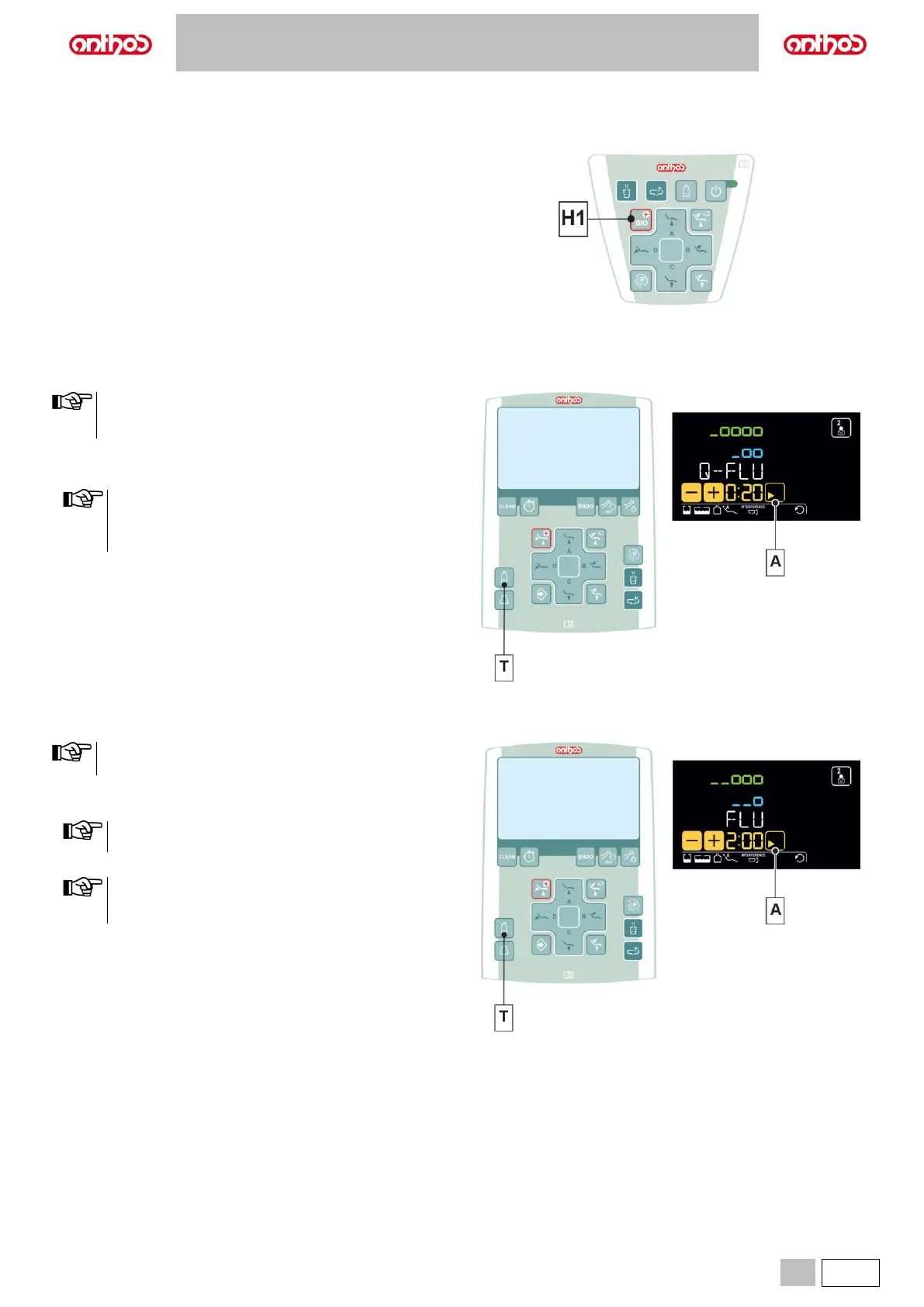
• Press button (H1) on the assistant's board to open the HYGIENE
CYCLE SETTING menu:
H1 Hygiene cycle setting menu.
Button pressed shortly: FLUSHING cycles.
Button pressed and held: BIOSTER S cycle.
5.1.1.1.1. QUICK FLUSHING CYCLE SETTING
• We recommend carrying out this operation after seeing each
patient.
• The cycle time is about 20 seconds
Performing the cycle.
• Press the “-” touch button to select the QUICK FLUSHING cycle.
• When independent water supply is used for flushing,
submenu will NOT be available if level is in reserve. (see
paragraph 7.2).
• The cycle time is about 20 seconds.
• Extract the instruments to be treated (the selected instruments will be
highlighted on the LCD Touch DISPLAY).
• Press the button (T) to activate/deactivate independent water supply
(with S.H.S. system, only).
• Press the touch button (A) to start the QUICK FLUSHING cycle (see
paragraph 7.6.).
5.1.1.1.2. LONG FLUSHING CYCLE SETTING
We recommend performing this operation at the beginning of
each working day.
Performing the cycle.
• Press the “+” touch button to select the LONG FLUSHING cycle.
When independent water supply is used for flushing, submenu
will NOT be available if level is in reserve. (see paragraph 7.2).
• Set cycle time by using buttons “+” or “-“.
Time setting ranges from a min. of 2 minute to a max. of 10
minutes. When using the distilled water tank, do not set a time
higher than 2 minutes.
• Extract the instruments to be treated (the selected instruments will be
highlighted on the LCD Touch DISPLAY).
• Press the button (T) to activate/deactivate independent water supply
(with S.H.S. system, only).
• Press the touch button (A) to start the LONG FLUSHING cycle (see
paragraph 7.5.).



 To Next Page