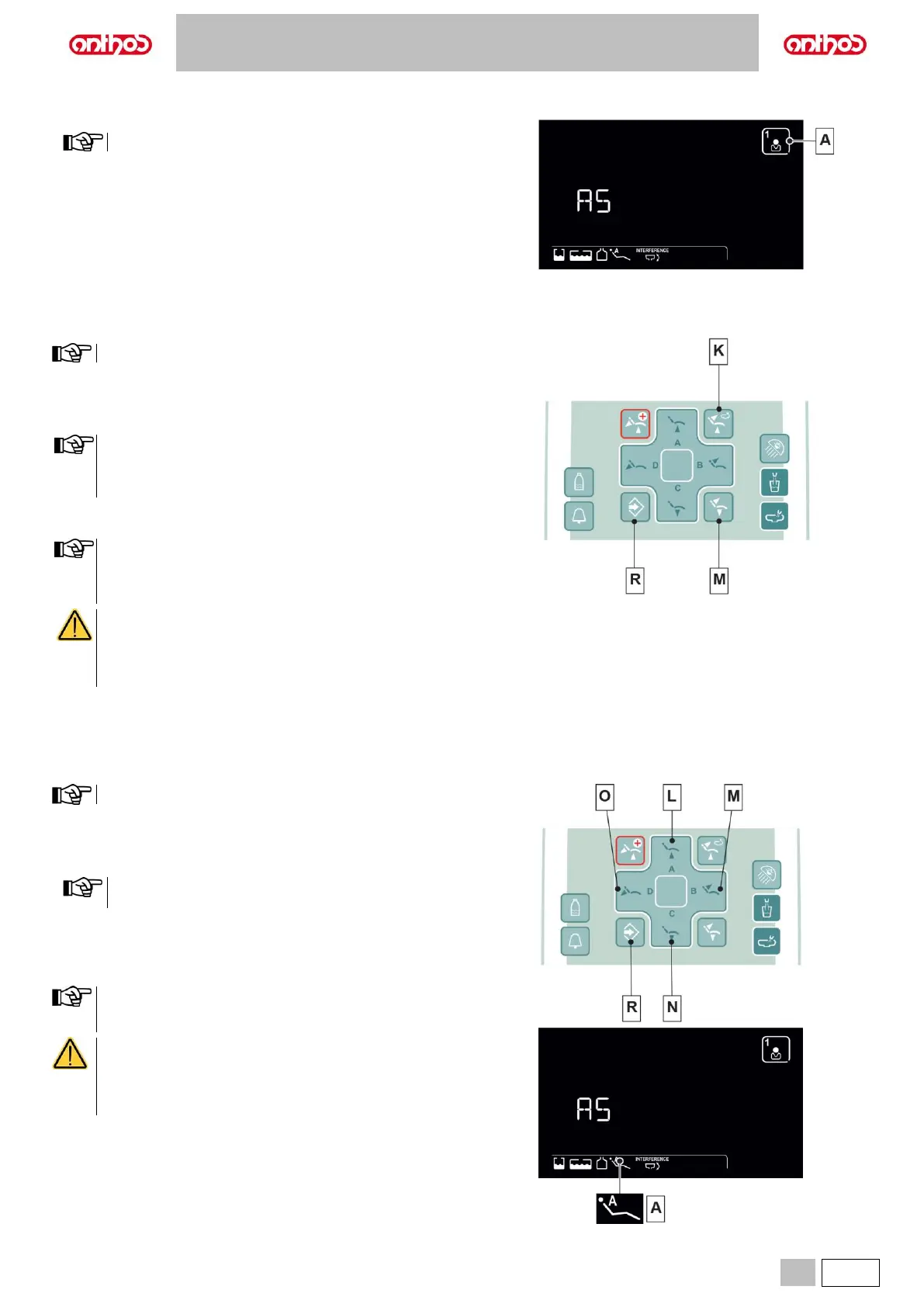
5.1.2. OPERATOR SELECTION
• Press button (A) repeatedly to set the desired operator.
There are 4 selectable operators.
5.1.3. DENTAL CHAIR "RINSING POSITION" AND "RESET POSITION" PROGRAMMING
This setting is specific for each single operator.
Proceed as follows:
• Adjust the dental chair into the desired position with the manual
movement buttons.
• Hold button (R) for at least 2 seconds to activate save mode.
for L6 series:
In the Rinse Position, the maximum seat height that can be saved
is the safety height (no interference between the seat and the
bowl).
• Press the buttons "Reset Position" (patient entry/exit) (M) or "Rinse
Position" (K) briefly to assign the position to the button.
The "Rinse Position" button (K) moves backrest and seat to rinse
position.
When button (K) is pressed again, backrest and seat will go back
to the previous position.
CRUSHING HAZARD
The positions already stored ensure a safety distance
between dental chair and floor. Do not store lower dental
chair positions, and in any case pay attention to the risk of
crushing.
5.1.4. PROGRAMMING THE DENTAL CHAIR POSITIONS A, B, C and D
This setting is specific for each single operator.
Proceed as follows:
• Adjust the dental chair into the desired position with the manual
movement buttons.
• Hold button (R) for at least 2 seconds to activate save mode.
The position of the dentist’s board is not stored in dental chair
programmes.
• Press the button (L), (M), (N) or (O) briefly to assign the position to the
button.
The appearance of icon (A) relating to the selected programme on the
LCD Touch DISPLAY will confirm that it has been saved.
To recall a programmed position, shortly press the button of the
selected programme.
CRUSHING HAZARD
The positions already stored ensure a safety distance
between dental chair and floor. Do not store lower dental
chair positions, and in any case pay attention to the risk of
crushing.



 To Next Page