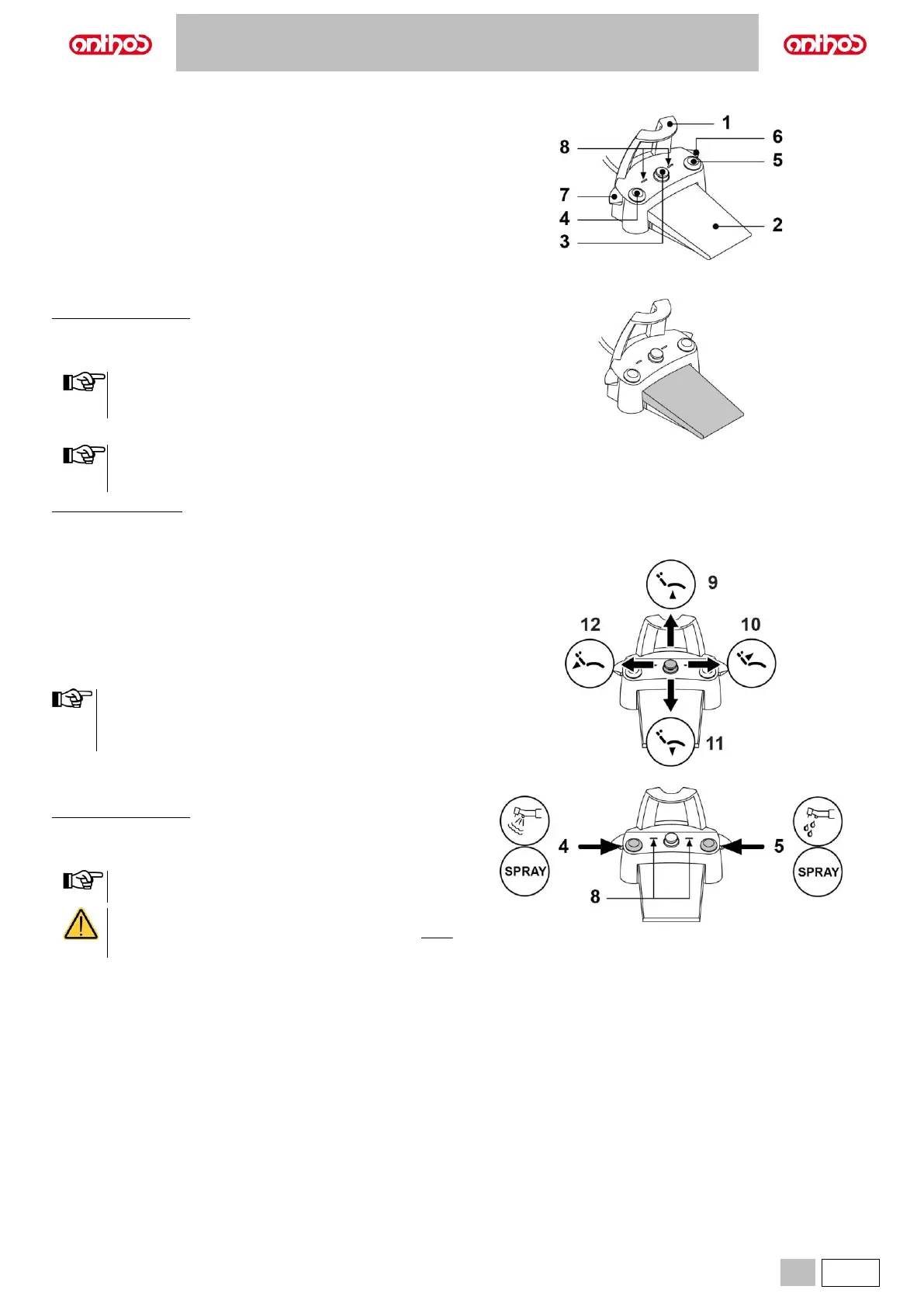
5.2.3. "POWER PEDAL" FOOT CONTROL
Description of the parts.
1 Handle.
2 Foot control.
3 Dental chair movement control.
4 Chip-air control or activation/deactivation of instrument spray function.
5 Water Clean System control or activation/deactivation of instrument
spray function.
6 Automatic dental chair return or programme "B” recall activation.
7 Patient rinse position or programme "A" recall activation.
8 Spray operation LED.
Foot control (2).
With instrument removed
• Pushing the pedal (2) for a long time starts the instrument.
You can adjust the speed/power by modulating the pressure on the
pedal.
The foot control adjusts the speed/power of the instrument
from the minimum to maximum value set from the dentist's
board.
• Release the pedal (2) to stop instrument operation.
With the spray active, at the end of the operation a blast of air
is automatically activated to remove any residual drops of
liquid in the spray ducts.
With instruments at rest
• When the foot control (2) is pressed, all automatic dental chair
movements are automatically blocked.
Joystick for dental chair movements (3).
It controls the following movements:
9 Dental chair seat up.
10 Dental chair backrest up.
11 Dental chair seat down.
12 Dental chair backrest down.
To stop movement, release the control.
• All dental chair movements are blocked when an instrument is
being used or the BIOSTER S system is running.
• It is possible to edit the joystick operation once the instrument
is extracted (see paragraph 5.1.1.7.).
Left-hand button (4).
With instrument removed
• Short press: enables/disables the spray function.
• Long press (at least 2 seconds): sends a jet of air to the instruments
(Chip air); the jet stops when the button is released.
The control works only when the Turbine and Micromotor are
in working position.
• A short sound warns of the switching.
When the LEDs (8) are on, they indicate operation WITH
spray.



 To Next Page