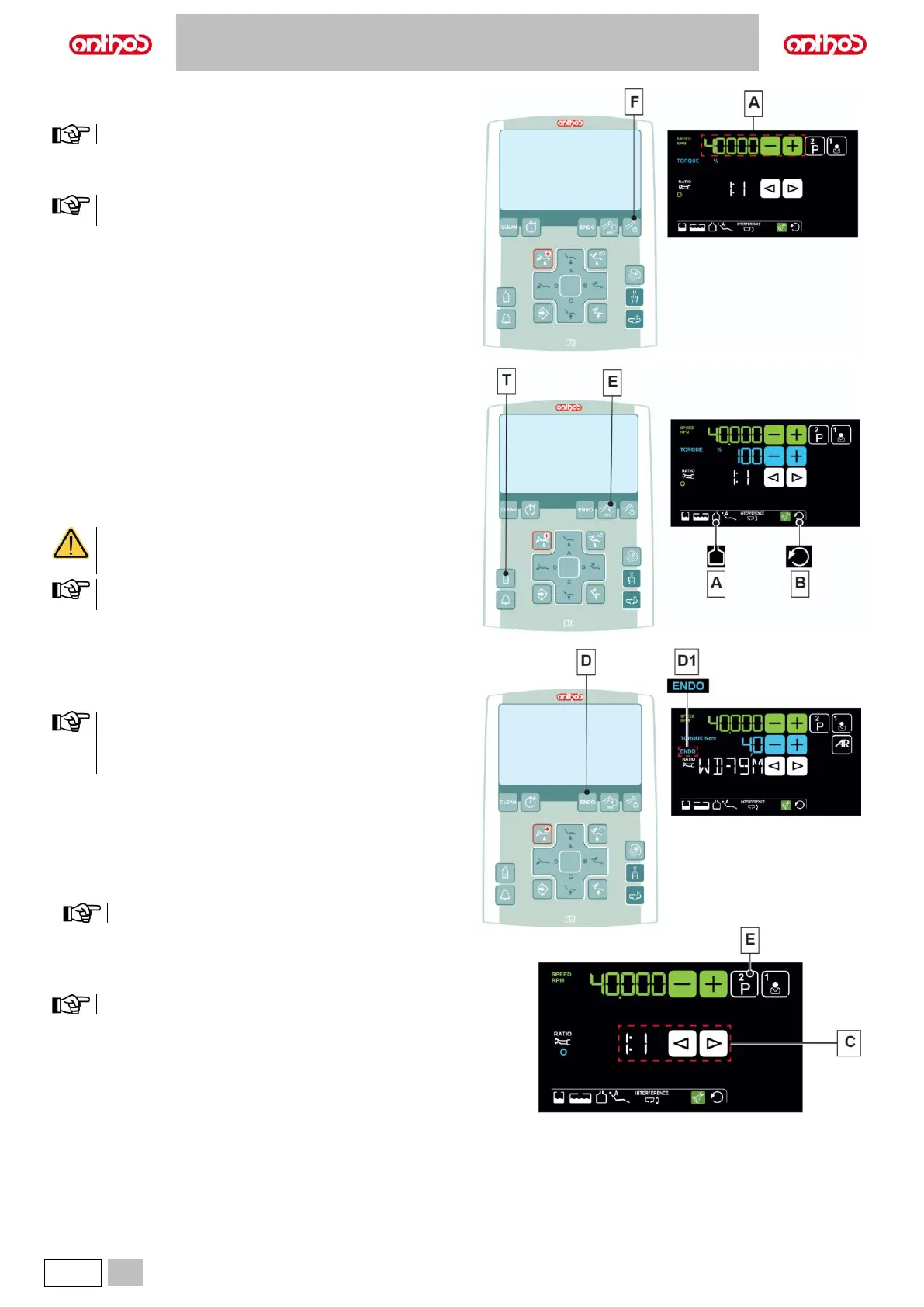
Adjusting the drill’s rotation speed.
Set the percentage of drill’s maximum rotation speed using buttons (A).
The data set are automatically saved.
Turning on the fiber optics.
Press the button to turn Fiber Optics on/off (F).
The Fiber Optics switch off when the turbine is not used for 30
seconds (rheostat lever disabled).
Activation/deactivation of independent water supply
(only with S.H.S. system).
• Press button (T) to activate/deactivate the independent water supply:
The icon (A) appearing on the DISPLAY indicates that the independent
water supply is active.
Reversing micromotor drill rotation direction.
• Select micromotor drill rotation direction by pressing button (E):
The reversed rotation direction is signalled by a sound (3 BEEPS) and by
icon (B) appearance on the DISPLAY.
As soon as the micromotor is extracted, in addition to the
icon (B), a sound (3 BEEPS) warns the operator if the
direction of rotation is reversed.
When the rheostat lever is on, the micromotor drill cannot reverse
its direction of rotation.
Selecting the operating modes (LCD Touch DISPLAY only).
If supported by the micromotor, select RESTORATIVE (see paragraph
5.5.1.) or ENDODONTIC (see paragraph 5.5.2.) operating modes using
button (D).
• The activation of ENDODONTIC mode is signalled on the LCD
Touch DISPLAY through icon (D1).
• Machines equipped with a basic motor only provide the
RESTORATIVE operating mode.
Selecting the micromotor working programmes (LCD Touch
DISPLAY only).
It is possible to set 4 micromotor working programmes.
Each working programme saves the following data:
- Operating mode.
- Maximum rotation speed.
- Handpiece reduction ratio.
The data set are automatically saved.
• Press button (E) repeatedly to set the desired working programme.
Selecting the reduction ratio (LCD Touch DISPLAY only).
Select the desired reduction ratio using buttons (C).
The data set are automatically saved.



 To Next Page