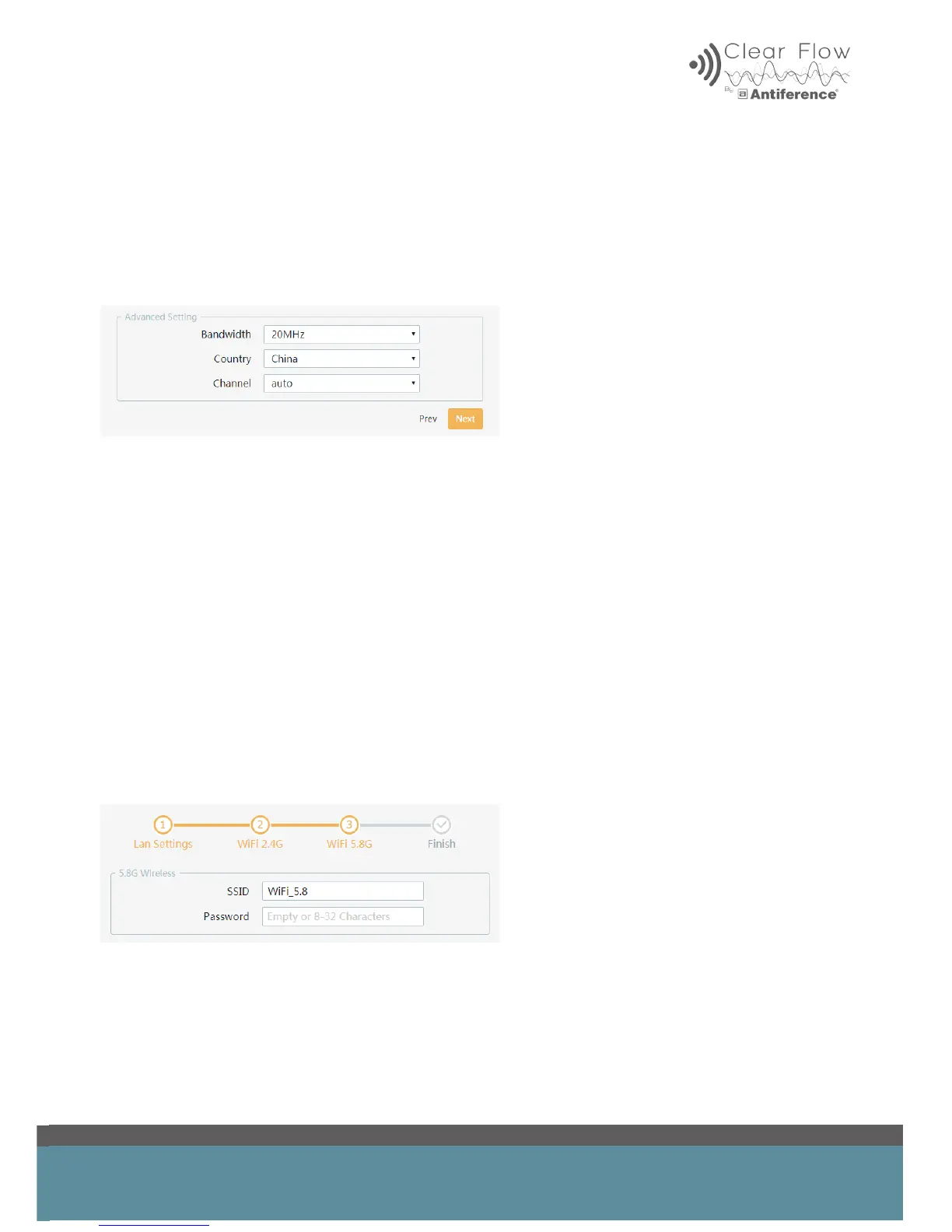
4.3 Advanced Settings 2.4GHz
Bandwidth selection – this should be set to 20MHz for 2.4GHz WiFi systems.
Select the country – default China (until Europe setting has been deployed)
Channel selection – choose a specic channel or run in auto mode.
4.4 WiFi 5.8GHz settings (where dual band is featured)
When setting up devices with dual band capability, you will nd an extra step on the set up wizard
called ‘WiFi 5.8G’. This is congured in the exact same way as the ‘WiFi 2.4G’ (same SSID and
password) if you’d prefer one seamless network across both bands. This allows for bandwidth
management from the Access Point to intelligently spread clients to suitable bands, increasing
network efciency and throughput.
It is possible to set a separate WiFi network on the 5.8GHz band in addition to 2.4GHz if required.
*Only applicable to dual band devices (Air 12 & Air PRO). Smart devices which support dual band
will be able to see two networks and can log into the 5.8GHz network as an alternative if required.
To set up the 5.8GHz band as a separate network; rst choose a suitable SSID for the 5.8GHz
WiFi, adding ‘_5G’ to the 2.4GHz SSID for example to help distinguish between networks.
Finally choose a password and click ‘Next’.


 To Next Page