OSD Setup
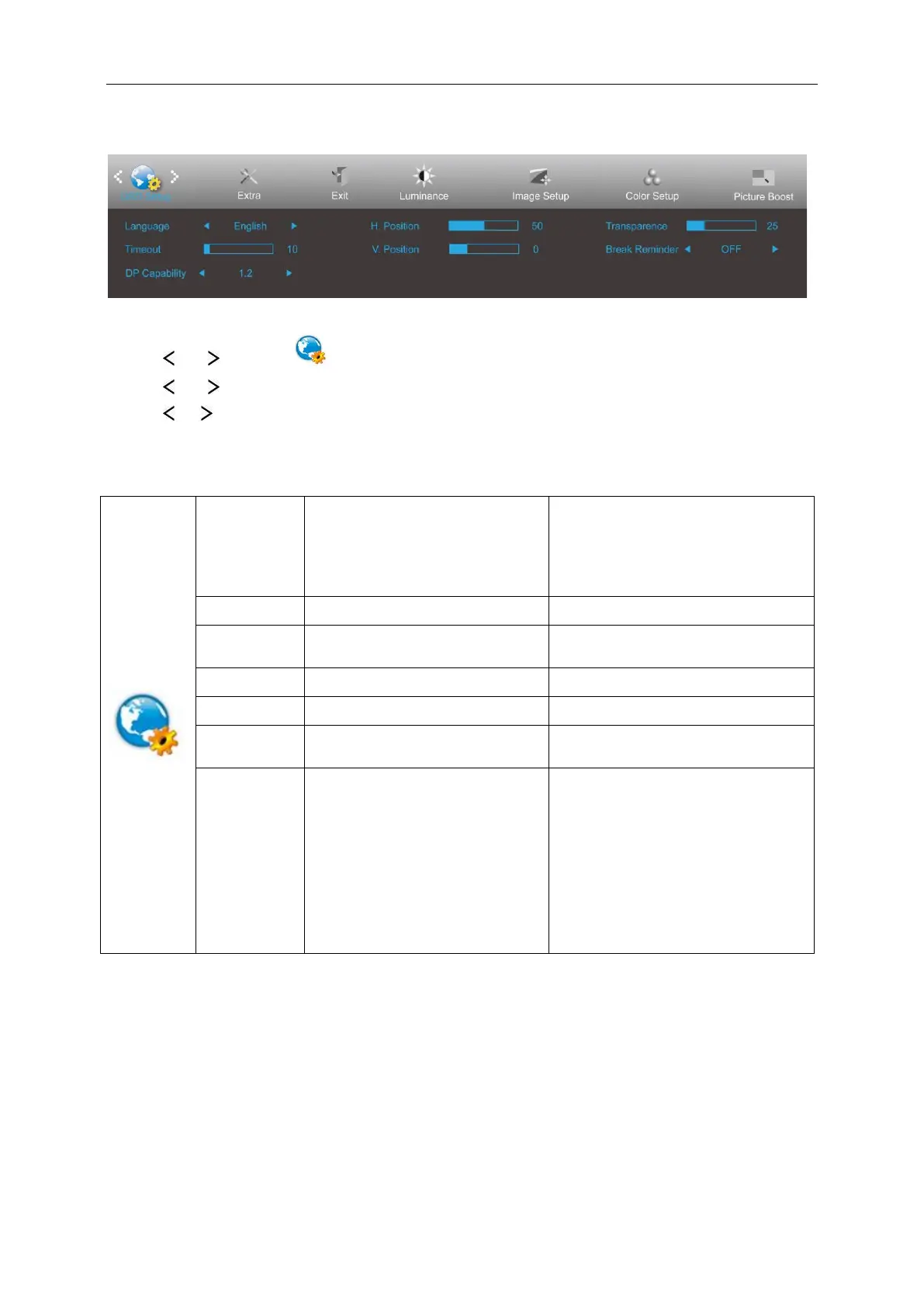
1 Press MENU (Menu) to display menu.
2 Press or to select (OSD Setup), and press MENU to enter.
3 Press or to select submenu.
4 Press or to adjust.
5 Press AUTO to exit.
English, France, Spanish,
Portuguese, German, Italian, Dutch,
Swedish, Finnish, Polish, Czech,
Russia, Korea, TChina, SChina,
Japanese
Adjust the horizontal position of the
OSD.
Adjust the vertical position of the OSD.
Break Reminder if the user continuely
work for more than 1 hours
1. In DP 1.1 mode, DP-out outputs full
image which is from DP-in if DP-in
received image data.
2. In DP 1.2 mode
(A) DP-out outputs full image which is
from DP-in if DP graphic card outputs
single monitor data.
(B) DP-out outputs next 1 or 2 monitor
image(s) if DP graphic card outputs 2 or
3 monitor images by daisy chain.
Notes:
If the DP video content supports DP1.2, please select DP1.2 for DP Capability; otherwise, please select DP1.1.


 To Next Page