4. [MEAS] Key
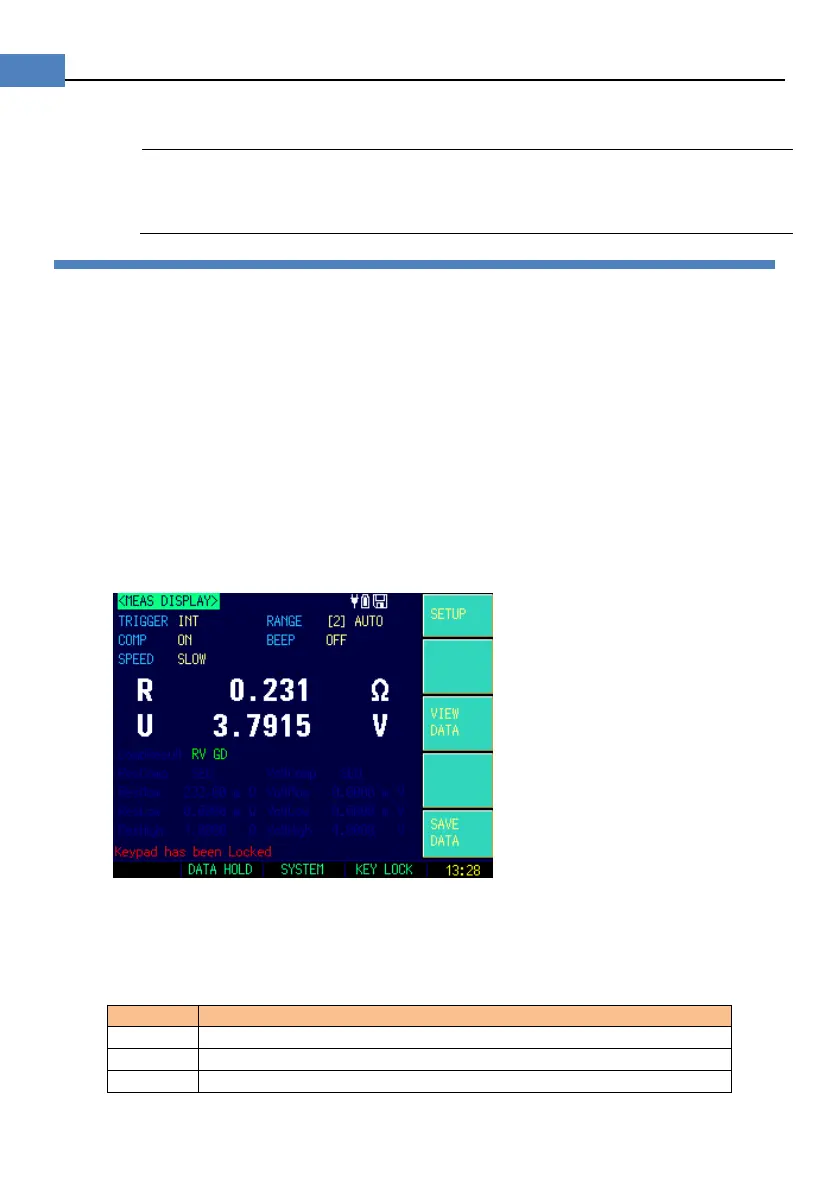
<MEAS DISPLAY> Page
Short-Circuit Correction
4.1 <MEAS DISPLAY>Page
Press [Meas] key to enter <MEAS DISPLAY>Page.
The <MEAS DISPLAY> page includes following setup:
Trigger Mode [TRIGGER]
Measurement Range [RANGE]
Test Speed [SPEED]
Comparator [COMP] ON/OFF
[BEEP] Feature
Softkey VIEW DATA – To Enter [VIEWDATA] page
Softkey S AV E DATA – To Store Current Measurement Result into Internal
Flash Disk
Figure 4-1 <MEAS DISPLAY>Page
4.1.1 [TRIGGER]
AT528/528L includes three following settings:
Internal trigger, Manual trigger and BUS trigger.
Table 4-1 Trigger Setting
Press [Enter] key once, the instrument runs a test cycle
Received a RS232 trigger command, the instrument runs a test cycle


 To Next Page