5. [SETUP] Key
This chapter describes:
<STEUP> page
5.1 < SETUP> page
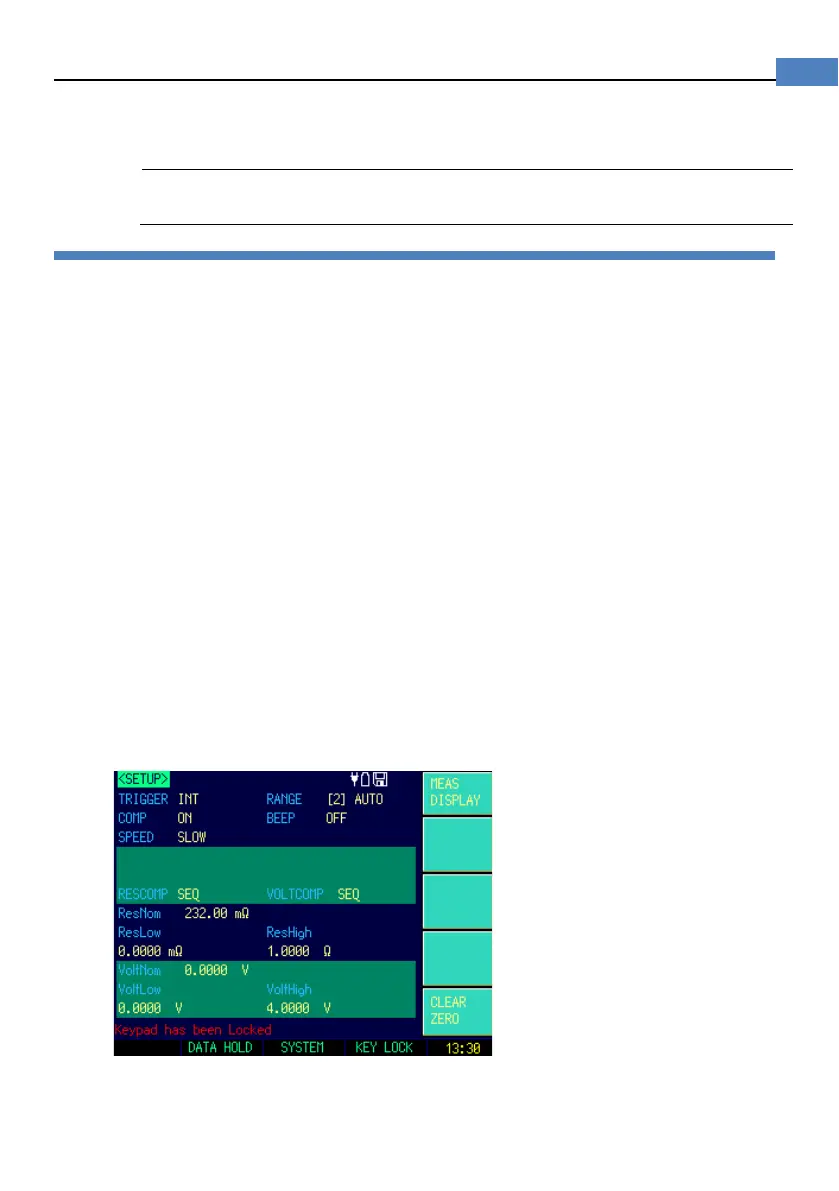
Press [Setup] key to enter <SETUP>page.
In <SETUP> page, the Instrument does not display measurement result and comparator
result, testing is not in progress.
The <SETUP> page includes following setup:
Trigger Mode [TRIGGER]
Measurement Range [RANGE]
Test Speed [SPEED]
Comparator [COMP] ON/OFF
BEEP Feature
Softkey CLEAR ZERO – Clear Zero Correction
RESMODE – AC Resistance Sorting Methods
VOLTCOMP– DC Voltage Sorting Methods
ResNom – Input Resistance Nominal Value
ResLow – Input Resistance Low Limit
ResHigh – Input Resistance High Limit
VoltNom – Input Voltage Nominal Value
VoltLow – Input Voltage Low Limit
VoltHigh – Input Voltage High Limit
Some settings can be also set up in <MEAS DISPLAY> page.
Figure 5-1 <SETUP>page


 To Next Page