Unpacking and Preparation
Warning: Do not use the cleaning solvent (alcohol or gasoline, etc.) on
the instrument.
Please use a clean cloth dipped in some water to do the case and panel cleaning.
1.5 Replace Battery
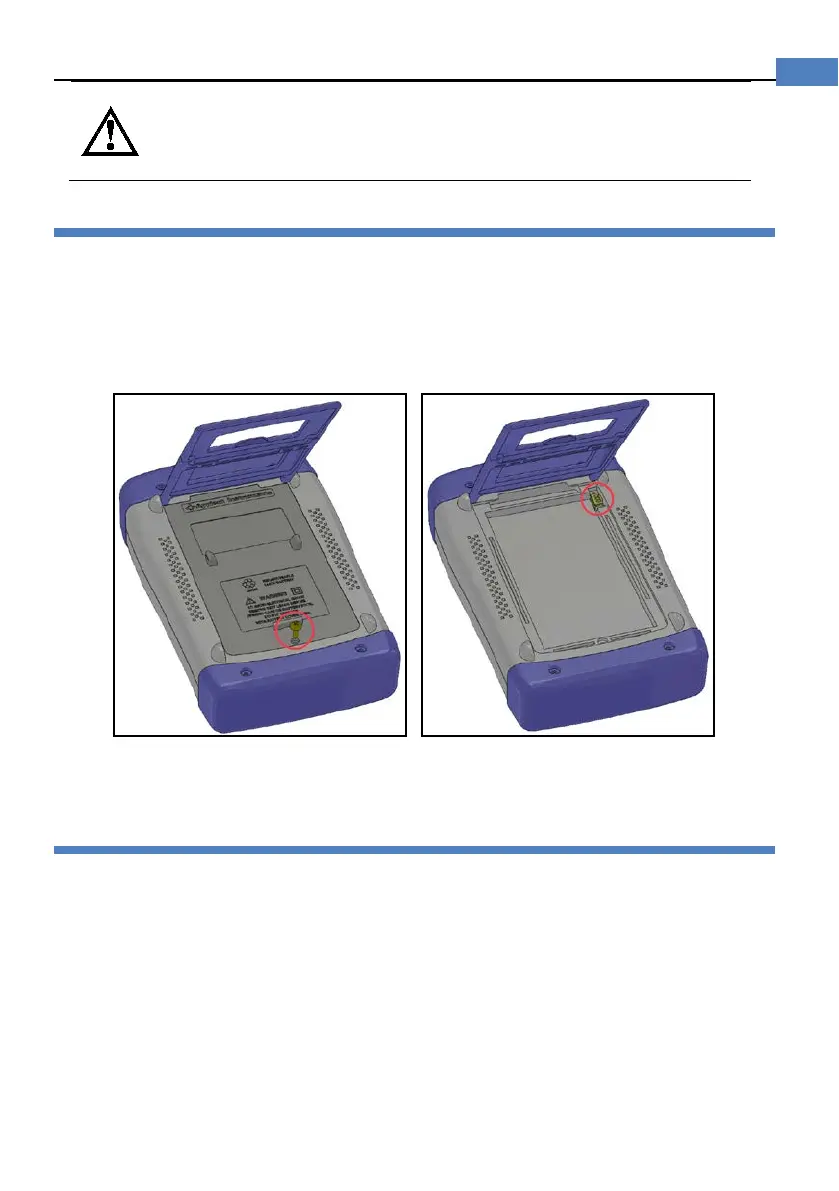
The instrument built-in rechargeable lithium battery, the battery has been installed in the
battery compartment of the instrument at the factory. You should replace the battery
according to the following procedure.
Figure 1-1 Replace Battery
1. Use a screwdriver to loosen the screws of the battery cover, remove the battery cover.
2. Remove the plug on the old battery, plug in new battery plug
3. Put a new battery into the battery compartment, replace the battery cover and tighten the
screws.
1.6 Adjust Support
The support has two positions:
60 degrees and 45 degrees.
45 degrees, makes the instrument more stable.


 To Next Page