Applus Technologies, Inc. Smog DADdy User Manual VER 8.2 Page 33 of 55
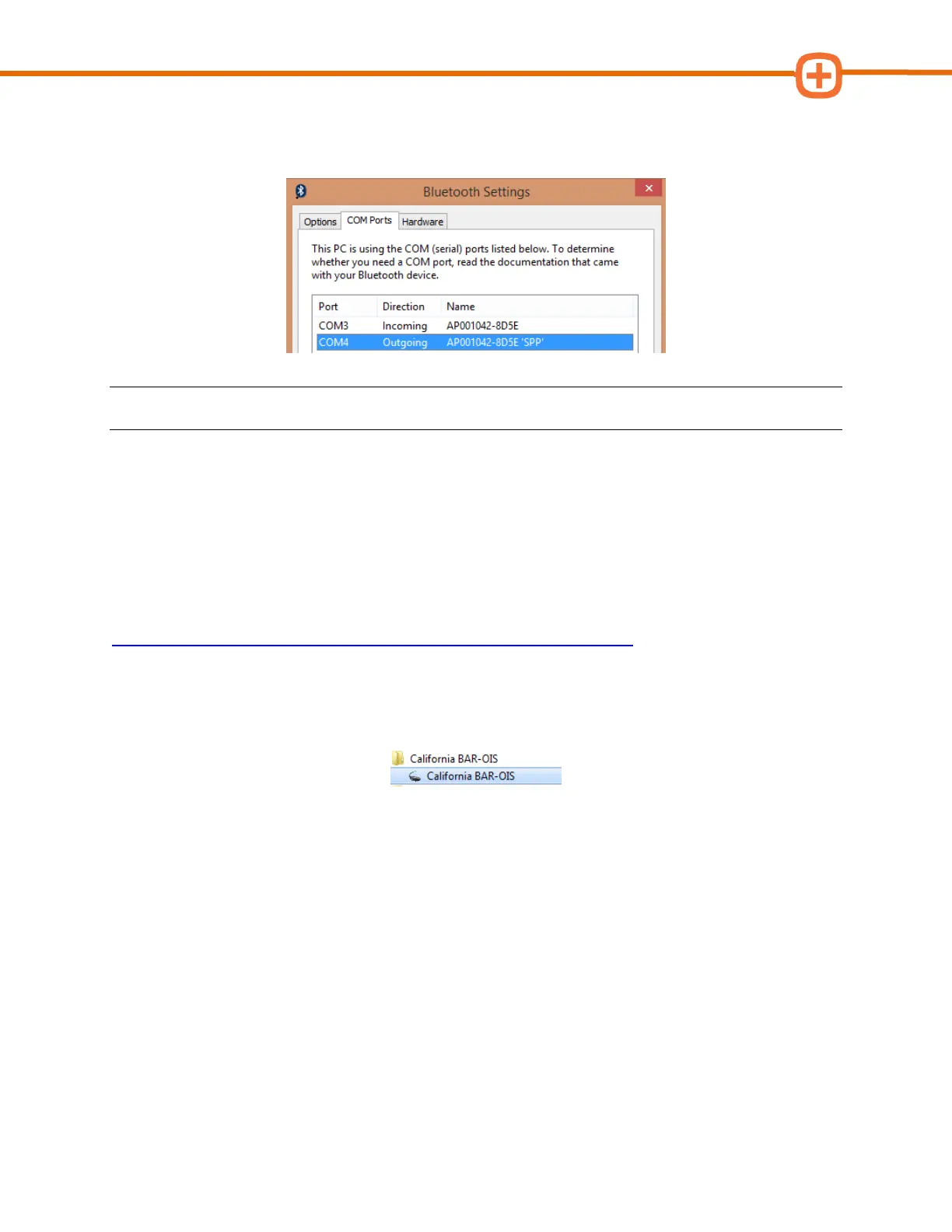
10. In Bluetooth Settings, click on the COM Ports tab and locate the Outgoing Port value
for your Smog DADdy. In the example below, the port number is “COM4”.
NOTE: Your port number will be used in the next section; you may want to write it down.
11. Click OK to exit the Bluetooth Settings window.
Configuring BAR-OIS
If this is the first time you are using the BAR-OIS software please review the
BAR-OIS Station
Registration and Download Video
located here:
https://www.youtube.com/watch?v=fmlPX5eV04U&feature=youtu.be and then complete your
configuration process with the following steps.
1. Launch the BAR OIS software by clicking on the Start Menu, Program Files, and
California BAR-OIS.
2. The ‘DAD Configuration’ screen will appear. Select
Applus
as your DAD vendor. Type the
COM port number you obtained from step 7 (wired) from the previous section or step
12 (wireless) into the DAD port field. If you are using a wireless device, you MUST
include an asterisk symbol (*) before entering the COM port number. For example, type
*COM4 versus COM4.



 To Next Page