10
Final Assembly
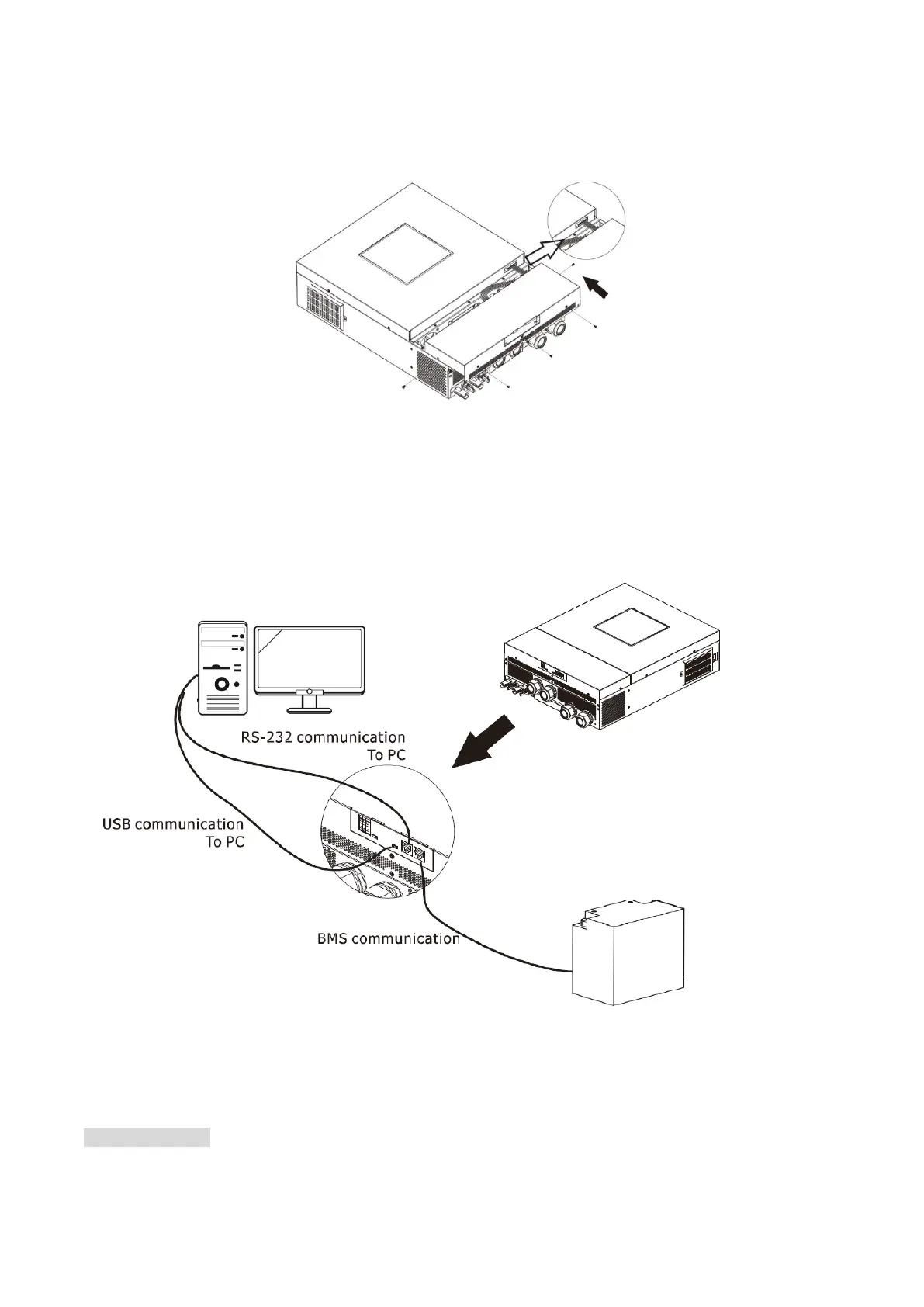
After connecting all wirings, re-connect one cable and then put bottom cover back by fixing five screws as
shown below.
Communication Connection
Serial Connection
Please use the supplied serial cable to connect between the inverter and your PC. Install the monitoring
software from the bundled CD and follow the on-screen instructions to complete your installation. For detailed
software operation, refer to the software user manual on the bundled CD.
Wireless Connection
There is switch button located on the bottom case. You may select WiFi or Bulutooth with this switch button.
WiFi Connection
This unit is equipped with a Wi-Fi transmitter. Wi-Fi transmitter can enable wireless communication between
off-grid inverters and monitoring platform. Users can access and control the monitored inverter with
downloaded APP. You may find “WatchPower” app from the Apple
®
Store or “WatchPower Wi-Fi” in Google
®
Play Store. All data loggers and parameters are saved in iCloud. For quick installation and operation, please
check Appendix III.



 To Next Page