31
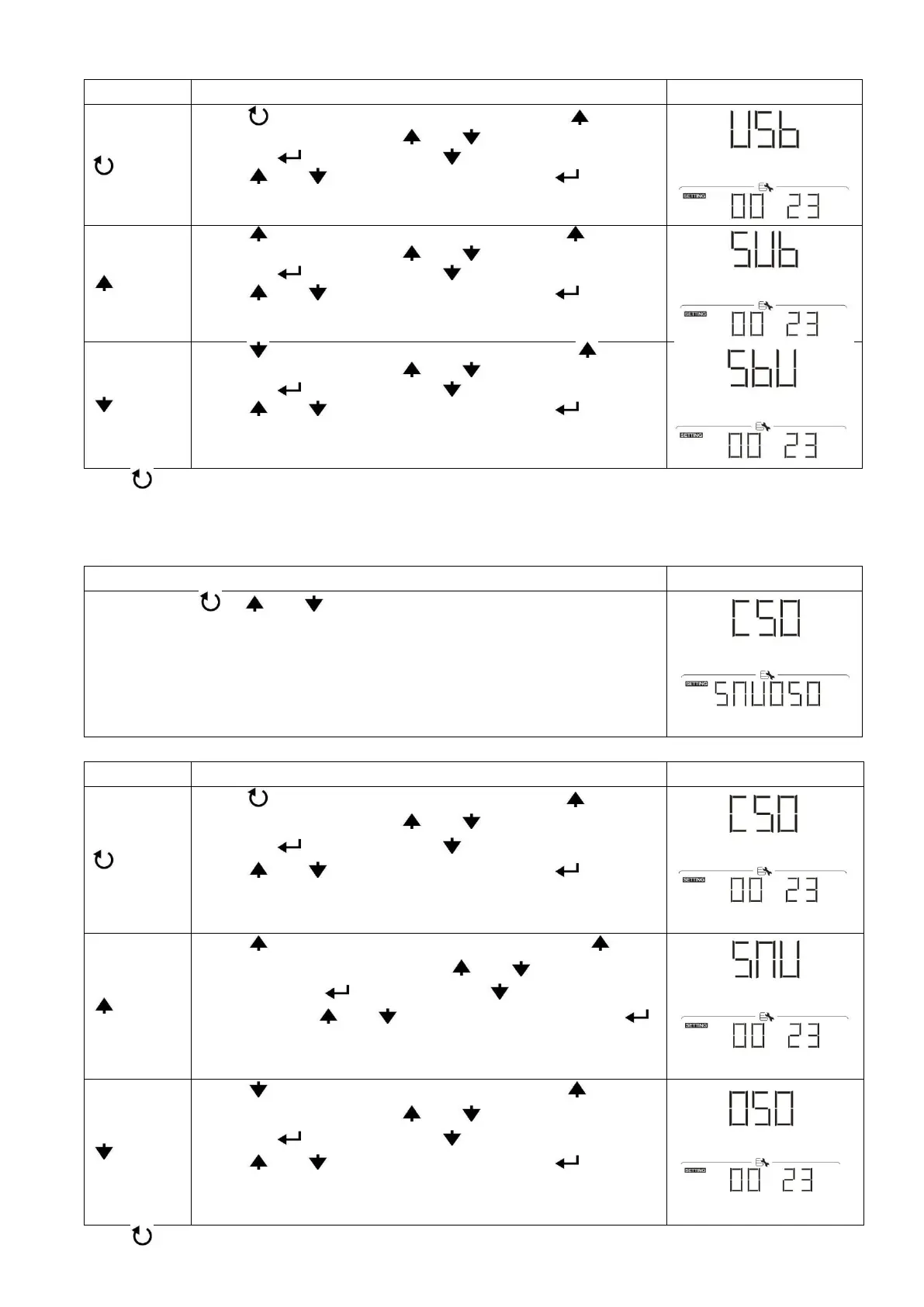
Step 4: Please select setting program by following each procedure.
Press “ ” button to set up Utility First Timer. Press “ ” button
to select staring time. Press “ ” or “ ” button to adjust values
and press “ ” to confirm. Press “ ” button to select end time.
Press “ ” or “ ” button to adjust values, press “ ” button to
confirm. The setting values are from 00 to 23, with 1-hour
increment.
Press “ ” button to set up Solar First Timer. Press “ ” button
to select staring time. Press “ ” or “ ” button to adjust values
and press “ ” to confirm. Press “ ” button to select end time.
Press “ ” or “ ” button to adjust values, press “ ” button to
confirm. The setting values are from 00 to 23, with 1-hour
increment.
Press “ ” button to set up SBU Priority Timer. Press “ ” button
to select staring time. Press “ ” or “ ” button to adjust values
and press “ ” to confirm. Press “ ” button to select end time.
Press “ ” or “ ” button to adjust values, press “ ” button to
confirm. The setting values are from 00 to 23, with 1-hour
increment.
Press “ ” button to exit the Setup Mode.
3. Timer Setting for the Charger Source Priority
This timer setting is to set up the charger source priority per day.
Step 1: Press “ ”, “ ” or “ ” button to enter the selectable programs (detail
descriptions in Step 3).
Step 3: Please select setting program by following each procedure.
Press “ ” button to set up Solar First Timer. Press “ ” button
to select staring time. Press “ ” or “ ” button to adjust values
and press “ ” to confirm. Press “ ” button to select end time.
Press “ ” or “ ” button to adjust values, press “ ” button to
confirm. The setting values are from 00 to 23, with 1-hour
increment.
Press “ ” button to set up Solar & Utility Timer. Press “ ”
button to select staring time. Press “ ” or “ ” button to adjust
values and press “ ” to confirm. Press “ ” button to select
end time. Press “ ” or “ ” button to adjust values, press “ ”
button to confirm. The setting values are from 00 to 23, with 1-
hour increment.
Press “ ” button to set up Solar Only Timer. Press “ ” button
to select staring time. Press “ ” or “ ” button to adjust values
and press “ ” to confirm. Press “ ” button to select end time.
Press “ ” or “ ” button to adjust values, press “ ” button to
confirm. The setting values are from 00 to 23, with 1-hour
increment.
Press “ ” button to exit the Setup Mode.



 To Next Page