4 Installing the Air System
28
4.1 Mounting the Solenoid
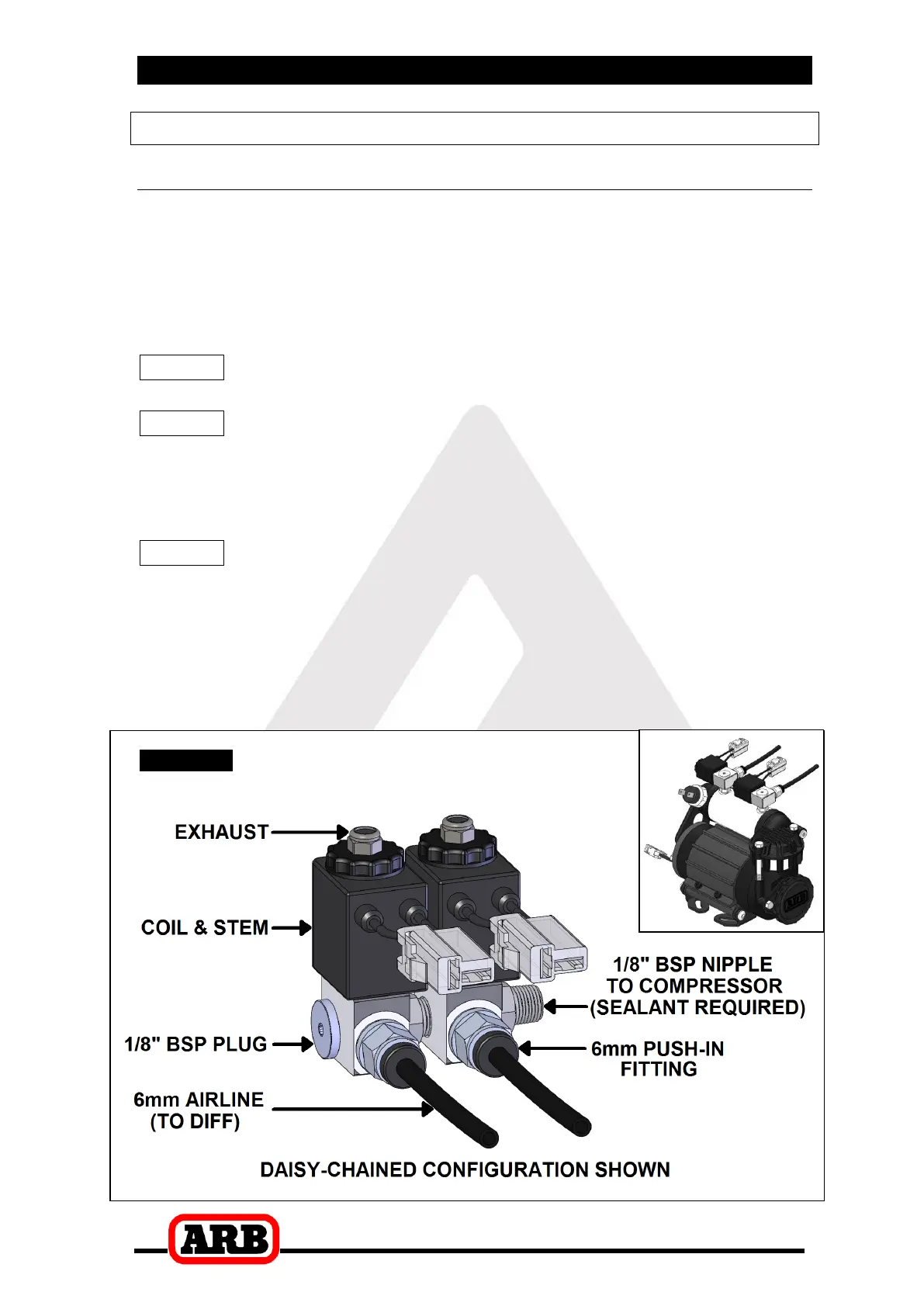
4.1.1 Connection to an ARB Air Compressor (Fig.19.)
Remove one of the 1/8” BSP plugs from its port in the compressor
tank.
Apply Teflon paste to the 1/8” BSP nipple on the solenoid and insert
it into the port and tighten. The solenoid should be rotated into a
position which does not obstruct any other ports on the compressor
tank.
NOTE : The coil and stem of the solenoid can be removed to
make installation easier.
NOTE : The solenoid is marked with two #1 ports. If space is
tight, a second solenoid can be “daisy-chained” off the
first one by removing the plug from the redundant #1
port and screwing the nipple from the second solenoid
into it (Fig. 19.).
NOTE : The solenoid exhausts compressed air through the
center of the black retaining cap when the Air Locker is
disengaged. Make sure this orifice cannot be
obstructed.
Assemble the 6mm push-in fitting into the solenoid outlet port
(stamped “2”) and hand tighten.
Figure


 To Next Page