GPs
12
USER MANUAL - version 4
4� MOsT COMMOn Uses
4�1� hOW dO I GO TO a sPeCIfIC addRess?
1
2
3
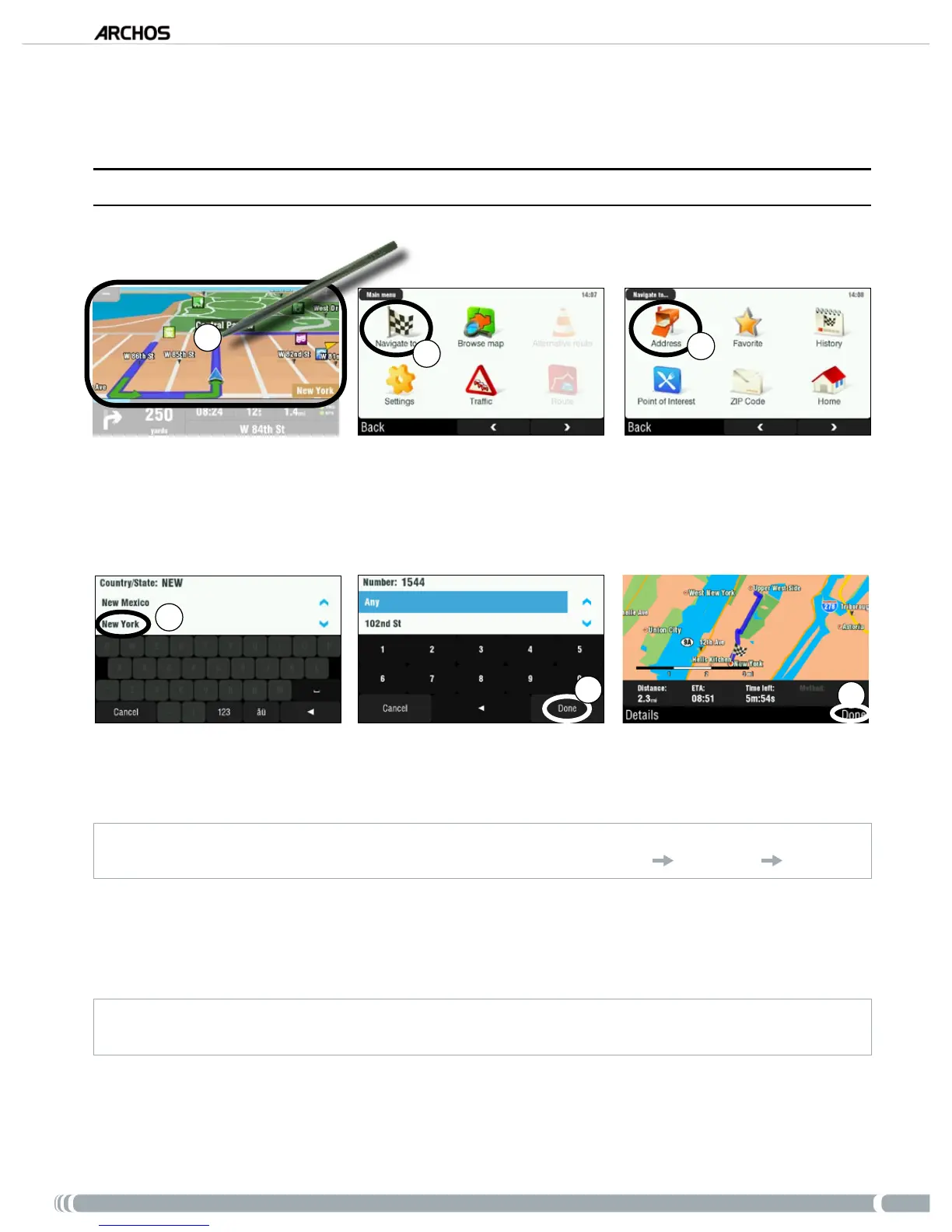
From the navigation screen, tap anywhere on the map area to access the main menu.
Tap on ‘
Navigate to’.
Select ‘
Address’.
4
5
6
Tap on the rst letters of the country/state using the keyboard. When the country/state appears in
the top list, tap on it. Similarly, select the city and the street.
For compound city and street names, for example “Saint John”, only enter “John”, as “Saint” would give too many results. If
you do not nd your city, you can try to enter the address using a ZIP code (
‘
Main menu’
‘Navigate to’
‘
ZIP Code’)
.
Enter the street number, using the keyboard, then tap on ‘Done’.
Wait while the ARCHOS computes a route. You will then see your route on the map*. Tap on ‘
Done’
to go back to the navigation screen and start following the instructions.
* You can tap on ‘
Details
’ to see the types of roads you are going to use. You can then choose to avoid highways, toll
roads, unpaved roads, etc.
1.
2.
3.
4.
5.
6.



 To Next Page