GPs
16
USER MANUAL - version 4
4�5� hOW dO I GO TO a POInT Of InTeResT (POI)?
Points of interest (POI) are, for example, restaurants, hotels, or gas stations. They appear as symbols on the
map during your route. The GPS can create a route to a specic point of interest.
Additional POIs are available in your ARCHOS personal account (www.archos.com/register), under the GPS section.
1
2
3
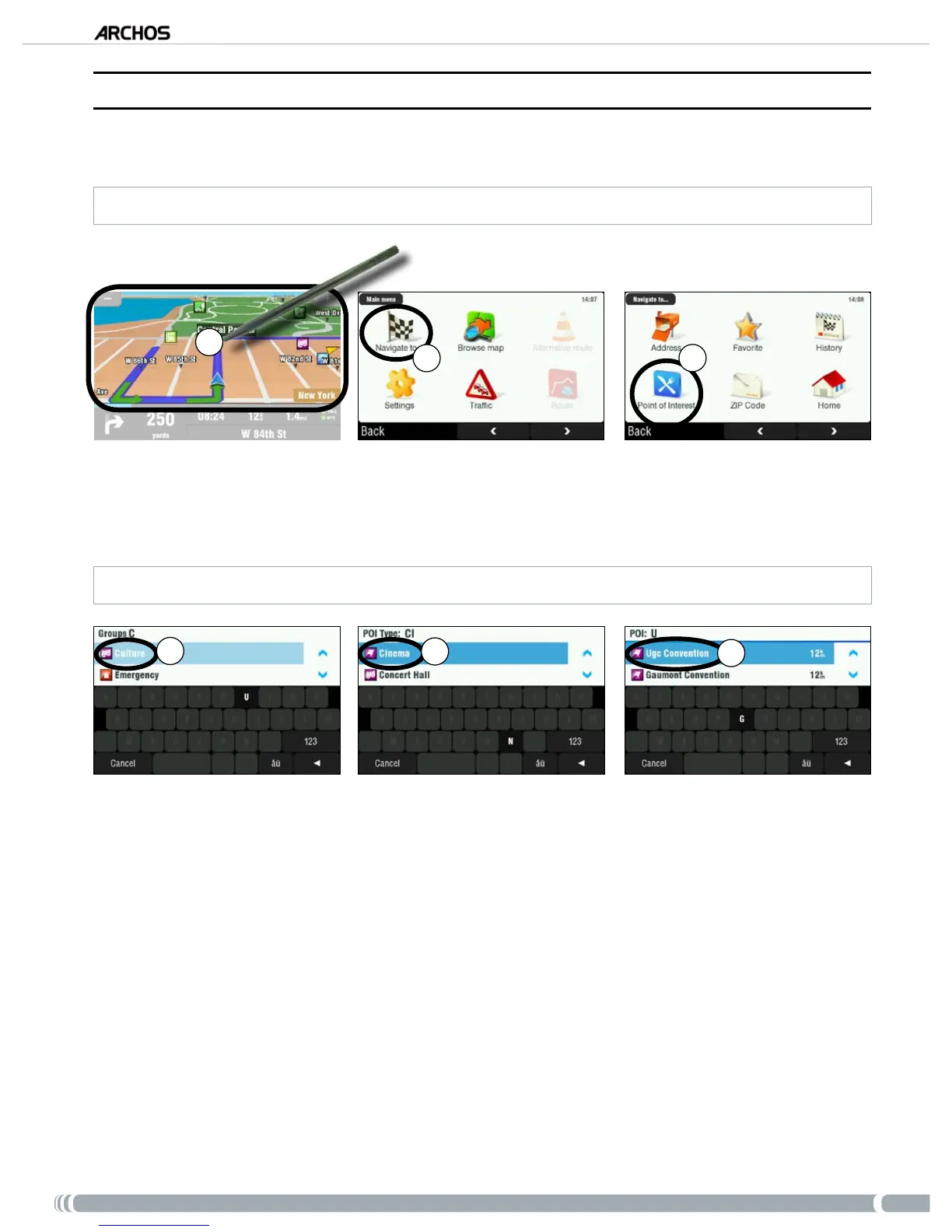
From the navigation screen, tap anywhere on the map area to access the main menu.
Tap on ‘
Navigate to’.
Tap on ‘
Point of Interest’ to see the closest POIs and select the one you want to go to.
You can also choose to go to a POI in a specic city. Go to the second screen of ‘
Navigate to
’ and select ‘
POI in City
’.
4
5
6
Use the arrows to scroll down to the group that you are interested in, and tap on it. For example:
‘Culture’.
Similarly, nd the POI type you’re interested in, and tap on it. For example: ‘Cinema’.
All corresponding POIs will be displayed from closest to furthest. Just select the one you want to go
to.
Wait while the ARCHOS computes the route. You will then see your route on the map. Tap on ‘
Done’
to go back to the navigation screen.
1.
2.
3.
4.
5.
6.
7.



 To Next Page