GPs
18
USER MANUAL - version 4
4�7� hOW dO I seT hIGhWaY/TOll ROad PRefeRenCes?
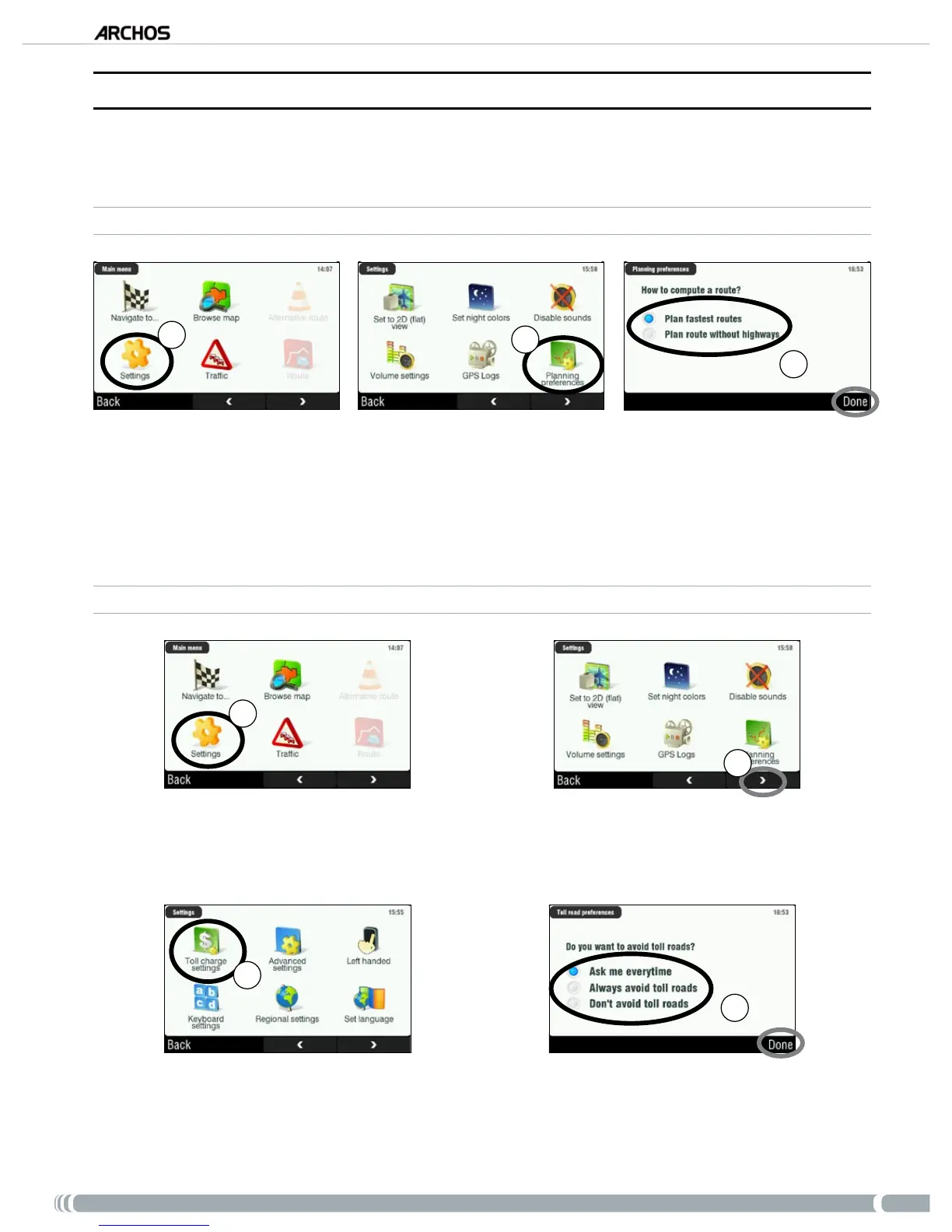
The GPS allows you to dene planning preferences that will be used every time you compute a route. You
can choose to always plan fastest routes, avoid highways or avoid toll roads.
PLANNING PREFERENCES
1
2
3
From the navigation screen, tap anywhere in the map area to access the main menu. Then tap on
‘Settings’.
Tap on ‘
Planning preferences’.
Choose the option that will be used every time you compute a route: ‘
Plan fastest routes’ or ‘Plan
route without highways’. Tap on an option to select it, then tap on ‘Done’.
TOLL CHARGE SETTINGS
1
2
From the navigation screen, tap anywhere in the map area to access the main menu. Then tap on
‘Settings’.
Tap on the bottom right arrow to go to the second ‘
Settings’ screen.
3
4
Tap on ‘Toll charge settings’.
Dene how you want to manage toll roads each time you compute a route: ‘Ask me every time’,
‘Always avoid toll roads’ or ‘Don’t avoid toll roads’. Tap on an option to select it, then tap on ‘Done’.
1.
2.
3.
1.
2.
3.
4.



 To Next Page