GPs
19
USER MANUAL - version 4
4�8� hOW dO I ReCOMPUTe a ROUTe (ROadblOCk/TRaffIC)?
Every time you leave the advised route, the GPS will automatically compute a new route based on your cur-
rent position. The ARCHOS also allows you to avoid trafc and road blocks.
AVOIDING TRAFFIC
For this to work, TMC (Trafc Message Channel) needs to be enabled (see chapter 6: Other Functions).
By default, if the ARCHOS receives information concerning trafc problems on your current route, it
will automatically compute a new route that will avoid the trafc.
AVOIDING ROAD BLOCKS
1
2
3
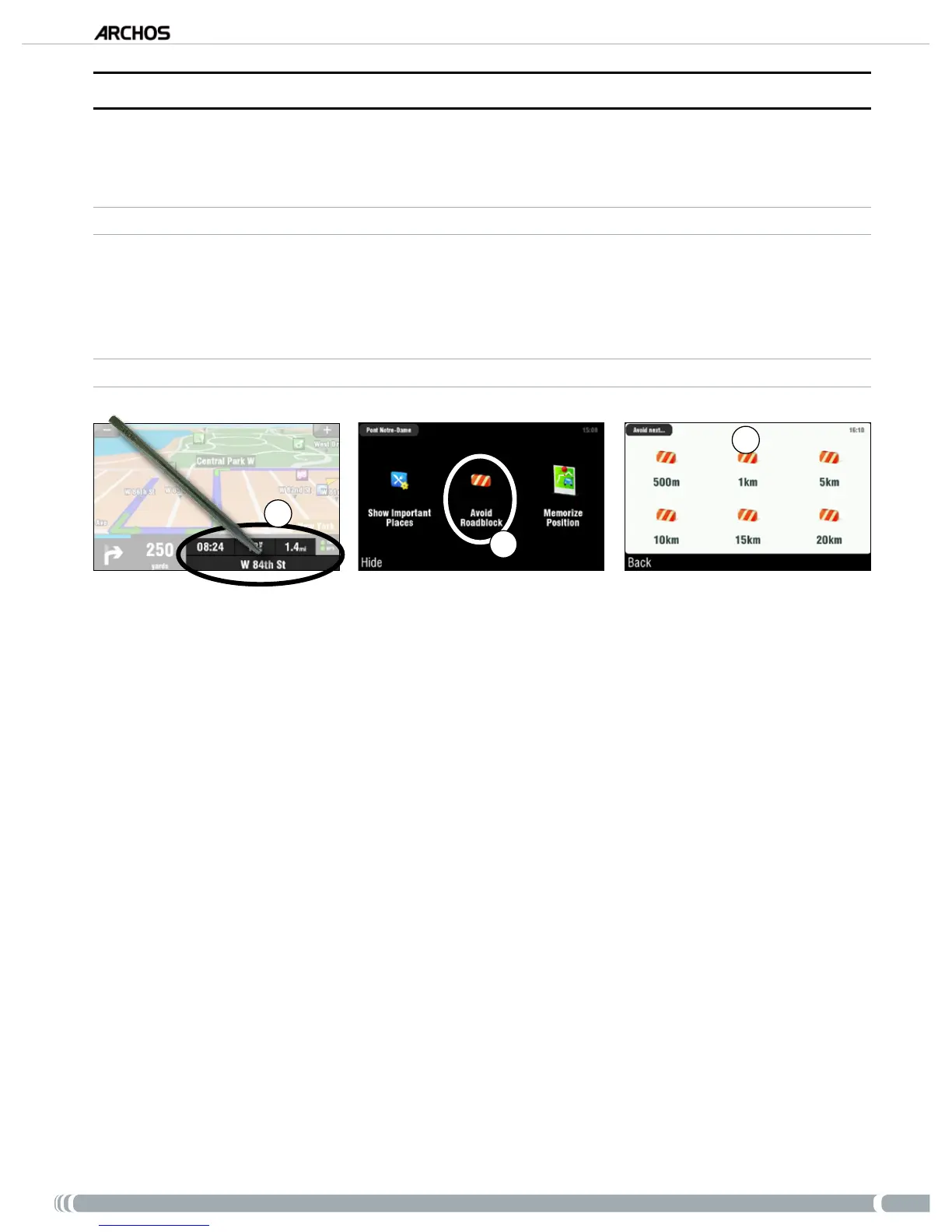
Tap on the bottom right of the navigation screen to access the quick menu.
Tap on ‘
Avoid Roadblock’.
Then select how far the roadblock is. The GPS will automatically recompute a route that will avoid
this road block.
•
•
1.
2.
3.



 To Next Page