GPs
13
USER MANUAL - version 4
4�2� hOW dO I MeMORIze a favORITe desTInaTIOn?
USING THE HISTORY (QUICKEST WAY)
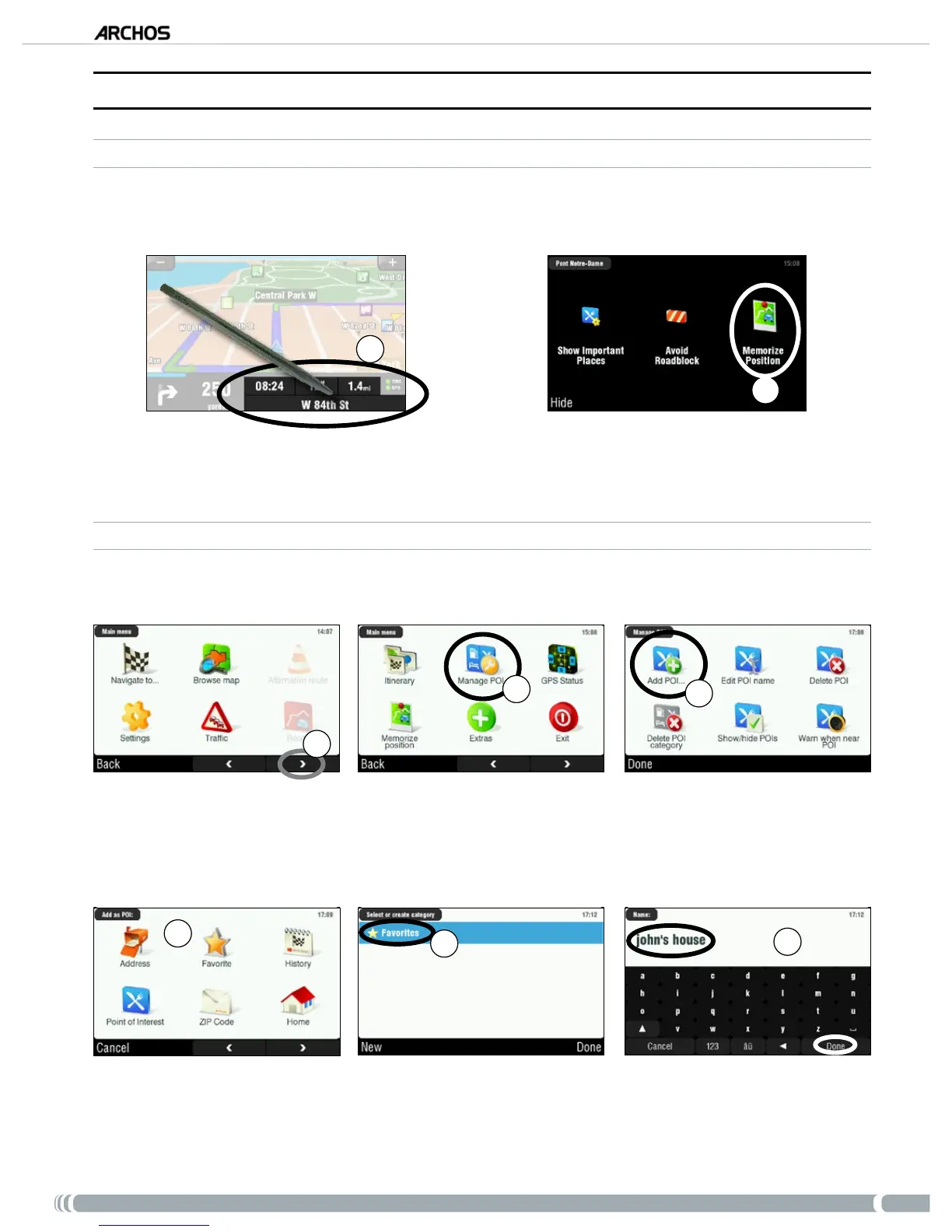
Every time a route is computed, the destination is automatically stored into the history. Furthermore, you
can add your current position to the history:
1
2
Tap on the bottom right of the navigation screen to access the quick menu.
Then tap on ‘
Memorize Position’. Your current position is automatically stored into the history.
CREATING A FAVORITE
In order to create a favorite, you will need to add a new point of interest, and then put it under the ‘Favorites’
category.
1
2
3
From the navigation screen, tap anywhere in the map area to access the main menu. Then tap on the
bottom right arrow to access the second screen of the main menu.
Tap on ‘
Manage POI’.
Tap on ‘
Add POI’.
4
5
6
Choose a method to enter your favorite location (address, city center, point on map, etc.), then
enter/select the address.
Tap on ‘
Favorites’. This will put the destination into the favorites.
Enter a name for the memorized destination, then tap on ‘
Done’.
1.
2.
1.
2.
3.
4.
5.
6.



 To Next Page