GPs
9
USER MANUAL - version 4
3� GeTTInG sTaRTed
3�1� enTeRInG The GPs aPPlICaTIOn
When you connect the ARCHOS player to the powered in-car holder:
the ARCHOS player turns on automatically.
on the ARCHOS 605, the “
Recorder” icon on the home screen becomes the “GPS” icon.
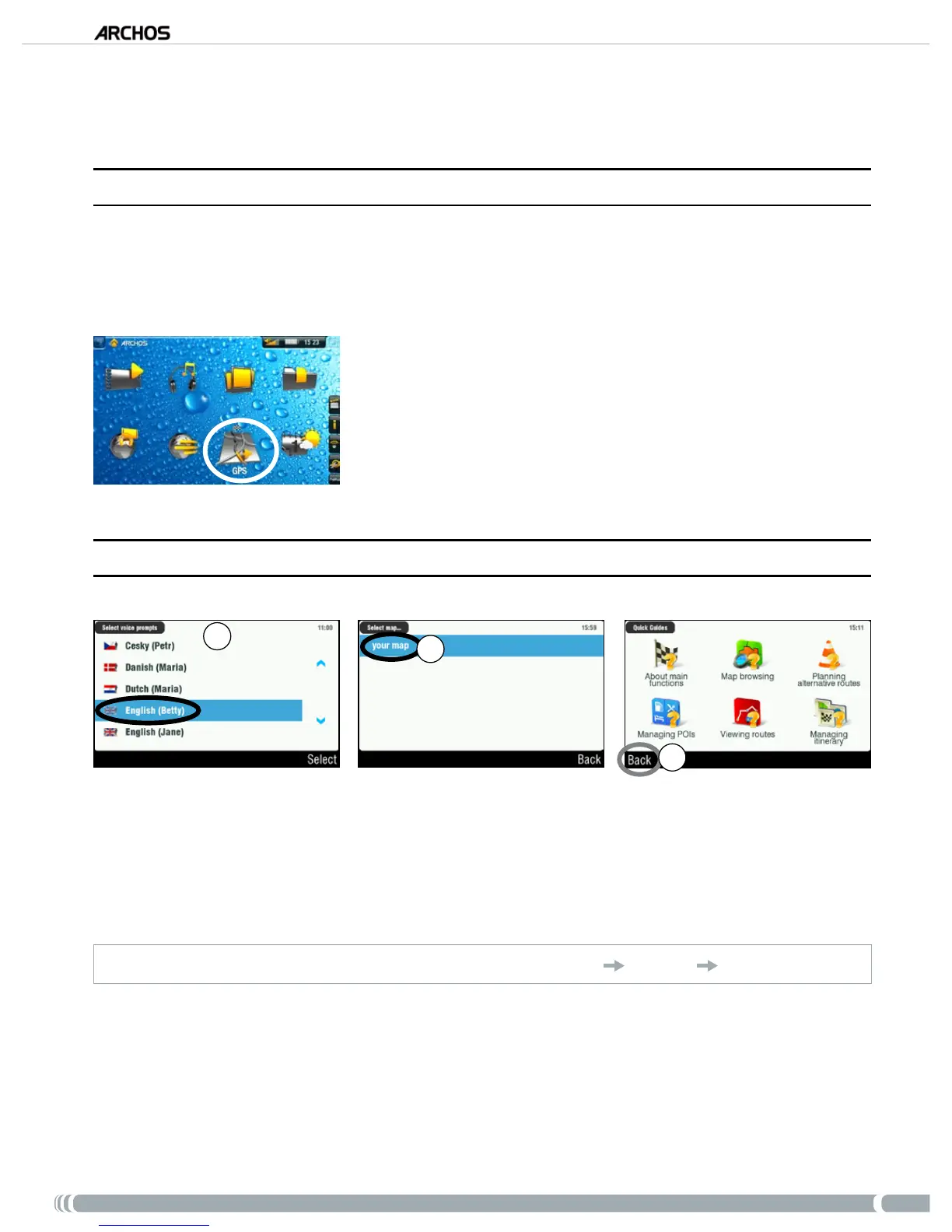
Tap on the “GPS” icon to enter the application. The start screen
appears.
After a few seconds, a red screen appears. Read the legal message
carefully, and tap on ‘
I agree’.
The rst time the GPS is used, you will have to enter a few basic
preferences (see next section).
1.
2.
3.
3�2� fIRsT TIMe seTUP
1
2
3
This initial installation will help you congure several settings such as the voice language and dis-
tance units (km or miles).
Select your map by tapping on it. Wait while the map is loading.
A choice of little help guides will be displayed*. Tap on one to read it, or tap on ‘
Back’ to go to the
main navigation screen.
* If you want to read the help guides later, you can always go to
‘
Main menu’
‘Settings’
‘
Quick Guides’
.
•
•
1.
2.
3.



 To Next Page