GPs
15
USER MANUAL - version 4
4�4� hOW dO I GO TO a MeMORIzed desTInaTIOn?
See the two previous sections to learn how to memorize a destination (history, favorite, or home). Explained
below are the procedures for going to a memorized destination.
1
2
3
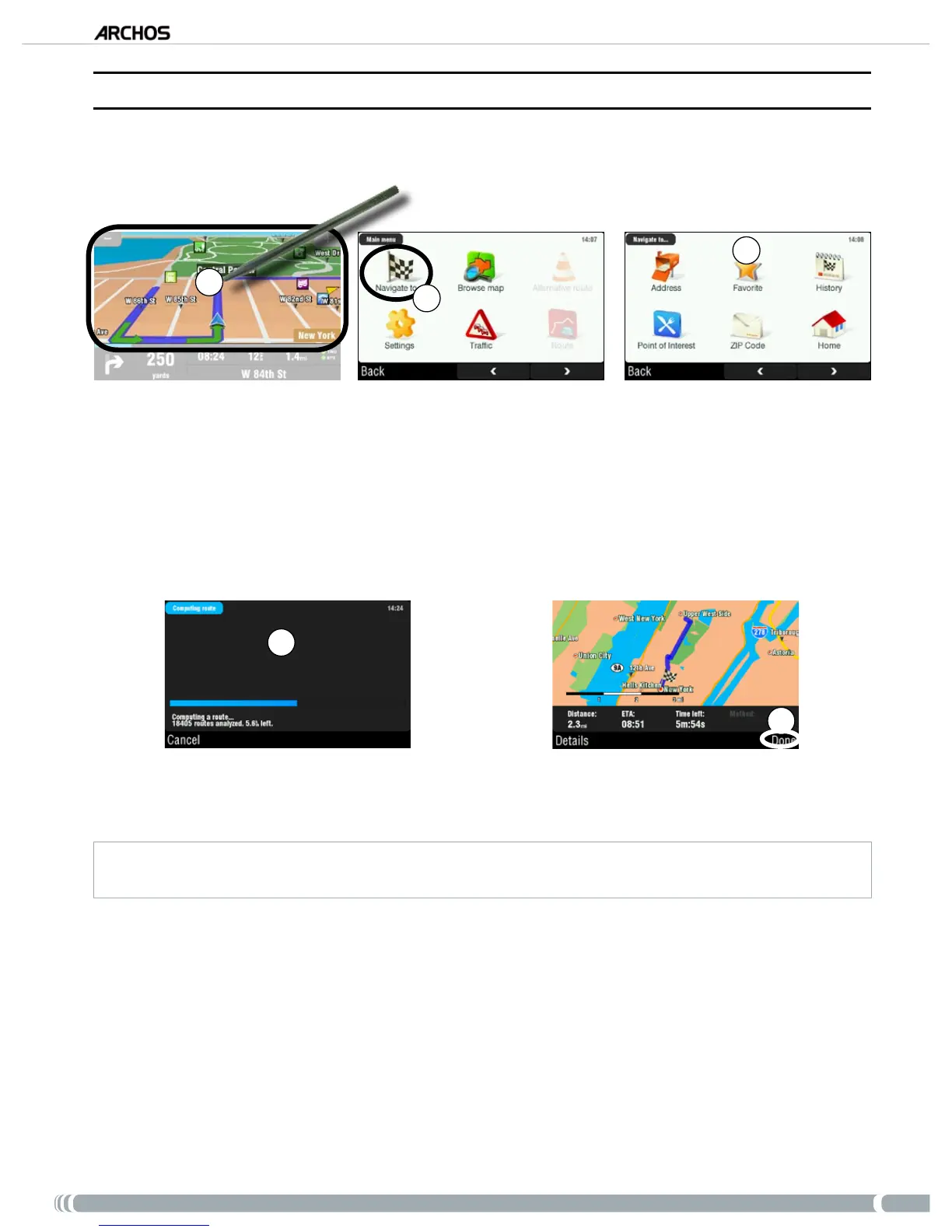
From the navigation screen, tap anywhere on the map area to access the main menu.
Tap on ‘
Navigate to’.
Here you can either:
choose ‘
History’, and select one of your previous destinations.
select ‘
Favorite’, and choose one of your favorites as your destination.
tap on ‘
Home’ to go to your home address
4
5
Wait while the ARCHOS computes a route.
You will then see your route on the map*. Tap on ‘
Done’ to go back to the navigation screen.
* You can tap on ‘
Details
’ to see the types of roads you are going to use. You can then choose to avoid highways, toll
roads, unpaved roads, etc.
1.
2.
3.
•
•
•
4.
5.



 To Next Page