24
Changing the Units of Measure
(6 Steps)
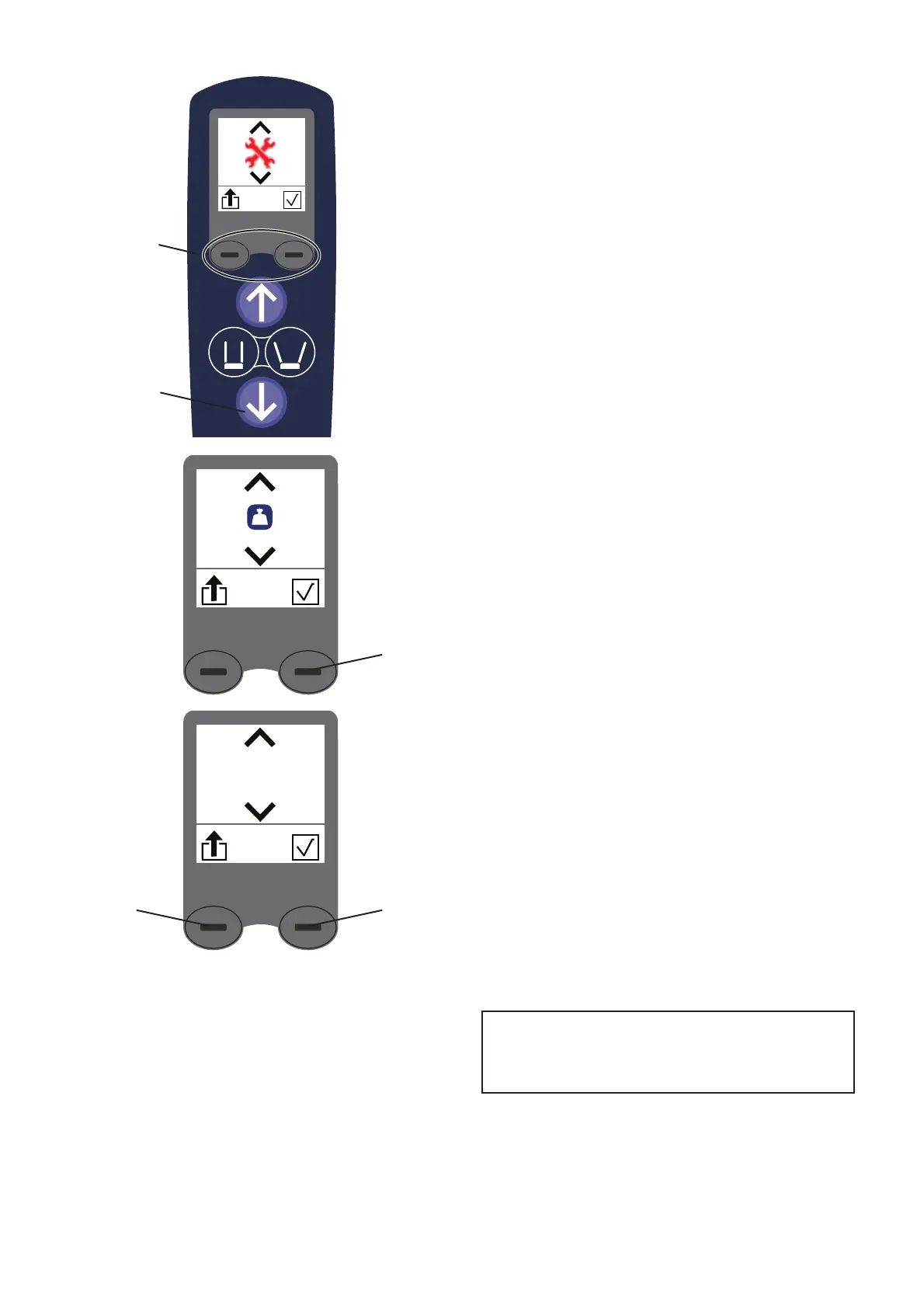
1. To display the Lift Status Screen, press both dash
buttons (A) at the same time. (See Fig. 40)
2. 7RDFFHVVWKHFRQ¿JXUDWLRQVFUHHQSUHVVWKHGRZQ
button (B) on the hand control. (See Fig. 40)
The Weight Unit screen will be displayed.
(See Fig. 41)
3. Press the right dash button (C) to access the units
of measurement option. (See Fig. 42)
4. To switch between kg and lb, press the down
button (B).
5. To save the settings and return to normal use,
press the right dash button (C). (See Fig. 42)
6. Press the left dash button (D) to exit without
saving changes. (See Fig. 42)
NOTE
It is not possible to change the units of
mass on the Class III scale.
A
B
Fig. 40
Fig. 41
C
kg
Fig. 42
CD













 To Next Page