installation &
operating instructions
3750 Pulpress
Pressurisation unit
12
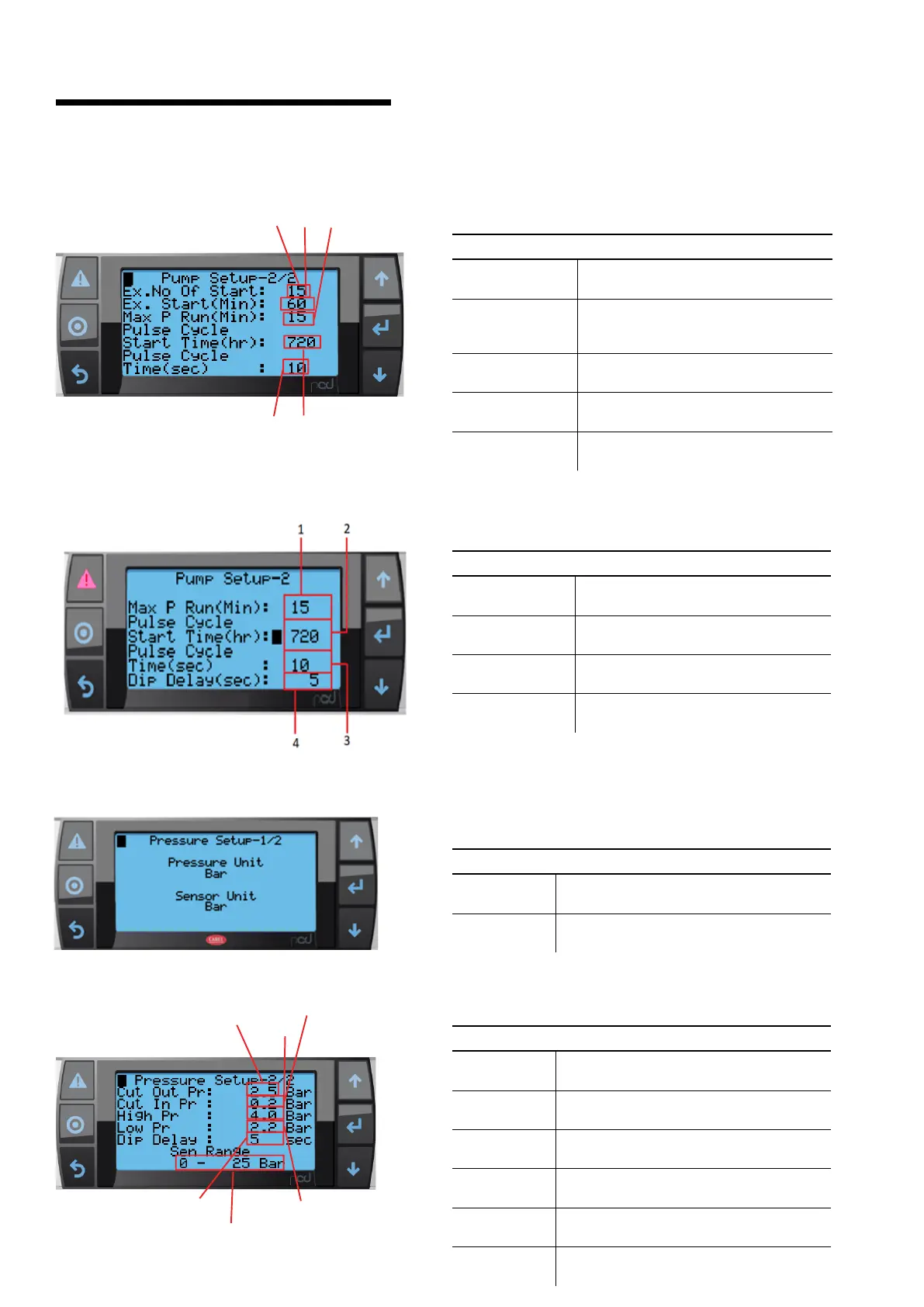
21.2.3 pump setup – 2
description
This screen allows user to access extended Pump Setup
buttons
1 Ex. No. of Start
Allows user to change excessive number
of starts in a desired amount of time.
2 Ex. Start (Min)
Allows user to change time in Min for
monitoring Ex. No. of starts in desired
time.
3 Max P Run
(Min)
Allows user to set max pump run time for
Auto Operation
4 Pulse Cycle
Start Time (Hr)
Allows user to set time to pulse Pump for
maintaining the healthiness of system.
5 Pulse Cycle
Time (Sec)
Allows user to Set time for which Pump
should run in Pulse cycle mode
21.2.4 pump setup – 2 (twin system only)
description
This screen allows user to access Pump Setup
buttons
1 Max P Run
(MIN)
Allows user to set max pump run time for
Auto Operation.
2 Pulse Cycle
Start Time (Hr)
Allows user to set time to pulse Pump for
maintaining the healthiness of system.
3 Pulse Cycle
Time (Hr)
Allows user to Set time for which Pump
should run in Pulse cycle mode.
4 Dip Delay
Allows user to set time for pump to mon-
itor pressure before starting.
1
2
3
5
4
21.2.5 pressure setup
description
This screen allows user to select pressure & sensor unit.
buttons
Pressure unit
Allows user to navigate units between Bar,
PSI, KPa, m and ft.
Sensor unit
Allows user to navigate units between Bar,
PSI, KPa, m and ft.
1
2
3
5
6
4
description
This screen allows user to access Pressure Setup
buttons
1 Cut Out Pr
Allows user to change the Cut Out pressure
for the Pump to stop operating
2 Cut In Pr
Allows user to change the Cut In at which
pump will start.
3 High Pr
Allows user to set High Pressure limit for
Pump safety and generate alarm
4 Low Pr
Allows user to set Low Pressure limit and to
generate alarm
5 Dip Delay
Allows user to set time for pump to monitor
pressure before starting.
6 Sen Range
Allows user to scale pressure sensor for
dierent ranges


 To Next Page