installation &
operating instructions
3750 Pulpress
Pressurisation unit
13
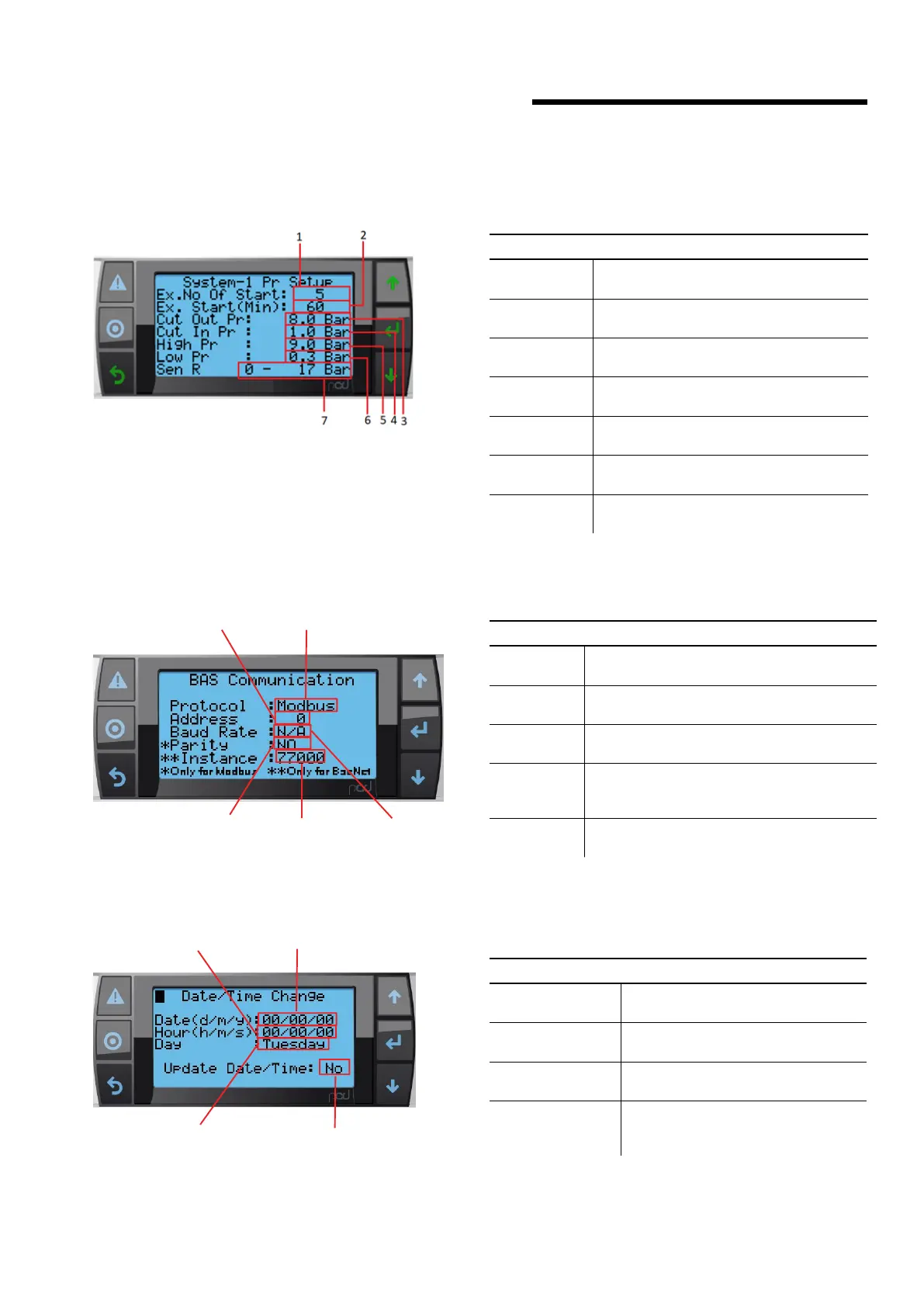
21.2.6 pressure setup (twin system only)
description
This screen allows user to access Pressure Setup
buttons
1 Ex.No of
Start
Allows user to change excessive number of
starts in a desired duration of time.
2 Ex.No of
Start (MIN)
Allows user to change time (in Min) for
monitoring Ex. No. of starts in desired time.
3 Cut Out Pr
Allows user to change the Cut-Out pressure
for the Pump to stop operating.
4 Cut In Pr
Allows user to change the Cut In at which
pump will start.
5 High Pr
Allows user to set High Pressure limit for
Pump safety and generate alarm.
6 Low Pr
Allows user to set Low Pressure limit and to
generate alarm.
7 Sen Range
Allows user to scale pressure sensor for
dierent ranges.
21.2.7 bas communication
description
This screen allows user to access bas communication Setup
buttons
1 Protocol
Allows user to navigate between Modbus,
BACnet or No select (n/a)
2 Address
Allows to change Address for Modbus and
BACnet
3 Baud Rate
Allows user to Navigate baud Rate between
9600, 19200, 38400
4 Parity
Allows user to Navigate Parity between odd,
even and no. This is only for Modbus connec-
tion
5 Instance
Allows user to Set BACnet Instance. This is only
for BACnet Connection
1
2
3
5
4
21.2.8 date/time change
description
This screen allows user to access to change controller Date
and Time
buttons
1 Date
Allows user to update Date to a con-
troller in format dd/mm/yy
2 Hour
Allows user to update Hour to a con-
troller in format hh/mm/ss
3 Day
Upon entering Date and Time system
will update the Day for that Date
4 Update Settings
Allows user to Navigate Parity between
odd, even and no. This is only for
Modbus connection
1
2
3
4


 To Next Page