installation &
operating instructions
3750 Pulpress
Pressurisation unit
8
notes
On chiller sets, the highest system pressure will occur when
the system is at ambient temperature after operation, where-
as on heating sets the highest pressure occurs at maximum
system operating temperature.
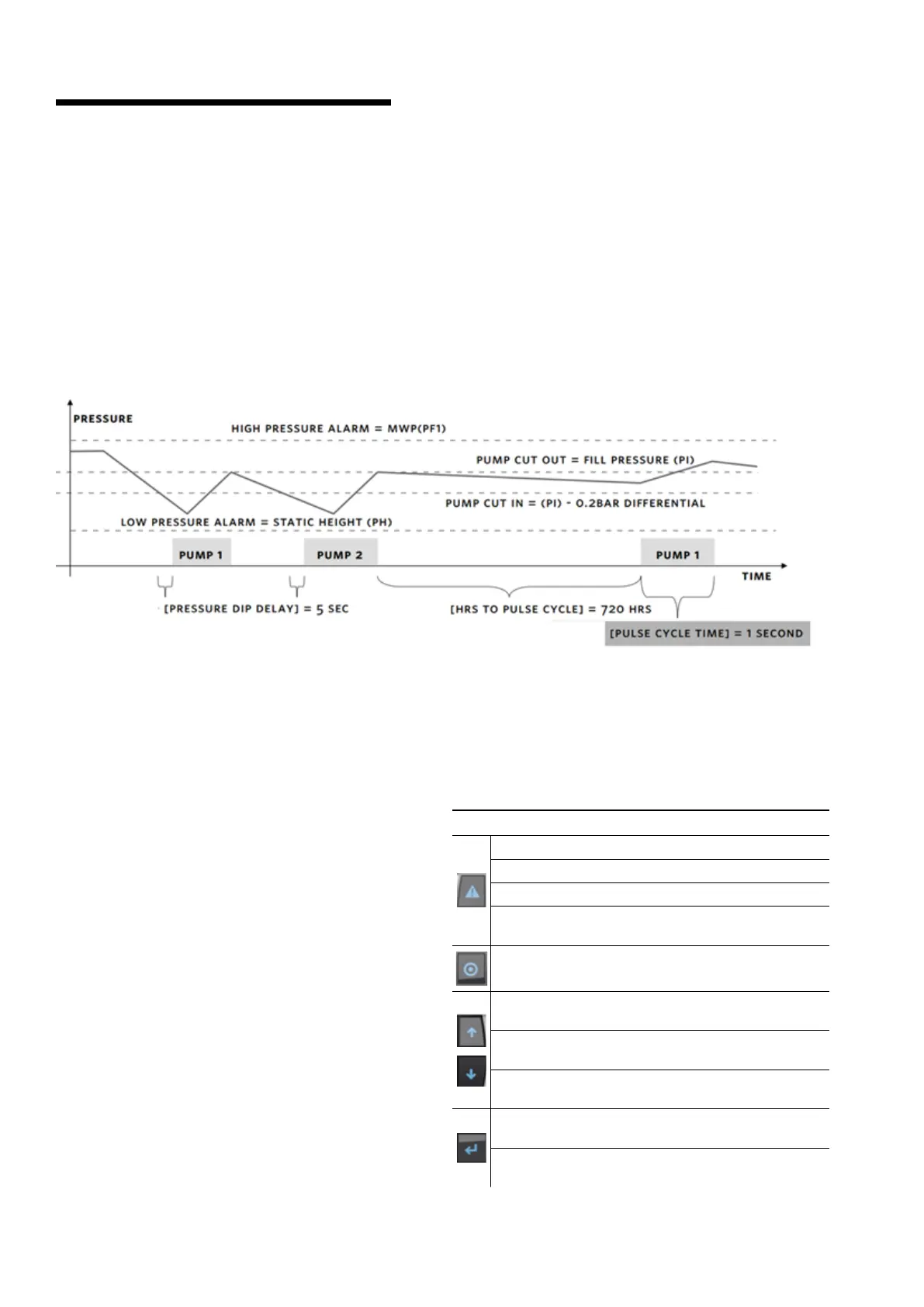
If the system pressure falls due to a slow leak, water in the
expansion vessel(s) will run back into the systems.
If the system leakage continues causing a drop in pressure
below the initial system pressure the pump(s) will start to
restore the initial system pressure.
In the event of a leak exceeding the pump(s) capacity then,
providing the set's volt free contacts have been wired accord-
ingly, the boiler burners will be shut down and the circulating
pumps are stopped. The system should then be closed down
and the leak rectified.
21.0 functional display
The 3750 Controller displays are divided in two set of
screens: Operation and Setup. The operation screens are
used by the operators to monitor and control the operation.
The Setup Screens are used to set and view the system
specific settings (i.e. number of pumps, pressure settings,
sensor range, etc.)
21.1 operation screens
21.1.1 Main screen/Twin-system screen
21.1.2 Test screen
21.1.3 System overview
21.1.4 Pump control screen
Diagnostics
21.1.5 Support information
21.1.6 System information
Alarms
21.1.7 Alarm screen
21.1.8 Alarm log screen
21.2 setup screens
21.2.1 Login
21.2.2 Pump setup – 1
21.2.3 Pump setup – 2
21.2.4 Pump setup – 2 (Twin system only)
21.2.5 Pressure Setup
21.2.6 Pressure Setup (Twin system only)
21.2.7
bas communication
21.2.8 Date/Time change
21.2.9 Password screen
21.2.10 Valve setup (Twin system only)
Standard keys: work same in all screens
Navigates to Alarm and Log screens
Solid White when there are no active alarms
Flashing Red when Alarm is activated and On Buzzer.
Solid Red when all alarms are reset and still some active
alarms
Navigates to Main Menu display,in all screens.
When cursor is at top left corner of the screen pressing
up or down key navigates b/w screen
When cursor over digital value pressing up or down will
toggle the value
When cursor over analog value pressing up or down
will increase or decrease value
Pressing Enter key move cursor to next field within
display
Set the value changed by up/down keys and save the
respective value
20.0 controller functions


 To Next Page