Chapter 3: Battery Installation and Removal
Release 8 STANDARD 1.1 August 2016 Touchstone TG862G Telephony Gateway User Guide
© 2016 ARRIS Enterprises LLC. All Rights Reserved. 17
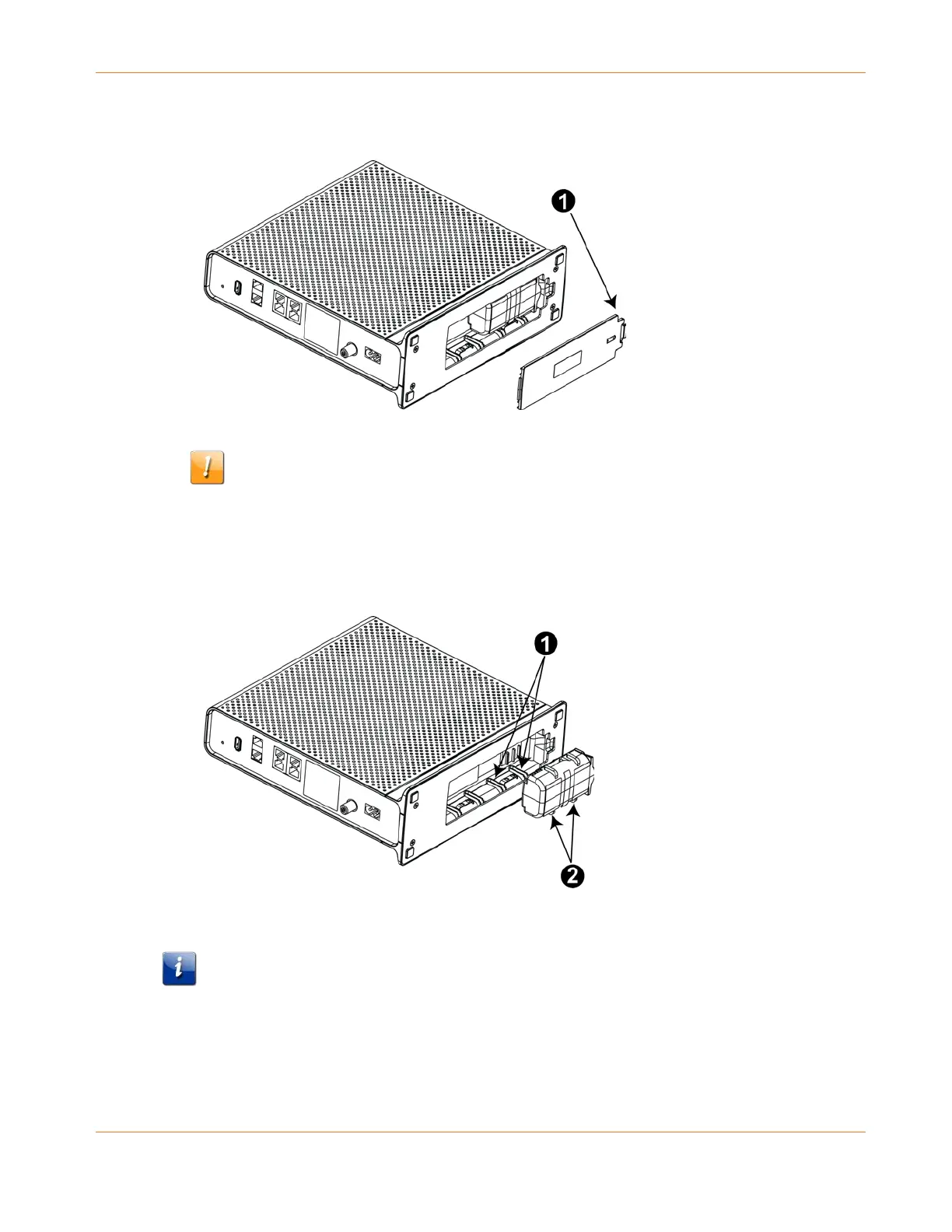
1. Press down and pull back on the latch holding the battery door (on the bottom of the
Telephony Gateway). Pull the door toward you. Set the door aside in a safe place.
1 - Latch End
CAUTION
Risk of equipment damage
Improperly inserting the battery may damage the battery connector in the Telephony
Gateway. Carefully follow the instructions in the next step to avoid damage.
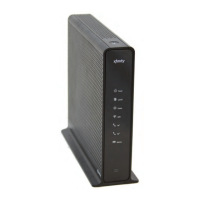
2. Hold the battery pack so that the guides on the battery align with the slots on the
Telephony Gateway and slide the battery into the bay.
1 - Battery Slots
2 - Battery Guides
Note: Batteries will not insert completely into the Telephony Gateway if not oriented
correctly. The battery should slide into the bay without significant force. Line up the
guides on the battery with the slots in the battery bay.
3. Push the battery pack into the bay until it seats into place. If you are taking the battery
out of the Telephony Gateway, position your finger in the battery opening area and use
leverage to dislodge the battery while pulling it straight back.










 To Next Page