Chapter 4: Installing and Connecting your Telephony Gateway
Release 8 STANDARD 1.1 August 2016 Touchstone TG862G Telephony Gateway User Guide
© 2016 ARRIS Enterprises LLC. All Rights Reserved. 24
Note: Setting the transmit power level to High increases the range. Setting it to Medium or
Low decreases the range proportionately.
Connecting the Telephony Gateway
WARNING
Risk of injury or equipment damage
Connecting the Telephony Gateway to the home’s existing telephone wiring should only be
performed by a professional installer. Physical connections to the previous telephone provider
must be removed and the wiring must be checked; there must not be any voltage. Cancelation
of telephone service is not adequate. Failure to do so may result in loss of service and/or
permanent damage to the Telephony Gateway.
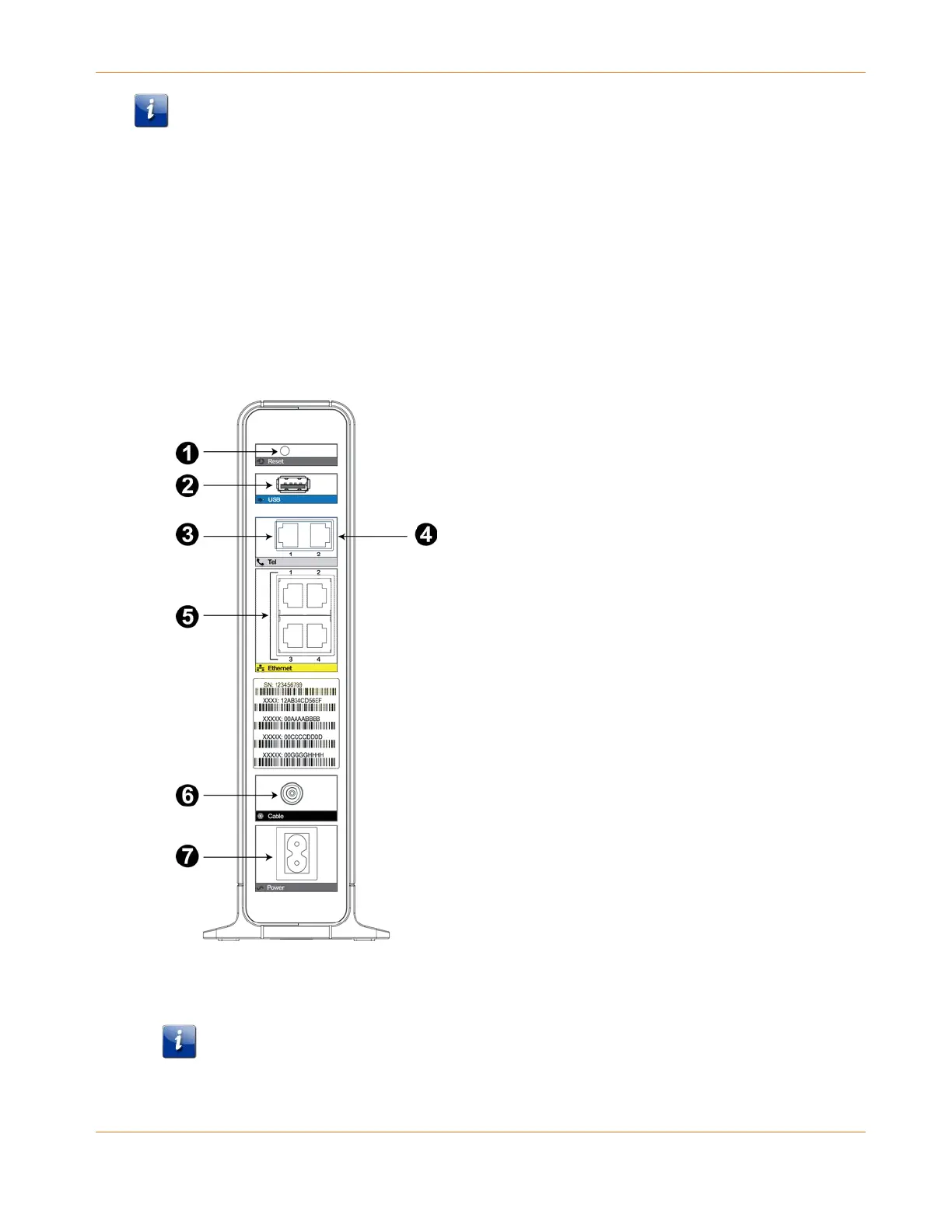
1. Connect one end of the coax cable to the cable outlet or splitter, and the other end to the
Telephony Gateway’s Cable connector (6). Tighten the connections by hand, then tighten
an additional 1/8 turn with a wrench.
Note: For best performance, use high-quality coax cable and minimize or eliminate
splitters between the cable jack and the Telephony Gateway.










 To Next Page