Chapter 6: Using the Telephony Gateway
Release 8 STANDARD 1.1 August 2016 Touchstone TG862G Telephony Gateway User Guide
© 2016 ARRIS Enterprises LLC. All Rights Reserved. 32
Patterns: Startup Sequence
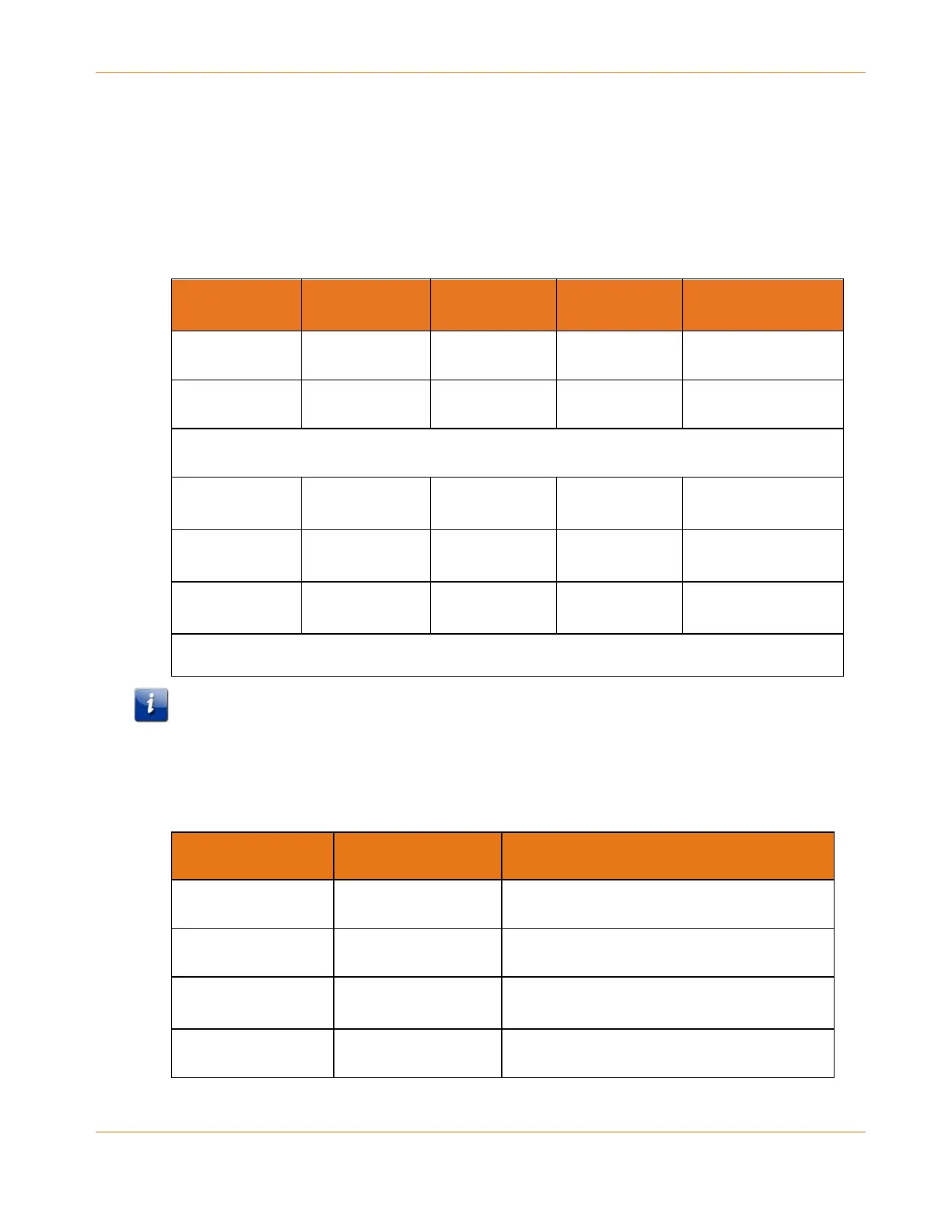
The following tables show the Telephony Gateway light patterns during each phase of the
startup sequence. There are two phases of startup; the telephony phase and the cable
modem phase. Both are outlined below.
Telephony Startup Sequence
Power, US/DS,
Online
Telephone 1 Telephone 2 Battery Description
Off Off Off Off No power to modem
Flash Flash Flash Flash Power-on Self Test
See Cable Modem Startup Sequence (page 32)
On Flash Off Off Retrieving telephone
network information
On Off Flash Off Retrieving telephone
line information
On Flash Flash Off Activating telephone
service
Normal Operation
Note: The US/DS indicator flashes during startup, and it turns on when the Telephony
Gateway establishes a connection.
Cable Modem Startup Sequence
US/DS Online Description
Flash (slow) Off Downstream search
Flash (fast) Off Downstream found; upstream search
On Flash Downstream and upstream found; retrieving
setup information from cable operator
On On Ready for service


 To Next Page