Chapter 3: Battery Installation and Removal
Release 8 STANDARD 1.1 August 2016 Touchstone TG862G Telephony Gateway User Guide
© 2016 ARRIS Enterprises LLC. All Rights Reserved. 18
Note: The Telephony Gateway will not begin operating until you apply AC power.
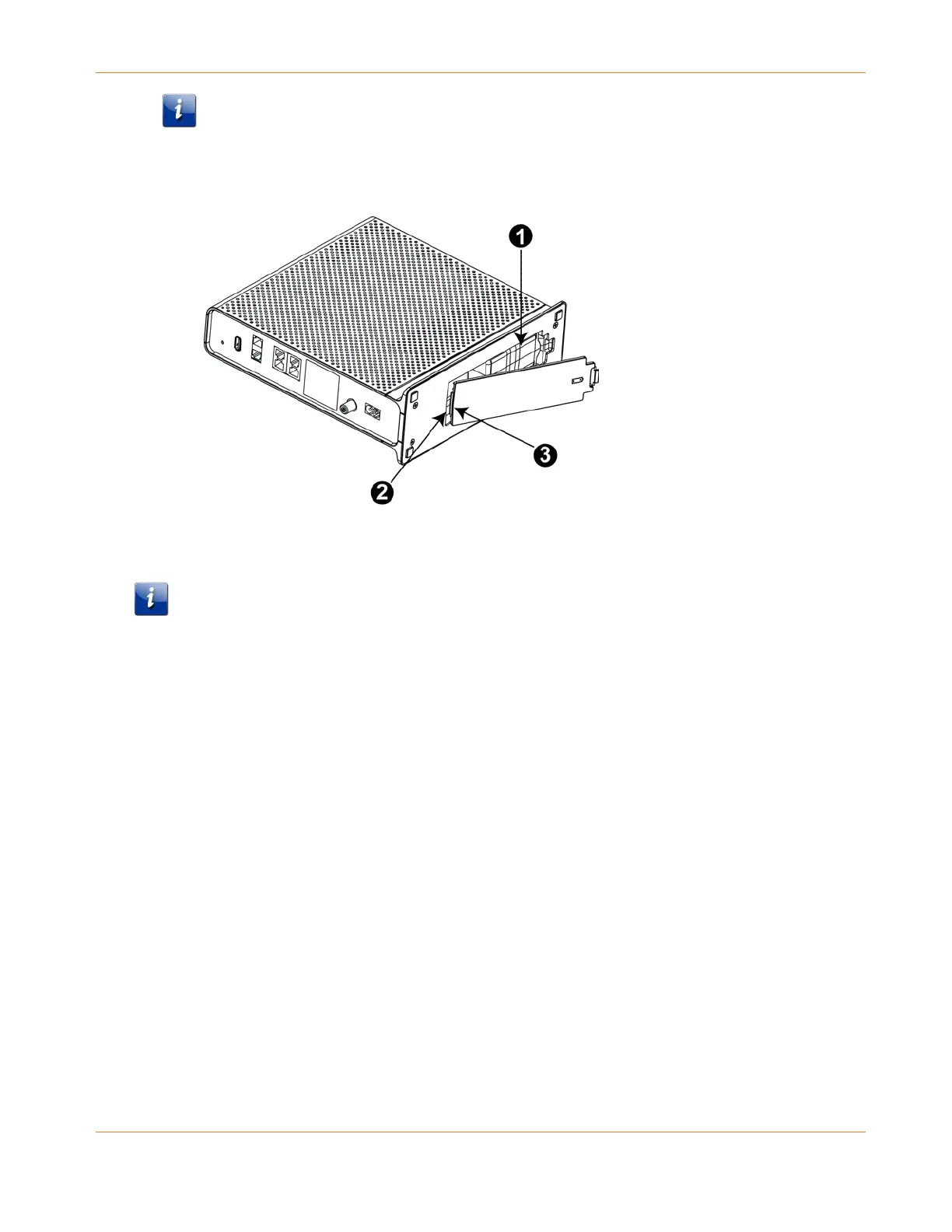
4. Replace the door. To do so, place the hinge tabs of the battery door into the receiver slots
inside the Telephony Gateway battery compartment on the opposite end of the battery
opening. Rotate the door toward the unit until the latch snaps back into place.
1 - Battery Compartment
2 - Receiver Slot
3 - Hinge Tab
Note: Telephony Gateways use a Lithium-Ion battery pack. Please recycle or dispose of the
battery responsibly and in accordance with local ordinances.
Battery Usage and Storage Conditions
The life expectancy of your battery should be several years, provided that it was
purchased from an approved source.
Your battery goes through a calibration procedure when it is first installed or replaced.
This procedure can take up to 72 hours to complete and is repeated every six months.
If your battery becomes fully drained during a power outage, the calibration procedure
will need to be repeated.
Your battery should be installed in your Telephony Gateway and kept there at all times. Do
not store the battery separately from the Telephony Gateway for any prolonged period of
time.
Battery Disposal Guidelines
To ensure compliance with current and future rechargeable battery take-back laws, ARRIS has
joined Call2Recycle, a collection program for rechargeable batteries throughout North
America. US and Canadian customers should visit http://www.call2recycle.org to properly
recycle your lithium-ion battery backup units (BBUs).










 To Next Page