8.2.4. More about CC# Patterns
The CC# values can be sequenced as we've seen above. However, they can also be used in
a more general way to set parameters in an external synth. If you send a certain CC# value
in the first step of a Pattern and there are no other values programmed in that Pattern, this
initial value will be held during the sequence. This feature gives you the creative option of
sending a new configuration to the external synth, module or virtual instrument at the start
of each Pattern!
!: Patterns can be chained. CC# Patterns are no exception. If you have three similar Patterns chained,
you could store CC# values in the first step of each Pattern. For example, in the first Pattern, you store
a CC# value that sets a filter half-opened; in the second Pattern you store a CC# value that opens the
filter a bit further; in the third Pattern you store a CC# value that fully opens the filter.
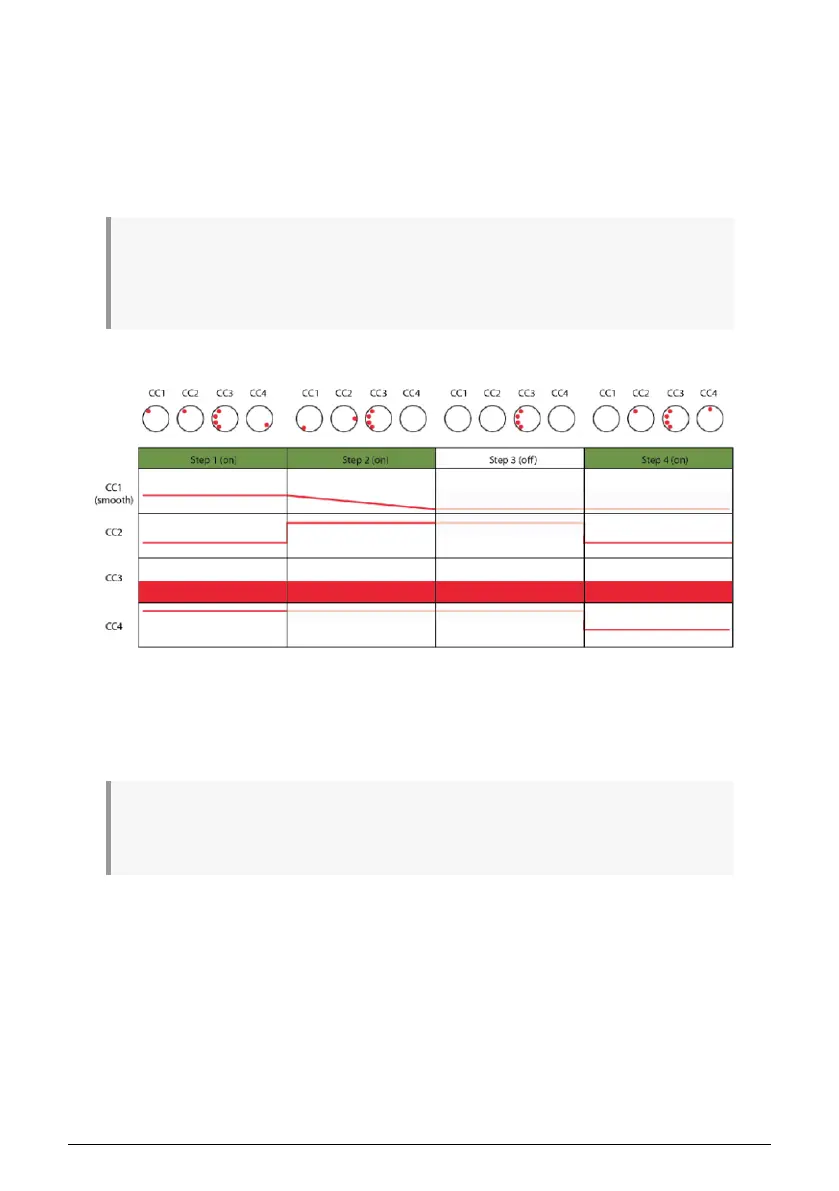
Here's a diagram with four CC#'s and four steps:
If you use the steps of Patterns to send different CC# values in each step, there is a feature
you can use to great effect: the looper, the horizontal control strip located under the two
vertical touch strips. The looper also works in Control mode. If you loop part of a sequence,
you will also loop the CC# values in that part of the sequence.
♪: There is one important difference between a normal track and a track in Control mode: a normal
track can be muted, but a control track cannot. It will always transmit CC# messages as long as it is
playing.
8.2.5. Visual Feedback
If a step in a Pattern has any recorded CC# data in it, its step button will be lit. Otherwise, it
will be unlit.
If there is recorded CC# data corresponding to a main encoder, its LED ring will have only
one LED lit (or one LED lit and one adjacent LED dimmed) to indicate the current value of
that CC#. If the sequencer is running, by 'moving', the LED ring will show the value changing.
If there is no recorded CC# data corresponding to a main encoder, its LED ring will have all
LEDs lit up to indicate the previously registered value of the CC# (plus one dimmed LED at
the end of the ring, if applicable).
Arturia - User Manual Keystep Pro - Control Mode 115














 To Next Page