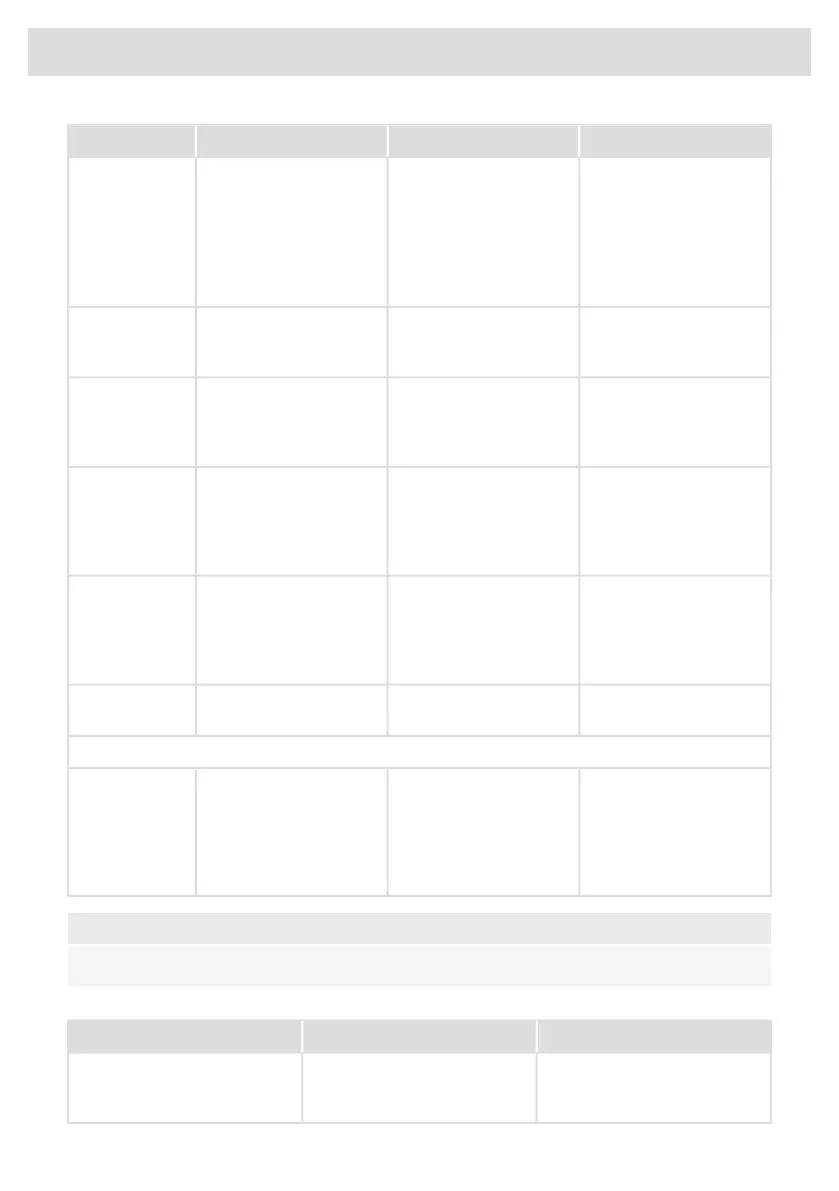
SolutionPossible causeSymptomError code
Try to connect the device
to your network again.
Failed to connect to Wi-Fi
network.
E7 appears on display
after setting up the Wi-Fi
connection.
E7
Make sure that new
devices can connect to
the network (e.g. MAC
address filtering is
disabled).
Use Celsius°Cooking™
cookware.
Non-Celsius°Cooking™
cookware is not
supported.
E65 appears on display,
together with Hestan Cue
is blinking
E65
Replace battery - check
the status with the Hestan
Cue App when unsure.
Celsius°Cooking™
cookware was not found
(empty battery, out of
range, etc.).
E66 is blinking together
with the Hestan Cue key.
E66
If handle cap is mounted
correctly; Replace battery
- check the status with the
Hestan Cue App when
unsure.
Celsius°Cooking™
cookware missing.
E67 is blinking together
with the Hestan Cue key.
E67
Remove the
Celsius°Cooking™
cookware, retry matching
the cookware after placing
it.
A timeout occurred during
one of the Hestan Cue
cook session setup steps.
E72 is blinking together
with the Hestan Cue key.
E72
Battery should be
changed soon.
Cookware battery is low.Lo/Bat appears on
display.
Lo/Bat
Extraction module
Open the window to be
able to use the extraction
module or stop the
message by touching the
flashing - (minus) or +
(plus) key(s).
The window, with mounted
window sensor is not
opened.
E80 appears on display.E80
NOTE!
In case of other error codes: please write down the error code and contact the service department.
Troubleshooting Wi-Fi
SolutionPossible causeSymptom
The hob must be switched off,
then touch the on/off key and
hold it for 5 seconds.
Wi-Fi turned off.Wi-Fi icon not shown.
Table continued from last page
56
Troubleshooting


 To Next Page