Service manual WM70
51
Instruction Image
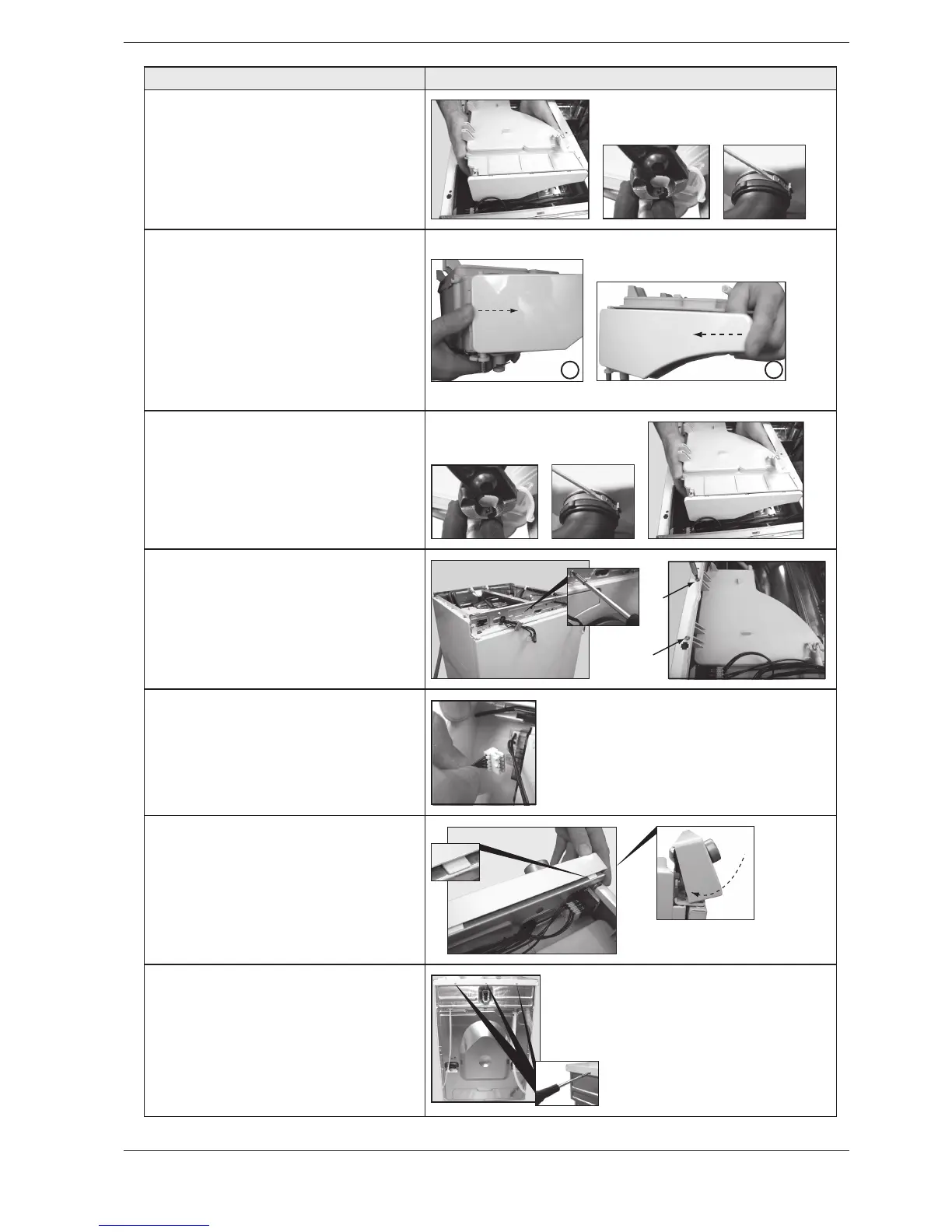
,IFT THE DETERGENT COMPARTMENT
Then remove the hose clamps for
all hoses, which are secured in the
detergent container. Then detach
the hoses from the detergent
compartment.
11.If necessary: Replace the decor
panel for the detergent compartment.
Detach the decor panel by pressing
according to image 1. Install the decor
panel by first placing the decor panel
in the grooves on the detergent
container and then snapping it into
place as illustrated in image 2..
1
2
12. Install the detergent compartment
by first pressing all hoses into place
and then securing them using the hose
clamps.
13. Screw the detergent compartment
into place using the three screws
(one in the front panel and two in the
frame)
14. Install all wiring in the relevant
locations on the control card.
15. Install the panel. Angle the panel
outwards and place the mounting
plates in the relevant grooves in
the front frame. Angle the panel
downwards and secure it with the
catches
16. Screw the top cover into place.



 To Next Page