GENOAD12M3-2Q
GENOAD12M3-2Q/H
GENOAD12M3/T
12 13
English
Chapter 2 Installation
This is a 9.6’’ x 13.39’’ (24.38cm x 34.01cm) motherboard. Before installing the
motherboard, study the conguration of the chassis to ensure that the motherboard ts
into it.
Make sure to unplug the power cord before installing or removing the motherboard. Failure
to do so may cause physical injuries and damages to the motherboard components.
2.1 Screw Holes
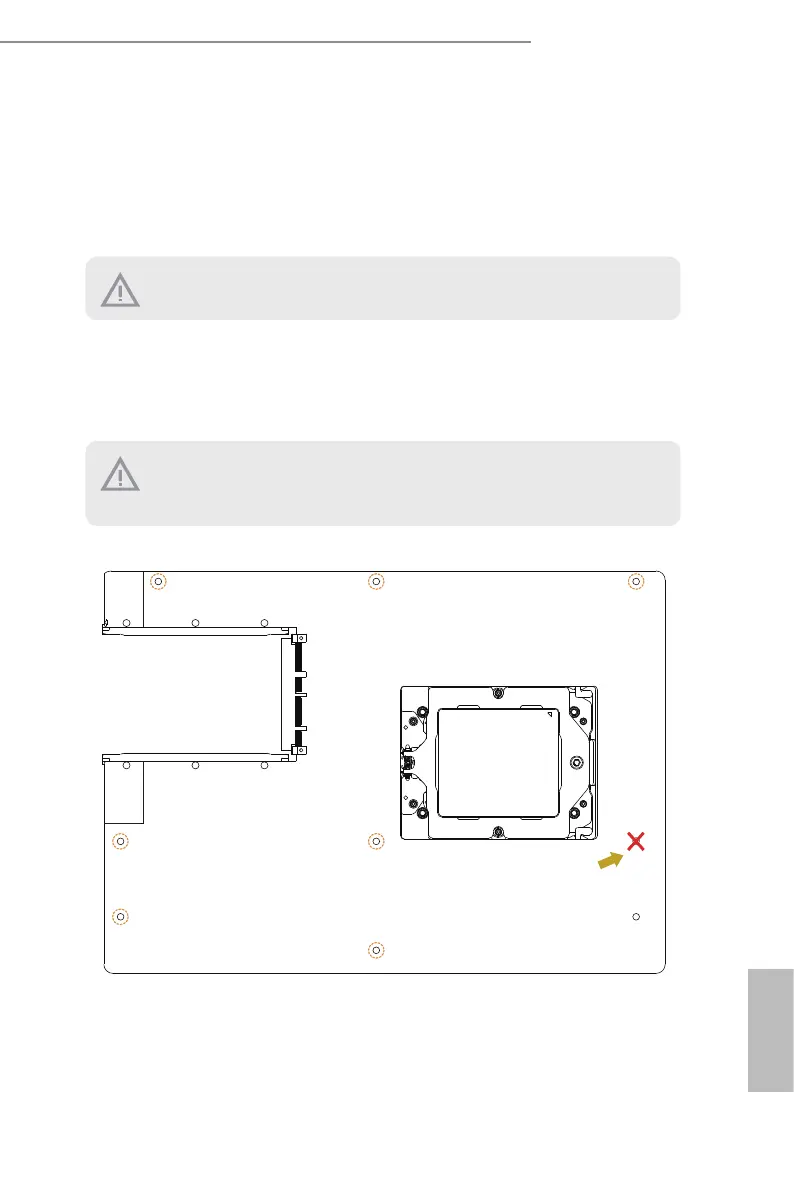
Place screws into the holes indicated by circles to secure the motherboard to the chassis.
Attention! Before installing this motherboard, be sure to unscrew and remove the stando
at the marked location, under the motherboard, from the chassis, in order to avoid electri-
cal short circuit and motherboard damages.
Remove the standoff
from the chassis
Rear I/O
Rear I/O






 To Next Page