GENOAD12M3-2Q
GENOAD12M3-2Q/H
GENOAD12M3/T
76 77
English
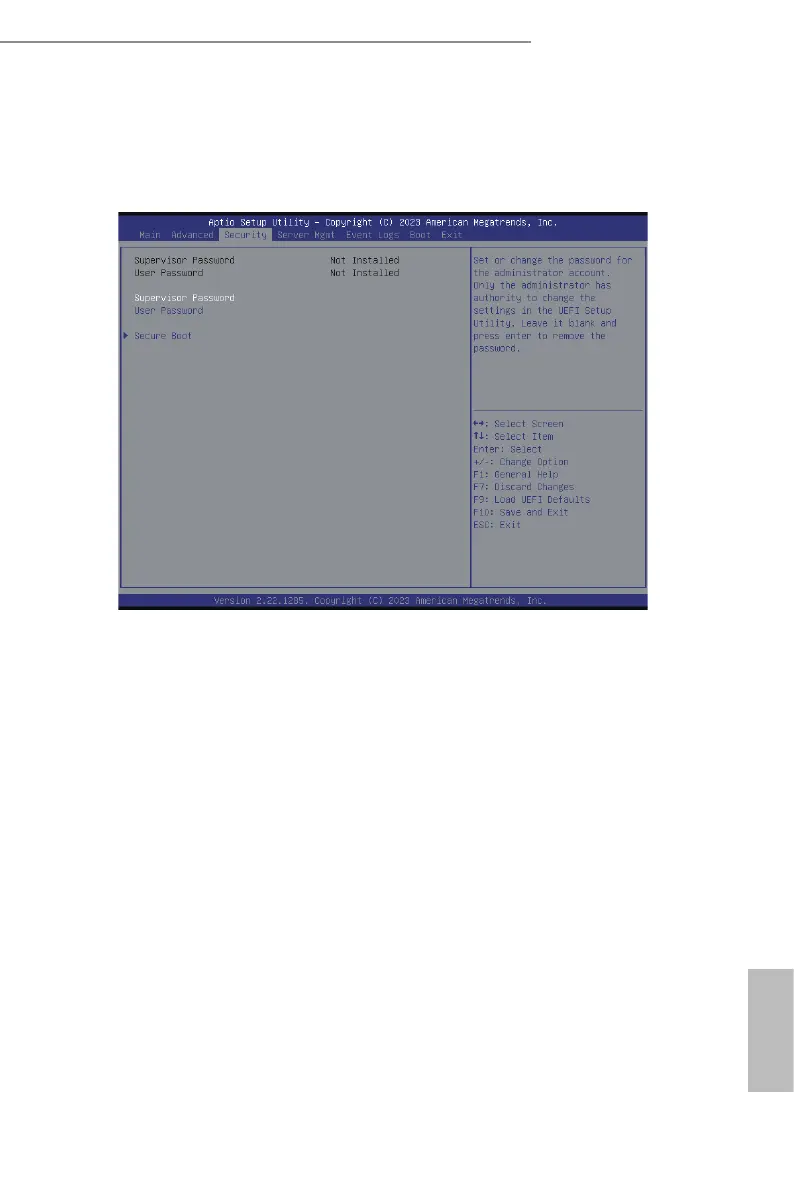
3.4 Security
In this section, set or change the supervisor/user password for the system. For the user
password, it also allows to clear it.
Supervisor Password
Set or change the password for the administrator account. Only the administrator has
authority to change the settings in the UEFI Setup Utility. Leave it blank and press enter to
remove the password.
User Password
Set or change the password for the user account. Users are unable to change the settings in
the UEFI Setup Utility. Leave it blank and press enter to remove the password.
Secure Boot
Use this to enable or disable Secure Boot Control. e default value is [Disabled]. Enable to
support Windows Server 2012 R2 or later versions Secure Boot.
Secure Boot Mode
Secure Boot mode selector: Standard/Custom. In Custom mode Secure Boot Variables can
be congured without authentication.
Install Default Secure Boot Keys
Please install default secure boot keys if it’s the rst time using secure boot.







 To Next Page