Viron eQ Salt Chlorinator With Bluetooth | Installation and Operation Manual
Page 17
• Manually Dose Acid: Select this function to
manually dose acid for a predetermined time.
7.5 Acid Dosing
Your pool professional may recommend the
addition of Acid to your pool.
To manually dose the pool:
MAINT > NEXT > DOSE > NO > NO > YES > Up or Down
for quantity of acid (litres) > ACCEPT > press POOL MODE
once to select AUTO for normal time clock operation
7.5.1 Acid Dosing without Sensors
The base model Viron eQ Chlorinator is supplied
without any pH or Chlorine sensors (sensors can
be ordered separately). In this model, you can
determine the dosing rate of the acid by selecting 1
to 10 in the pH set screen.
The eQ Chlorinator will adjust the dosing level
according to the chlorine production (the higher the
chlorine production, the faster the pH change and
the more acid required).
1. Install the acid dosing tube after the
chlorinator cell on the return to the pool pipe.
2. Once the pH value is set, the information
screen will alternates between the current
status of the chlorinator and the chlorine
output setting (between 0 and 8).
IMPORTANT: Check the pH balance each day for
the first week of operation. Adjust the pH setting
until it settles at the desired pH level. Once the
desired pH level is achieved, continue to manually
test your pH every week and adjust the pH setting
as required.
7.5.2 Acid Dosing with Sensors
When pH and chlorine sensors are connected, the
screen displays the following messages:
• Chlorine Level (chlorine low, chlorine OK,
chlorine high)
• Cell operating at (percentage of maximum
output, or “off”)
• pH set point (factory preset at 7.6)
• pH actual (will read close to set point providing
acid container has acid available to be dosed)
7.6 Electrical Connection Details
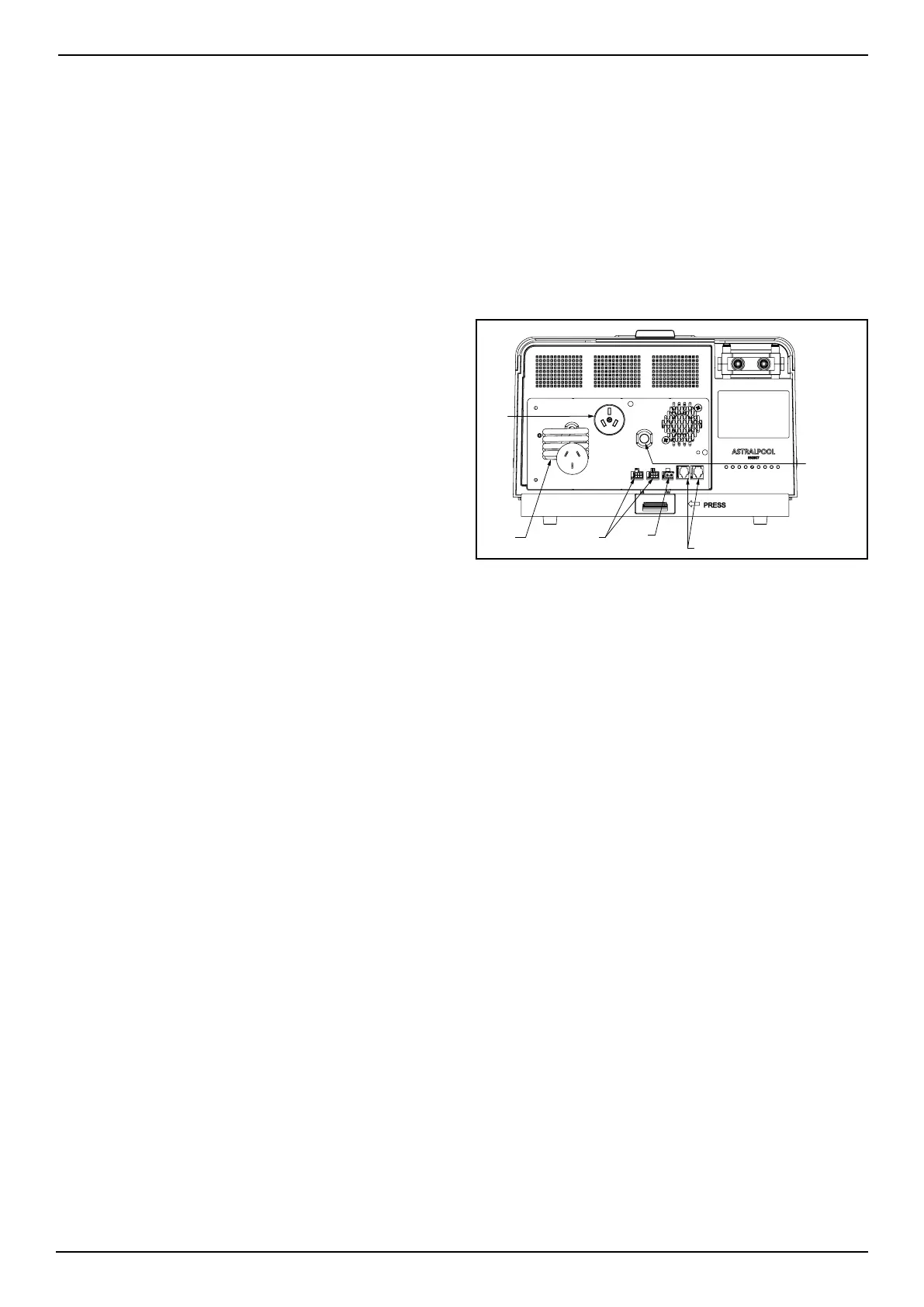
The Viron eQ Salt Chlorinator controller’s electrical
connections are found on the underside. See
Figure 16.
• Two (2) RJ12 ports;
• Two (2) sensor probe ports (although labelled,
they can be used for either orp or ph);
• One (1) light connector for use with an
AstralPool light only. This port operates off
22VDC.
pH/ORP
Probes
Light
RJ12 (Communication)
Power
Cable
Chlorinator
Cell Cable
GPO
Figure 16. Viron eQ Controller (bottom view)
NOTE: The SLX/FLX lights can handle 12VAC input
voltage or up to 24VDC voltage. As the Viron eQ
Chlorinator’s output is 22VDC, the SLX/FLX light
can be paired with this system.
There are indeed some differences between
operating SLX/FLX lights with AC voltage and
DC voltage.
Our SLX/FLX lights have special functionalities
like colour changing sequences (scrolling from
one colour to another). These functionalities
depends on the AC voltage frequency for timing,
so that multiple lights can be synchronized
together.
With DC voltage, multiple lights will go out of
sync when operated in the colour changing
sequences. When operated in solid colour
modes, DC voltage operates similarly to AC
voltage.



 To Next Page