ASUS DAV Center 33
Amplier features
Your ASUS DAV Center A33/A31 comes with a built-in amplifier. The amplifier features enable you to optimize
your listening environment with a touch of the button, saving you from complex audio setup procedures.
LEO (Listening Environment Optimizer)
The LEO™ technology virtually adjusts your speaker placement to deliver an excellent audio experience. With
a microphone placed at the listener’s location, LEO™ sends out test tones to each speaker and analyzes the
feedback signal to determine speaker distance, phase, sound pressure level, and related parameters.
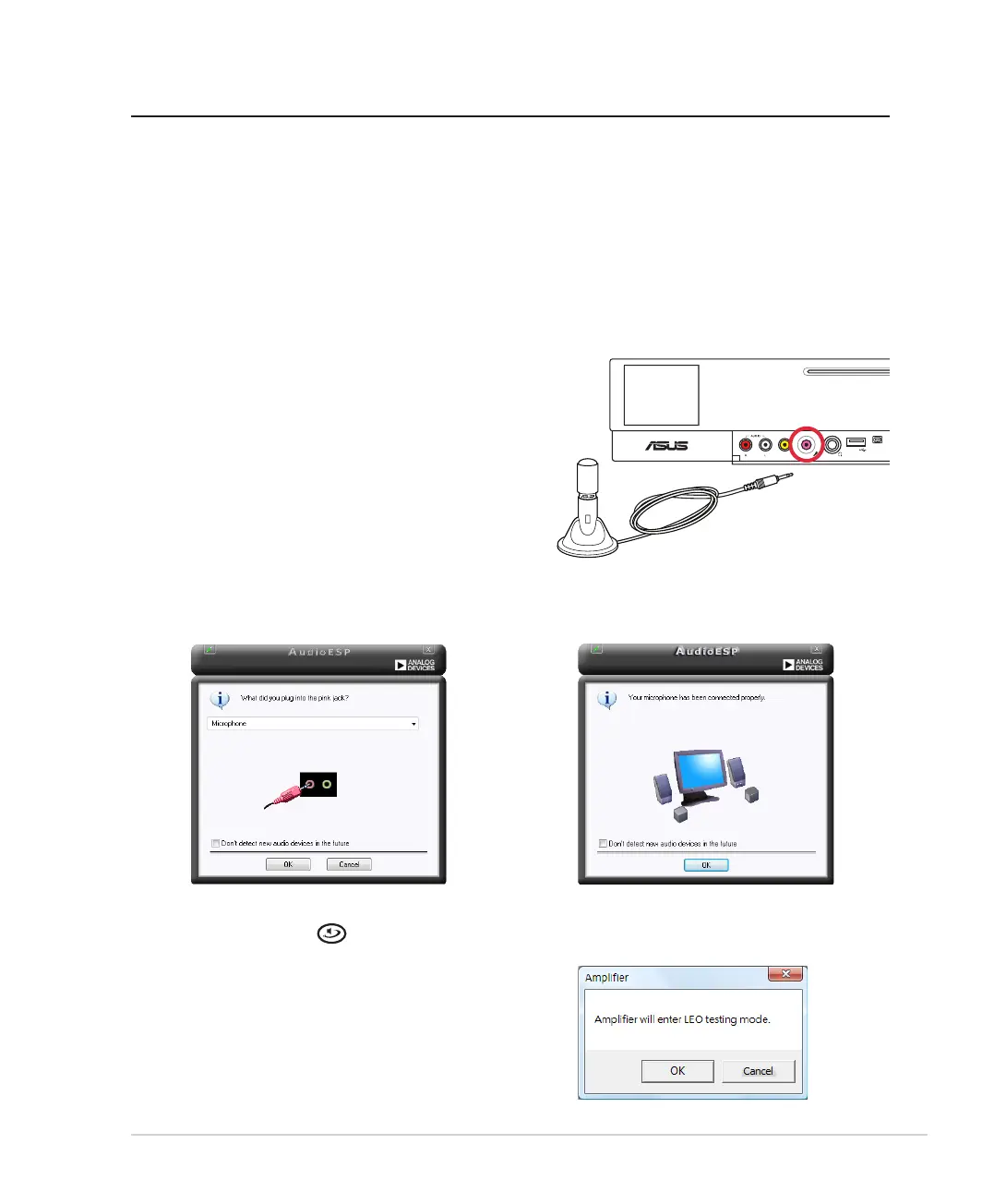
To activate the LEO™ function:
1. Plug the microphone into the microphone jack
on the A33/A31 front panel and place it at your
listening location.
<OJKU
;9(
/+++
33)9*
396XU*[U6XU*[U
2. A dialog box pops up to show that an audio
device is detected. Click OK.
3. Click OK to confirm the setup.
4. Press the LEO button on your amplifier
remote.
5. Click OK to enter the LEO testing mode.













 To Next Page