Home
Asus
Cell Phone
P735
Page 68
Asus P735 - Page 68
150 pages
Manual
Save Page as PDF
To Next Page
To Next Page
To Previous Page
To Previous Page
Loading...
68
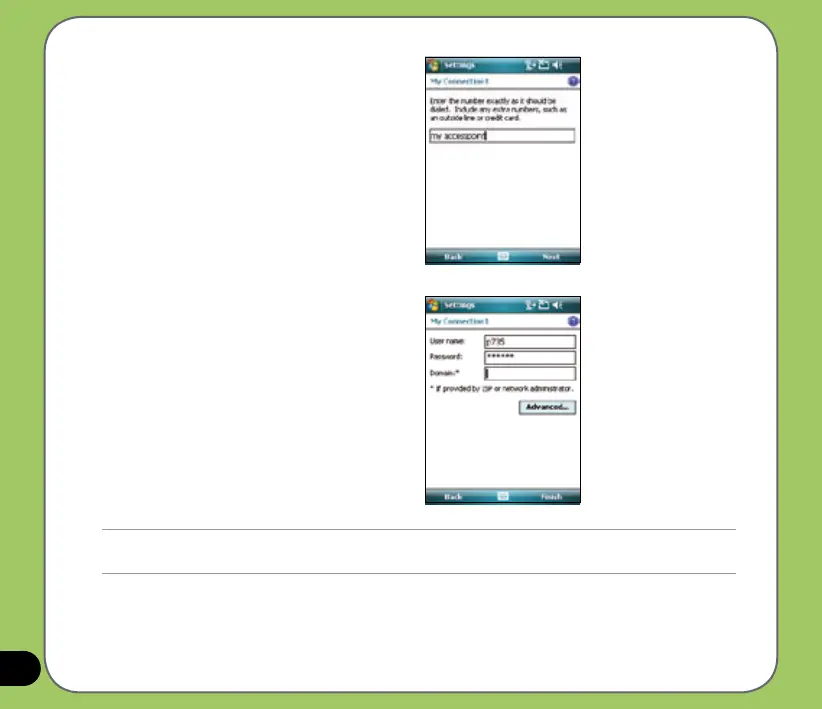
6. Input the
Access point name.
7. Input your user name, password, and
domain then tap
Finish
. Contact your
network administrator for assistance.
NOTE:
The GPRS and USB connections can not be used at the same time.
67
69
Table of Contents
Main Page
Default Chapter
3
Table of Contents
3
P735 Specifications
8
Package Contents
9
Chapter 1: Getting Started
11
Getting to Know Your P735
12
Layout
12
Device Components Description
14
Getting Your Device Ready
16
Installing the SIM Card and Battery
16
Charging the Battery
18
Starting up
19
Powering Your Device
19
Using the Stylus
19
Calibrating P735
20
Locking the Keys and Buttons
20
The Today Screen
21
Status Indicators
22
Icon Description
23
Screen Orientation
25
Start Menu
26
Entering Data
27
Chapter 2 : Entering Data
28
Using the Input Panel
28
Using the Block Recognizer
28
Using the On-Screen Keyboard
29
Using the Letter Recognizer
30
Using the Transcriber
31
Writing and Drawing on the Screen
32
Recording Voice
33
Using Activesync
35
Synchronizing Via Mini-USB
37
Synchronizing Via Bluetooth
38
Synchronizing with Exchange Server
39
Setting the Synchronization Schedule
41
Searching Information
42
Getting Help
43
Phone Features
45
Chapter 3 : Phone Features
46
Using the Phone
46
Phone Pad
46
Adjusting the Device Volume
47
Making a Call
48
Using the Phone Pad
48
Making Calls from Contacts
50
Making Calls from Call History
50
Making and Receiving a Video Call
52
Using Voice Commander
53
Receiving a Call
54
Wireless Features
55
Chapter 4 : Wireless Features
56
Using the Wireless Manager
56
Using Bluetooth
57
Overview
57
Activating Bluetooth in Your Device
57
Configuring Bluetooth
58
Using WLAN (IEEE 802.11B/G)
63
Introduction
63
Activating WLAN in Your Device
63
Configuring WLAN
64
Setting a GPRS Connection
66
Connecting GPRS
69
Disconnecting GPRS
70
Chapter 5 : My Secrets
74
Using My Secrets
74
Enabling My Secrets
74
Unlocking My Secrets
76
Locking My Secrets
77
My Secrets Setting
78
Disabling My Secrets
81
Chapter 6 : Multimedia Features
86
Using the Camera
86
Launching the Camera
86
Navigation Button Functions in Camera Mode
87
Supported Formats
88
Camera Mode Screen
89
Camera Options Menu
91
Taking Photos
97
Video Mode Screen
98
Video Options Menu
100
Recording Videos
104
Viewing Pictures and Video
106
Chapter 7: Other Features
107
Windows Live
108
Windows Live Search
109
Biz Card Recognition
110
Using the Biz Card Recognition
110
Meeting Time Planner
113
Using the Meeting Time Planner
113
Clean Reset
114
Internet Sharing
115
Flashlight
116
Remote Presenter
117
Using the Remote Presenter
117
Setting Ring Tone
123
Adding Ring Tone to Selection
123
Changing the Ring Tone
124
Wake-Up Setting
125
Mode Switcher
126
System Information
127
Restoring Default Factory Settings
128
Chapter 8 : Device Component Status
131
ASUS Status Icon
131
LCD Brightness
131
CPU Mode Setting
132
USB Setting
132
LCD Brightness
133
Power
133
Memory
134
Storage Card Memory
134
ASUS States Settings
135
Programs Running in Memory
135
Appendix
137
Notices
140
Replaceable Batteries
140
Safety Information
144
Phone Care
144
The Battery
144
Memory Card
145
Driving Safety
146
Electronic Devices
147
Hearing Aids
147
Other Medical Devices
147
Posted Facilities
148
Other Safety Guidelines
148
Blasting Areas
148
Potentially Explosive Environments
148
Contact Information
150
Other manuals for Asus P735
Update Procedure
3 pages
Related product manuals
Asus P750
188 pages
Asus P550
176 pages
Asus P527
38 pages
Asus P535
132 pages
Asus ROG Phone
18 pages
Asus PadFone 2
8 pages
Asus ROG PHONE 3
208 pages
Asus ROG PHONE 7
87 pages
Asus ROG Phone 5
83 pages
Asus ROG PHONE 8
87 pages
Asus ROG PHONE ZS600KL
90 pages
Asus Padfone mini PF400CG
60 pages



 To Next Page